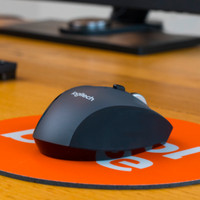
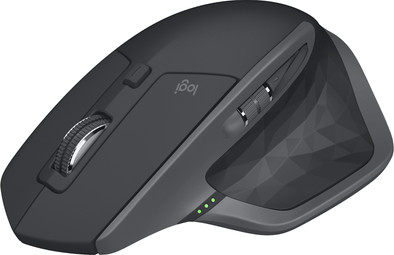
Logitech MX Master 2S Wireless Mouse Black
Never available again
View alternatives in the sidebar
View alternatives in the sidebar
Product number | 782360 | |
|---|---|---|
Manufacturer code | 910-005966 | |
Brand | Logitech | |
Warranty | 2 years | |
Processing of your defect | Carry-in warranty |
Mouse model | Standard | |
|---|---|---|
Input | Laser | |
Number of buttons | 4 | |
Ergonomic design | ||
Left or right-handed | Right-handed | |
Adjustable DPI | ||
Mouse controls | Buttons, Scroll wheel | |
Suitable for gaming | ||
Programmable buttons | ||
Number of programmable buttons | 2 | |
Lighting peripherals | ||
Silent mouse | ||
Horizontal scrolling | ||
Mouse surface | Any surface | |
Product family | MX |
Connection type | Wireless | |
|---|---|---|
Type of wireless connection | Bluetooth | |
Bluetooth version | 4.0 | |
Nano receiver | ||
Number of devices that can be paired | 3 |
Plug and Play | ||
|---|---|---|
Compatible with operating system | Windows, macOS |
Power supply type | Rechargeable battery | |
|---|---|---|
Battery level indicator | ||
Replaceable battery |
Color | Black | |
|---|---|---|
Mouse size | Large | |
Width | 8,5 cm | |
Height | 4,8 cm | |
Depth | 12,6 cm | |
Material | Plastic | |
Finish | Matte and glossy | |
Weight | 145 g |
anything for a smile
Connection type | Wireless | |
|---|---|---|
Type of wireless connection | Bluetooth | |
Mouse model | Standard | |
Ergonomic design | ||
Left or right-handed | Right-handed | |
Suitable for gaming | ||
Silent mouse | ||
Depth | 12,6 cm |
According to our mouse expert
With Logitech Flow, you can use the mouse to control up to 3 computers at the same time and exchange files between connected computers.
Thanks to the improved battery life, the MS Master 2S lasts up to 70 hours and charges very quickly.
The button and horizontal scroll wheel let you navigate and operate advanced functions easily.
The computers connected via Logitech Flow must be in the same network.
The Logitech MX Master 2S is a luxurious mouse aimed at ergonomics and functionality. That's because the mouse has a horizontal scroll wheel and button in addition to the standard thumb buttons. These let you easily navigate through large Excel files or 3D projects and provide fast access to advanced functions. Thanks to the Logitech Flow software, you can control up to 3 computers simultaneously with this mouse. How? Simply drag the mouse cursor to the edge of your screen and the mouse automatically appears on your laptop screen, for example. Via the right-click menu, you can exchange files between the connected computers. Unlike its predecessor, the battery now lasts up to 70 days and 3 minutes of charging is enough for an entire day's use.
5 stars
224
4 stars
59
3 stars
7
2 stars
0
1 star
1
Connection options
Ergonomics
Accuracy
Size
Design
The MX Master 2s is a nice mouse to look at and the shape itself is fine. It's just that in this class there are other mice that fit better in a hand than this one. Strangely enough, the ergonomics are a step backwards compared to the predecessor of this series, namely the MX Performance (I don't count the MX Master 2, the 2s is simply an overhaul after problems with the regular 2). The thumb buttons are oddly placed, as it apparently has to be operated with the back phalanx of your thumb. For the front phalanx, which you usually use, they are simply too far back. The 'ledge' that your ring finger half rests on on the MX Performance is no longer there, and when I miss it I notice how big the difference is.
Logitech has chosen to add a horizontal scroll wheel to the MX Master 2, which will be one of the reasons that the thumb buttons have been moved back. It may be a godsend for regular editors and Excel users, but it will be of little use to most. I would rather they had just designed a separate mouse for these people, since by far the largest group is now the victims of this choice.
The freewheel function allows for easy scrolling through long pages, and the smart-scrolling function ensures that it is activated automatically. For me this works perfectly. Unfortunately, other manufacturers don't have this feature, which means Logitech is the only choice for me. Compared to the MX Performance, switching between regular mode and freewheel works by means of an electrical construct, and I wonder if this will continue to work well. I rather rely on mechanical solutions in this regard. The advantage of the electrical solution is that you can reprogram the button.
Logitech has switched software suite from Setpoint to Options. It took me a while to realize that this was really about a new software suite by the generic name. Personally, I do regret not having all my Logitech input devices in the same suite now. But Options itself works fine and is user-friendly. Once you've set up your mouse, you don't need to see it anymore, of course.
Overall, the Master 2s is a fine mouse, but we've seen better, including from Logitech itself. Hopefully they will rethink the ideas behind the design, because in fact the MX series has only deteriorated since the Revolution, both in ergonomics and build quality. Technically it is all better, but the ergonomics are what the user actually notices with this kind of productivity mice that are not aimed at mouse-intensive things like gaming.
If you can really use a second scroll wheel and are looking for something in this segment, it can be recommended. If not, I'd look into something else. Other Logitech mice also have a freewheel option, so that's not the reason for choosing this mouse. I bought an M720, which is now my most used mouse.
Rajesh
10 May 2019
Automatically translated from Nederlands
The pros and cons should say it all, but this mouse doesn't work on Linux by default.
Logitech Options, the software that allows you to change the buttons on your mouse, does not have a Linux version (Windows and MacOS only).
It is possible to connect your mouse using the Logitech Unifying Receiver and Solaar (https://pwr.github.io/Solaar/), but this does not allow you to set any further options and does not display the battery level.
If you don't want to use Solaar, you can connect with the mouse by holding down the button to change the channel and then pairing with the mouse via bluetoothctl, but that is of course not useful for the general user.
I have not tried to pair the mouse via the Bluetooth GUI interface.
Mitchell
28 July 2017
Automatically translated from Nederlands
OK, I admit it, I've used the cheapest mice all my life, just because I didn't care. That thing just has to work. No more. However? Well, I now have the MX Master and feel like a king. What a lovely mouse this is. Nice in the hand, super sharp to set, of course way too many buttons for me, but I really can't find a single flaw
Sybrand de Jager
9 July 2019
Automatically translated from Nederlands