Never available again
View alternatives in the sidebar
According to our monitor expert
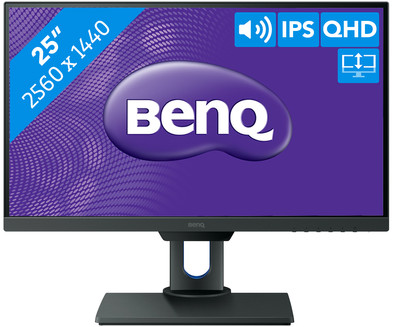
With the BenQ PD2500Q, you can work on professional graphic and color-sensitive tasks such as editing photos, and designing CAD models and animations. The screen conjures up all details on the screen in a realistic fashion due to the high WQHD resolution and the accurate color representation of the IPS panel. The high brightness and the 100% coverage of the sRGB and Rec. 709 color spaces also make the monitor very suitable for professional photo and video editing. Adjust the monitor to the right height and angle to relieve yourself of neck and shoulder strain after working long hours designing. Do you need more workspace? Thanks to the thin bezel, you can easily set up a couple of these monitors side by side without any thick borders standing in the way.
Sharpness | Quad HD (1440p) | |
|---|---|---|
Curved | ||
Aspect ratio | Standard (16:9) | |
Refresh rate | 60 Hz | |
Response time | 4 ms | |
Panel type | IPS panel | |
Color depth | 17 million colors (8-bit) | |
Built-in speakers |
5 stars
38
4 stars
12
3 stars
0
2 stars
0
1 star
0
Installation ease
User friendliness
Image quality
Price-quality ratio
Design
I was looking for a good alternative to my old Apple Thunderbolt 27” display, which I recently sold. Incidentally, the Apple monitor was an excellent monitor with a beautiful design, especially in combination with. my macbook. However, through work I have a Windows laptop and unfortunately I could not connect it to it and since I also work at home, connection to an external monitor is handy. In addition, I was / am of the opinion that there are now excellent alternatives that are a lot cheaper. So the apple display was able to sell well with some pain in the heart and thoroughly researched a good alternative and finally, after doubts between 3 remaining monitors (of which 2 27” monitors), came up with the slightly smaller BenQ PD2500Q. Absolutely no regrets about this choice. Monitor is packaged well and firmly, and also easy to take out :-) without a mess that remains behind, such as poo foam that crumbles completely. The monitor is easy to assemble and ready for use. The monitor works great in combination with my work laptop (HP probook) and my private macbook. The settings can easily be adjusted to your own liking. I use the macbook setting on the monitor 1-on-1 for my macbook (so no awkward search for the right setting). Absolutely great. In addition, the monitor has enough connections (HDMI, (mini) display port, USB) and a blue light filter, which is very pleasant for your eyes. I'm actually very happy that I chose this 25” monitor and not another 27” monitor. The size is perfect and big enough for me. The edges are very narrow and you can easily place another monitor next to it as a second screen. The price is fine and you get, in my opinion, real value for money. In fact... for the price of an Apple Thunderbolt display or a more expensive 27” monitor, you can buy two of these PD2500Q monitors. I will definitely buy a second monitor in due course.
Ellen Penning
2 February 2018
Automatically translated from Dutch
Calm image with beautiful colors, calibrated in the factory. The PPI of 117 (2560x1440 on 25'') is obviously higher than with a 27'' panel with the same resolution, letters on the screen are large enough and easily legible. Many presets, including a Low Blue Light mode that is especially nice when working at night.
Because of the 1.2'' larger screen, the larger letters and nicer colors, it just beats the somewhat older and cheaper BENQ BL2420PT 23.8'' which has received an award from Hardware Info. 25'' is ideal for this resolution. The BL2420PT seems to have a better screen, just a bit sharper and quieter. The PD2500Q has more backlight bleeding. The anti-glare coating is also slightly better on the 2420PT, the screen is matte. For gaming and movies the 2500Q wins, for work the 2420PT is just a bit more pleasant, provided that smaller but sharp letters are not a problem.
The ambient sensor that adjusts the brightness of the screen itself is a modern torture device, but it can easily be turned off.
Hubert Graafmolen
17 June 2018
Automatically translated from Dutch
Sharp image quality, installing the screen can be done without tools. only the HMDI cables could have been a little longer...
N.
25 January 2019
Automatically translated from Dutch
With Coolblue Extended Warranty, you are protected against costs due to quality defects of your monitor for the next 5 years. During the entire term, we will reimburse up to the original purchase price. You can easily add the Extended Warranty in your shopping cart.
€ 33,99
one-timeAdd your monitor to your shopping cart. In the next step, you can add the Extended Warranty. You can exchange or return your purchase for free within 30 days.
Product number | 789103 |
|---|---|
Manufacturer code | 9H.LG8LA.TSE |
Brand | BenQ |
Warranty | 2 years |
Processing of your defect | Carry-in warranty |
Recommended display resolution | 2560x1440 | |
|---|---|---|
Sharpness | Quad HD (1440p) | |
Aspect ratio | Standard (16:9) | |
Refresh rate | 60 Hz | |
Response time | 4 ms | |
Panel type | IPS panel | |
Brightness | 300 cd/m2 | |
Local dimming | ||
HDR support | ||
Contrast ratio | 1000 | |
Touchscreen | ||
Screen reflection | Anti-glare | |
Blue light filter | ||
Flicker-free technology | ||
Color space | sRGB | |
sRGB color coverage percentage | 100 % | |
Color depth | 17 million colors (8-bit) | |
Adaptive Sync | ||
Resolution width | 2560 pixels | |
Resolution height | 1440 pixels | |
Anti-reflection type | Anti glare | |
Horizontal viewing angle | 178 ° |
Height | 53,2 cm | |
|---|---|---|
Width | 57 cm | |
Depth | 23,9 cm | |
Weight | 7,2 kg | |
Color | Black | |
Including stand | ||
Material | Plastic | |
Cable management | ||
Appearance | Neutral | |
Curved |
Number of HDMI connectors | 1 | |
|---|---|---|
Number of Female HDMI type A 1.4 ports | 1 | |
Number of headphone jacks | 1 | |
Type of headphone connection | 3.5mm (TRRS) | |
Protocol mini DisplayPort port | DisplayPort | |
Number of Female Standard DisplayPort 1.2 ports | 2 | |
Number of female standard USB-A ports | 4 | |
Female standard USB-A port version | 3.0 | |
Number of female 3.5mm TS Audio Jack ports | 1 | |
Number of female 3.5mm TRRS Audio Jack ports | 1 | |
Type of USB port | Standard USB-A | |
Number of USB ports | 4 |
Included by default | DisplayPort cable, HDMI cable | |
|---|---|---|
Not included by default | USB-C cable |
Adjustable in height | ||
|---|---|---|
Tiltable | ||
Pivotable stand | ||
Pivot function | ||
VESA mount option | ||
VESA mount | 100x100mm |
Energy label | G | |
|---|---|---|
Energy consumption standby | 0,5 W | |
Energy consumption active | 62 W | |
Energy consumption per 1000h | 26 kWh | |
Annual energy consumption | 37,96 kWh | |
Annual energy costs | 8,35 euros |
Built-in speakers | ||
|---|---|---|
Sound system | Stereo | |
Webcam | ||
Split screen | ||
Kensington lock | ||
Best tested |
Image quality according to customers | Excellent | |
|---|---|---|
Design according to customers | Nice | |
Recommended for use | Internet, email, and text processing, Office work, Watching movies in Full HD |
