Dell UltraSharp U2518D
Never available again
View alternatives in the sidebar
View alternatives in the sidebar
According to our monitor expert
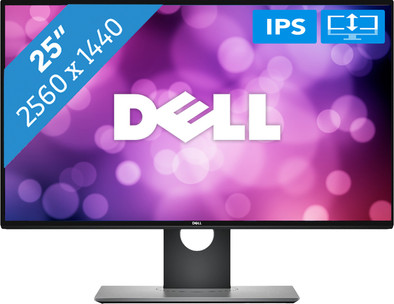
With the Dell UltraSharp U2518D you can edit your photos and company videos at the office or at home in QHD resolution. Or use it to check your email or watch a movie. Thanks to the thin bezels, you'll have ample screen room, which makes this Dell highly suitable for a multi-monitor setup. This way, you can work on your presentation while answering your latest emails. Want to edit photos? With the 2560x1440 resolution, that won't be a problem on this monitor. The IPS panel displays great colors from all angles. This Dell can be adjusted in various ways to ensure comfortable posture. After purchasing your new monitor, you can get started right away, as it comes with a DisplayPort connection cable.
Sharpness | Quad HD (1440p) | |
|---|---|---|
Curved | ||
Aspect ratio | Standard (16:9) | |
Refresh rate | 60 Hz | |
Response time | 5 ms | |
Panel type | IPS panel | |
Color depth | 17 million colors (8-bit) | |
Built-in speakers |
5 stars
20
4 stars
13
3 stars
0
2 stars
0
1 star
0
Installation ease
User friendliness
Image quality
Price-quality ratio
Design
I have two monitors of this type and have been using them for half a year now. I must say that I am very satisfied. They are two beautiful screens with a beautiful screen quality. In addition, the design is very sleek, which I find especially important with a double setup. The material the screens are made of is very robust and looks neat. All in all I have good experiences, and few bad experiences with the product. When you watch a nature movie, or play a good game, it seems lifelike.
Vince
3 February 2019
Automatically translated from Dutch
This screen is just what I was looking for. Perfect for home work. Work clearly with multiple applications open.
Ronny Kupers
6 November 2018
Automatically translated from Dutch
I bought two UltraSharp U2518D for a dual monitor setup. Ideal monitors with a high resolution, but because of 25 "no beasts. The factory color calibration with a delta E < 1 is very good, the calibration report (with monitor serial number) is included with the monitor. Tilting the screen is very useful for some work. Numerous connection options with HDMI, DisplayPort, Mini DisplayPort, USB 3.0 hub (useful for keyboard, mouse, USB Ethernet adapter etc).
Daisy Chaining (looping through the monitors) is possible via DisplayPort if your computer supports MST (Multi Stream Transport). You can then directly connect two monitors with one DisplayPort cable, because the first monitor is connected to the second.
It is a pity that the hole in the base is placed quite low so that the cables are clearly visible when the monitor is placed on a slightly higher position. Also, the on/off button is sometimes a bit difficult to press, certainly not the finest button, but otherwise fine.
Spee
3 April 2018
Automatically translated from Dutch
With Coolblue Extended Warranty, you are protected against costs due to quality defects of your monitor for the next 5 years. During the entire term, we will reimburse up to the original purchase price. You can easily add the Extended Warranty in your shopping cart.
€ 19,99
one-timeAdd your monitor to your shopping cart. In the next step, you can add the Extended Warranty. You can exchange or return your purchase for free within 30 days.
Product number | 795995 |
|---|---|
Manufacturer code | 210-AMRR |
Brand | Dell |
Warranty | 2 years |
Processing of your defect | Carry-in warranty |
Recommended display resolution | 2560x1440 | |
|---|---|---|
Sharpness | Quad HD (1440p) | |
Aspect ratio | Standard (16:9) | |
Refresh rate | 60 Hz | |
Response time | 5 ms | |
Panel type | IPS panel | |
Local dimming | ||
HDR support | ||
Contrast ratio | 1000 | |
Touchscreen | ||
Screen reflection | Anti-glare | |
Blue light filter | ||
Flicker-free technology | ||
Color space | sRGB | |
sRGB color coverage percentage | 99 % | |
Color depth | 17 million colors (8-bit) | |
G-sync | ||
G-sync Ultimate | ||
Adaptive Sync | ||
Resolution width | 2560 pixels | |
Resolution height | 1440 pixels | |
Anti-reflection type | Anti glare | |
Viewing distance | 40 - 106 cm | |
Horizontal viewing angle | 178 ° | |
Vertical viewing angle | 178 ° |
Height | 52,7 cm | |
|---|---|---|
Width | 56,7 cm | |
Depth | 20 cm | |
Weight | 6,24 kg | |
Color | Black | |
Including stand | ||
Material | Plastic | |
Cable management | ||
Appearance | Neutral | |
Curved |
Number of HDMI connectors | 1 | |
|---|---|---|
Number of Female HDMI type A 1.4 ports | 1 | |
Number of headphone jacks | 1 | |
Type of headphone connection | 3.5mm (TRRS) | |
Protocol mini DisplayPort port | DisplayPort | |
Number of Female Standard DisplayPort 1.2 ports | 2 | |
Number of female standard USB-A ports | 2 | |
Female standard USB-A port version | 3.0 | |
Number of female 3.5mm TS Audio Jack ports | 1 | |
Number of female 3.5mm TRRS Audio Jack ports | 1 | |
Number of USB ports | 3 | |
Type of USB port | Standard USB-A | |
Number of USB ports | 5 |
Included by default | DisplayPort cable |
|---|
Adjustable in height | ||
|---|---|---|
Tiltable | ||
Pivotable stand | ||
Pivot function | ||
VESA mount option | ||
VESA mount | 100x100mm |
Energy consumption standby | 0,5 W | |
|---|---|---|
Energy consumption active | 28 W |
Built-in speakers | ||
|---|---|---|
Webcam | ||
Split screen | ||
Kensington lock | ||
Best tested |
Image quality according to customers | Very good | |
|---|---|---|
Design according to customers | Neutral | |
Recommended for use | Internet, email, and text processing, Office work, Watching movies in Full HD |

