
Choose your monitor:
Meet via the webcam and connect via USB-C
Choose your monitor:
Meet via the webcam and connect via USB-C
According to our monitor expert
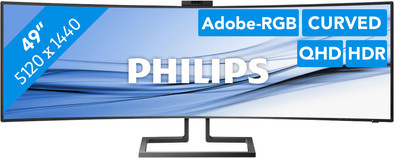
You have enough screen space with the Philips 499P9H, whether you want to edit multiple company photos at the same time or work in an Excel sheet with 50 columns. Thanks to the 49-inch ultrawide screen, you have just as much screen space compared to 2 monitors of 27 inches without annoying bezels. You also put less strain on your neck with the curved screen, which curves around your field of view. This screen is both large and sharp. With a 5120x1440 pixels resolution, you can watch photos and videos in Dual Quad HD. The 121% sRGB value and 91% Adobe RGB value ensure a wide color gamut, which provides image editing in true-to-life colors. You can adjust this monitor in multiple ways for a comfortable working posture.
Sharpness | Quad HD (1440p) | |
Curved | ||
Aspect ratio | Super ultrawide (32:9) | |
Refresh rate | 70 Hz | |
Response time | 5 ms | |
Panel type | VA panel | |
Color depth | 17 million colors (8-bit) | |
Built-in speakers |
5 stars
44
4 stars
27
3 stars
4
2 stars
1
1 star
0
Installation ease
User friendliness
Image quality
Price-quality ratio
Design
I bought the Philips 499P9H to upgrade my home office and to be able to work more efficiently. Specifically, I chose this monitor because it is the cheapest 49" monitor with 5120 x 1440 resolution (vs Dell UltraSharp 49 inch eg). This resolution gives you (even) more workspace compared to a 49" 1080p screen, more than enough pixels to get rid of everything!
This screen is equivalent to two 27" 1440p monitors, but without a border in the middle. Note, once you're used to an ultrawide, you won't want to go back to the dual screen setup!
I use the monitor daily and almost exclusively to work on (several Excels, remote desktops, documents, emails, ...). I connect my laptop through the USB-C cable that comes with the screen, the screen charges the laptop, so you don't need the charger of the laptop (the screen supplies 65 watts through the USB-C cable. most laptops have enough with this, but the Dell XPS 15 for example not). The screen has multiple USB connections and devices connected via the USB-C cable are detected on your PC via the screen. So the screen functions as a hub, which is very convenient.
When you play a game on this monitor, the wide curved image ensures that you are completely immersed in the game, which is a nice experience. Playing a racing game on a monitor like this is very unique! Due to its refresh rate of 60Hz, it is not a monitor for the serious gamer.
In terms of design, this monitor is an eye catcher. The sturdy metal stand has a luxurious look, just like the bottom edge of the screen. The lower edge is made of plastic, but has a brushed metal pattern and looks very neat.
A nice extra with this monitor is the fold-out webcam that supports Windows Hello. He can therefore recognize your face and log in to Windows. Nice feature, I hadn't seen this before!
The price made me think about this purchase for a while, so long that the screen was sold out at Coolblue! Luckily it was back in stock quickly and I ordered it right away. 999 euros for a monitor is expensive, especially while 2 monitors of 27" 1440p are (can be) cheaper, but in my opinion you certainly get a lot for this money. Just to name: less cable work, built-in hub, windows hello, no edge in the middle so you can effectively put something in the middle to focus on, high curve radius, ...
Just to mention my negatives: There is very minimal backlight bleed, which is normal for a larger screen. I have not put this in the negatives because it is absolutely not noticeable in normal use. When connecting 2 PCs, after activating this function, the monitor shows the 2 inputs next to each other. This gave me problems with the resolution of 1 of the 2 PCs on the screen. Other than that, I haven't found any downsides so far.
In short, I am very satisfied with this screen, it increases my efficiency and I always feel like crawling behind this monitor. They won't take this from me anymore. Small tip: if you opt for a 49-inch screen, make sure you install good window manager software. Personally, I use WindowGrid, it does exactly what I want, but that's personal preference!
Ken Meeus
9 April 2019
Automatically translated from Dutch
Because of a lot of video editing and also database management a gigantic fine screen. You no longer have to scroll so much from left to right. Partly due to the resolution, this screen is very suitable for making 4KUHD video for Bluray. This really is a perfect screen for Media Specialists. Still need to save some money, but there will definitely be another one at my other workplace.
Jan Lagerwaard
11 April 2019
Automatically translated from Dutch
Is completely what I was looking for.
Bob Jespers
7 June 2019
Automatically translated from Dutch
Current product
Â
Â
Â
Â
Retail price
€ 1.019,-€ 859,-
Retail price
€ 1.249,-€ 998,95
Retail price
€ 1.218,-€ 849,-
Retail price
€ 1.349,-€ 1.069,-
Retail price
€ 1.599,-€ 1.323,-
VA panel
IPS panel
IPS panel
IPS panel
IPS panel
Yes
Yes
Yes
Yes
Yes
G
F
F
D
F
5120x1440
3840x1600
3440x1440
3840x2160
5120x2160
With Coolblue Extended Warranty, you are protected against costs due to quality defects of your monitor for the next 5 years. During the entire term, we will reimburse up to the original purchase price. You can easily add the Extended Warranty in your shopping cart.
€ 79,99
one-timeAdd your monitor to your shopping cart. In the next step, you can add the Extended Warranty. You can exchange or return your purchase for free within 30 days.
Product number | 826182 |
Manufacturer code | 499P9H/00 |
Brand | Philips |
Warranty | 2 years |
Processing of your defect | Carry-in warranty |
Recommended display resolution | 5120x1440 | |
Sharpness | Quad HD (1440p) | |
Aspect ratio | Super ultrawide (32:9) | |
Refresh rate | 70 Hz | |
Response time | 5 ms | |
Panel type | VA panel | |
Local dimming | ||
HDR support | ||
Contrast ratio | 3000 | |
Touchscreen | ||
Type of HDR | DisplayHDR 400 | |
Screen reflection | Anti-glare | |
Blue light filter | ||
Flicker-free technology | ||
Color space | sRGB | |
Color depth | 17 million colors (8-bit) | |
G-sync | ||
G-sync Ultimate | ||
Adaptive Sync | ||
Type of adaptive sync | FreeSync | |
Resolution width | 5120 pixels | |
Resolution height | 1440 pixels | |
Anti-reflection type | Anti glare | |
Viewing distance | 86 - 231 cm | |
Horizontal viewing angle | 178 ° |
Height | 56,8 cm | |
Width | 119,4 cm | |
Depth | 30 cm | |
Weight | 15,3 kg | |
Color | Black | |
Including stand | ||
Material | Metal, Plastic | |
Cable management | ||
Appearance | Neutral | |
Curved | ||
Screen curve | 1800 R |
Number of HDMI connectors | 2 | |
Number of Female HDMI type A 2.0 ports | 2 | |
Number of headphone jacks | 1 | |
Type of headphone connection | 3.5mm (TRRS) | |
Number of USB 3.1 Female USB-C port | 1 | |
Number of Female Standard DisplayPort 1.4 ports | 1 | |
Number of female 3.5mm TS Audio Jack ports | 1 | |
Number of female 3.5mm TRRS Audio Jack ports | 1 | |
Number of USB ports | 4 | |
Type of USB port | USB-C | |
Number of USB ports | 4 | |
USB-C dock | ||
Maximum USB-C dock power | 65 W |
Included by default | DisplayPort cable, HDMI cable, USB-C cable |
Adjustable in height | ||
Tiltable | ||
Pivotable stand | ||
Pivot function | ||
VESA mount option | ||
VESA mount | 100x100mm |
Energy label | G | |
Energy consumption standby | 0,3 W | |
Energy consumption active | 45 W | |
Energy consumption per 1000h | 52 kWh | |
Annual energy consumption | 75,92 kWh | |
Annual energy costs | 30,37 euros |
Built-in speakers | ||
Sound system | Stereo | |
Webcam | ||
Split screen | ||
Kensington lock |
Image quality according to customers | Very good | |
Design according to customers | Neutral | |
Recommended for use | Internet, email, and text processing, Watching movies in Full HD |
