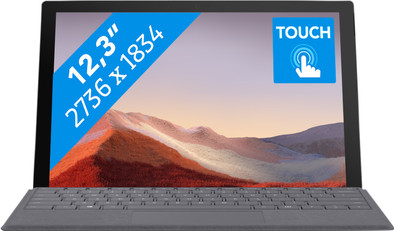
Microsoft Surface Pro 7 - i5 - 8GB - 128GB
Never available again
View alternatives in the sidebar
View alternatives in the sidebar
If you're looking for a new laptop, there's a large selection to choose from. This makes it difficult to choose the best one for you. We're happy to help you. Curious about what to keep in mind? Read our advice page.

Product number | 839108 | |
|---|---|---|
Manufacturer code | VDV-00003 | |
Brand | Microsoft | |
Warranty | 2 years | |
Processing of your defect | Carry-in warranty |
Screen size | 12,3 inches | |
|---|---|---|
Touchscreen | ||
Panel type | IPS panel | |
Sharpness | WQXGA | |
Resolution width | 2736 pixels | |
Resolution height | 1834 pixels | |
Refresh rate | 60 Hz | |
Screen reflection | Glossy | |
Adaptive Sync |
Processor | Intel Core i5 | |
|---|---|---|
Processor code name | Ice Lake | |
Processor cores | Quad-Core (4) | |
Clock speed | 1,1 GHz | |
Turbo speed | 3,7 GHz | |
Cache memory | 6 MB |
Internal RAM | 8 GB | |
|---|---|---|
Memory composition | 1x 8GB | |
Memory slot 1 | 8 GB | |
Total number of RAM slots | 1 |
Total storage capacity | 128 GB | |
|---|---|---|
Storage type | SSD | |
SSD storage capacity | 128 GB |
Video card | Intel Iris Plus Graphics | |
|---|---|---|
Type of video card | Shared |
Operating system | Windows | |
|---|---|---|
Windows OS version | Windows 10 Home | |
Operating system language | Multiple languages can be configured |
Laptop model | 2-in-1 | |
|---|---|---|
Color | Silver | |
Material | Metal | |
Metal type | Aluminum | |
Height | 0,85 cm | |
Width | 29,2 cm | |
Depth | 20,1 cm | |
Weight | 0,77 kg |
Mobile data connection | No | |
|---|---|---|
WiFi standards | Wireless AX | |
Bluetooth | ||
Bluetooth version | 5.0 |
USB port | ||
|---|---|---|
Number of USB ports | 2 | |
Type of USB port | Standard USB-A, USB-C | |
Protocol Female USB-C port | DisplayPort Alternative Mode, USB, USB electricity | |
USB version Female USB-C port | 3.1 | |
Number of female standard USB-A ports | 1 | |
Female standard USB-A port version | 3.1 | |
Number of USB 3.1 Female USB-C port | 1 | |
HDMI connector | ||
DisplayPort connector | ||
VGA connector | ||
Network connector | ||
Thunderbolt connector | ||
Headphone jack | ||
Memory card reader |
Keyboard layout | Not included | |
|---|---|---|
Numeric keypad | ||
Spill-resistant | ||
Backlit keyboard | ||
Mechanical keyboard | ||
Programmable keys |
Built-in microphone | ||
|---|---|---|
Number of speakers | 2 | |
Sound reproduction | Stereo | |
Integrated computer speakers brand | Standard speakers |
Built-in camera | ||
|---|---|---|
Image definition webcams | Full HD (1080p) |
Battery technology | Lithium-ion | |
|---|---|---|
Power connector input type (female) | Other brand/product specific |
Manufacturer's warranty | ||
|---|---|---|
Type of manufacturer's warranty | Manufacturer's carry-in warranty | |
Manufacturer's carry-in warranty | 2 years |
TPM (Trusted platform module) | ||
|---|---|---|
Kensington lock | ||
Windows Hello | ||
Fingerprint identity sensor | ||
Infrared camera |
Extra installed software |
|---|
anything for a smile
Screen size | 12,3 inches | |
|---|---|---|
Processor | Intel Core i5 | |
Internal RAM | 8 GB | |
Total storage capacity | 128 GB | |
Video card | Intel Iris Plus Graphics | |
Panel type | IPS panel | |
Touchscreen | ||
Windows OS version | Windows 10 Home |
According to our laptop expert
You can use the Surface Pro 7 as a laptop and tablet thanks to the touchscreen and the optional Type Cover.
With a weight less than 1kg, you can easily take the Surface Pro with you on the go.
As soon as the upgrade is available for your device, you can upgrade to Windows 11 for free.
Other models from the Pro 7 series have a more powerful processor, which you can also use to edit videos.
A type cover keyboard and touch pen aren't included by default.
Note: the type cover isn't included by default and needs to be purchased separately.
The Microsoft Surface Pro 7 is a tablet and laptop in one. With the touchscreen, you can take notes with your fingers during a work meeting or edit photos in Photoshop. Does your coworker want you to make notes of the meeting? If so, use the optional Type Cover. You can easily attach this magnetic keyboard to the Surface. This way, you can type texts like on a traditional laptop. With a weight of less than 1 kilogram, you can easily take the Surface with you to the next meeting. On the train back home, you can place it on the table and quickly log in with your own face via the webcam and Windows Hello. Afterwards, you can enjoy a Netflix movie on the high resolution PixelSense screen during your train journey.
€ 94,99
Battery life
Speed
Design
Replacement for my MacBook Pro after my work switched to Office365. Works great with 1 work account and 1 personal account. Opted for the i7 16gb 512gb SSD. Photo editing and making music in Ableton works fine (just set asio4all: google moltenmusic). Even gaming is an option (Rocketleague 60fps at 1368x912 on high quality). A week after commissioning and after installing office, albleton, photo editing, a few games and syncing Onedrive, I have about 200 GB of disk space. The additional cost for the 512 GB SSD is insane, but necessary for my use. Photos and documents work fine from an SD card by the way, so if you don't go over 265GB with the programs you want to run you can "save" a lot of money.
Operation with the finger is nice (popup keyboard), but for longer texts and key combinations, the keyboard is actually indispensable. The pen is especially fun for scribbling on documents from colleagues or for people who are more creative than me.
Doubted about the Pro X and Go2 because of the battery life and thinner screen bezels. Chose the Pro 7 because I need a full-fledged computer that can run regular programs. A new Pro may be released at the end of this year with a better battery and larger screen, but you can't always wait and given the virus outbreak, I now use it the most. Did I mention that the microphone, speakers, and camera work great for video conferencing?
Tip: turn off throttling. He gets mostly hot and noisy and then has to take a step back because he gets too hot Tip: buy a 60w USB C charger and you can go out with 1 charger for both your phone and laptop
Rens
3 June 2020
Automatically translated from Nederlands
I was looking for a good lightweight laptop because I travel a lot, this laptop is perfect for that. I also find the touchscreen very nice to scroll back and forth through files. Until your colleagues to whom you show an image or Excel find out that your laptop works with a touchscreen and they start scrolling with their greasy fingers. Minus point.
Paula
7 December 2019
Automatically translated from Nederlands
Unpack, follow installation and run, exactly what you would expect from a laptop. Many laptops often feel a bit cheap and flimsy, but still cost a lot of money. The surface pro may be a bit more pricey, but feels great and that gives confidence that it does what it was bought
Robin Bronsteede
10 March 2020
Automatically translated from Nederlands