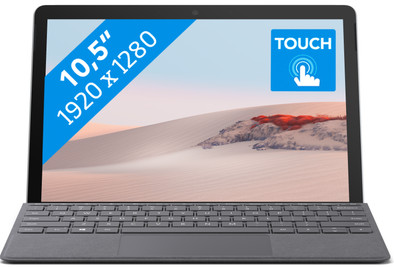
Microsoft Surface Go 2 - 4GB - 64GB
Never available again
View alternatives in the sidebar
View alternatives in the sidebar
Product number | 859980 | |
|---|---|---|
Manufacturer code | STV-00003 | |
Brand | Microsoft | |
Warranty | 2 years | |
Processing of your defect | Carry-in warranty |
Screen size | 10,5 inches | |
|---|---|---|
Touchscreen | ||
Panel type | IPS panel | |
Sharpness | WUXGA | |
Resolution width | 1920 pixels | |
Resolution height | 1280 pixels | |
Refresh rate | 60 Hz | |
Screen reflection | Glossy | |
Adaptive Sync |
Processor | Intel Pentium Gold | |
|---|---|---|
Processor code name | Kaby Lake | |
Processor cores | Dual-Core (2) | |
Clock speed | 1,7 GHz | |
Turbo speed | 1,7 GHz | |
Cache memory | 2 MB |
Internal RAM | 4 GB | |
|---|---|---|
Memory composition | 1x 4GB | |
Memory slot 1 | 4 GB | |
Total number of RAM slots | 1 |
Total storage capacity | 64 GB | |
|---|---|---|
Storage type | Flash | |
SSD storage capacity | 64 GB |
Video card | Intel HD Graphics 615 | |
|---|---|---|
Type of video card | Shared |
Operating system | Windows | |
|---|---|---|
Windows OS version | Windows 10 in S mode |
Laptop model | 2-in-1 | |
|---|---|---|
Color | Silver | |
Material | Metal | |
Metal type | Magnesium alloy | |
Height | 0,83 cm | |
Width | 24,5 cm | |
Depth | 17,5 cm | |
Weight | 0,522 kg | |
Operating system language | Multiple languages can be configured |
Mobile data connection | No | |
|---|---|---|
WiFi standards | Wireless AX | |
Bluetooth | ||
Bluetooth version | 5.0 |
USB port | ||
|---|---|---|
Number of USB ports | 1 | |
Type of USB port | USB-C | |
Protocol Female USB-C port | HDMI Alternate Mode, USB, USB electricity | |
USB version Female USB-C port | 3.1 | |
Number of USB 3.1 Female USB-C port | 1 | |
HDMI connector | ||
DisplayPort connector | ||
VGA connector | ||
Network connector | ||
Thunderbolt connector | ||
Headphone jack | ||
Memory card reader |
Keyboard layout | Not included | |
|---|---|---|
Numeric keypad | ||
Spill-resistant | ||
Backlit keyboard | ||
Mechanical keyboard | ||
Programmable keys |
Built-in microphone | ||
|---|---|---|
Number of speakers | 2 | |
Sound reproduction | Stereo |
Built-in camera | ||
|---|---|---|
Image definition webcams | Full HD (1080p) |
Battery technology | Lithium-ion | |
|---|---|---|
Battery life according to customers | Standard |
Manufacturer's warranty | ||
|---|---|---|
Type of manufacturer's warranty | Manufacturer's carry-in warranty | |
Manufacturer's carry-in warranty | 2 years |
TPM (Trusted platform module) | ||
|---|---|---|
Kensington lock | ||
Windows Hello | ||
Fingerprint identity sensor | ||
Infrared camera |
Extra installed software |
|---|
anything for a smile
Screen size | 10,5 inches | |
|---|---|---|
Processor | Intel Pentium Gold | |
Internal RAM | 4 GB | |
Total storage capacity | 64 GB | |
Video card | Intel HD Graphics 615 | |
Panel type | IPS panel | |
Touchscreen | ||
Windows OS version | Windows 10 in S mode |
According to our laptop expert
On the touchscreen, you can swipe through your apps with with your finger and quickly edit a note or email.
With Windows 10 in S mode, you can install applications from the Microsoft Store, so you're better protected from viruses.
As soon as the upgrade is available for your device, you can upgrade to Windows 11 for free.
Multitasking is slow with an Intel Pentium Gold processor, so make sure you choose a laptop with at least an i5 processor if you want more than internet browsing and text processing.
The 10.5-inch screen is suitable for everyday tasks, but a small screen is less suitable for photo editing or watching movies.
Note: The type cover isn't included by default, so you need to purchase it separately.
You can use the Microsoft Surface Go 2 - 8GB - 64GB as a laptop and as a tablet for basic tasks like typing reports and browsing the internet. Since it weighs just over half a kilogram, you can carry it in a bag and check your email or watch a Netflix series on the go. Thanks to the easily detachable Surface Type Cover (sold separately), you can choose whether you want to use the Surface Go as a laptop or as a tablet. The useful stand at the back allows you to place it somewhere, so you can comfortably make notes with the optional Surface Pen. The battery lasts about 10 hours, so you can easily take it with you all day without having to look for a socket.Note: this laptop runs on Windows 10 in S Mode. Prefer the regular Windows 10? Turn off Windows in S mode via the Windows Store to use the full version of Windows 10.
Receive an email with a personal voucher code for 1 free year of Norton 360 Deluxe antivirus one day after purchase.
5 stars
6
4 stars
10
3 stars
1
2 stars
0
1 star
0
I bought the Surface as a second chance. It was indicated that the product came from an exchange and therefore had some signs of use (scratches on the screen). Coolblue had taken such clear pictures of this that I assumed they were a lot worse. The scratches are no more than normal signs of use. So very satisfied in that regard. I am also very satisfied with the product itself.
What I am a lot less satisfied with is the condition in which the product was delivered to me. I think it has to do with the fact that the device was cleaned after the previous owner, but the version of Windows it came with was so barebones that it didn't even have a WiFi driver on it. Since I don't have an ethernet to usb C adapter, the next logical step was to download drivers on another PC>USB stick>Surface and then install them. Where it is not that Windows on the Surface is in S mode by default. This means that programs can only be installed directly from the online Microsoft App Store. MiFi then via tethering. Only I have to start a program that is on the MiFi itself and therefore does not come from the App store. You can disable S mode, but you can only do that in the App Store.... In short, installing the drivers manually was not possible.
I was at my wits end and thought CoolBlue might have a solution and called their helpdesk. I was on hold for about 30 minutes, after which I got an employee on the line and briefly explained the above. Gets put on hold again about 10 minutes later disconnects from the other end (could have been wrong in the line, felt the question was too difficult).
I eventually managed to solve it myself by connecting my phone via USB tethering, so performing the first Windows Update, after which WiFi connection was immediately possible.
This is no way to deliver a product. I have now managed to get out of the catch22, but I think many others here would have been completely stuck.
Rutger
3 December 2020
Automatically translated from Nederlands
The entry-level model of the Surface Go 2 (with a Pentium CPU) feels very slow to me, and gets annoying at some point. Furthermore, it is a nice and solidly built Windows tablet/laptop.
Dion Olsthoorn
3 September 2020
Automatically translated from Nederlands
I used a Chrome box with a 24" monitor. If I have many tabs open at the same time in Chrome, it is really slow.
I was looking for a compact laptop to work anywhere and to replace my Chrome box. In terms of software, I only need MS Office and the web browser to maintain my website. I also have Affinity Designer for my logo and marketing.
So I don't have high demands in terms of software. This means that the Surface Go 2 - despite the (very) slow CPU - still runs smoothly. Starting up and logging in goes very smoothly in combination with the excellent webcam. MS Office and adjusting my website go perfectly.
The only moment that I notice that it is a very slow computer is when there are major Windows updates to install. Fortunately, this is not an everyday occurrence.
Maarten Wauters
10 September 2021
Automatically translated from Nederlands