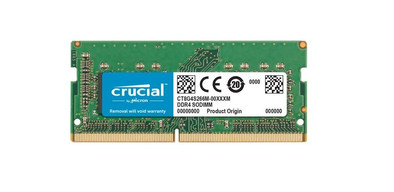
Crucial 16GB 3200MHz DDR4 SODIMM (1x16GB)

Never available again
View alternatives in the sidebar
View alternatives in the sidebar
Product number | 874279 | |
|---|---|---|
Manufacturer code | CT16G4SFRA32A | |
Brand | Crucial | |
Warranty | Lifetime | |
Processing of your defect | Via Coolblue |
Compatible with product type | Laptop | |
|---|---|---|
Compatible with operating system | Linux, Windows | |
RAM type | SO-DIMM | |
Memory type | DDR4 | |
Voltage RAM | 1.2V | |
Pins (RAM) | 260 |
Internal RAM | 16 GB | |
|---|---|---|
Memory composition | 1x 16GB |
Memory speed | 3200 MHz | |
|---|---|---|
CAS latency memory module | 22 |
Suitable for gaming |
|---|
anything for a smile
Memory composition | 1x 16GB | |
|---|---|---|
Memory speed | 3200 MHz | |
Compatible with operating system | Linux, Windows | |
Internal RAM | 16 GB | |
RAM type | SO-DIMM | |
Memory type | DDR4 | |
CAS latency memory module | 22 | |
Compatible with product type | Laptop |
According to our internal memory expert
This RAM is suitable for Windows and Linux-based laptops.
You get a lifelong warranty from Crucial on this RAM module.
The 16GB RAM is enough to perform demanding photo and video edits and running programs like AutoCAD.
Check whether this RAM is compatible with the memory that is now installed in your computer.
Note: this RAM module only fits in Windows laptops. This RAM is unsuitable for a Mac desktop or laptop. The computer needs to have a DDR4 connector. Check if this is the case in Windows Task Manager, 'More details', under the header 'Performance'. Under 'Memory', it says either DDR3 or DDR4. If it doesn't say anything about the connector, you need a DDR4.
With the Crucial 16GB 3200MHz DDR4 SODIMM (1x16GB), you expand the RAM of your Windows or Linux laptop with 16GB. This RAM is divided over 1 RAM module of 16GB and has clock speed of 3200MHz. With 16GB RAM, your laptop can perform multiple and more demanding tasks. For example, editing photos and videos or running demanding programs like AutoCAD.
Performances
Stability
Speed
Works great with the Synology DS923+
Martijn
4 June 2023
Automatically translated from Nederlands
I have a laptop (Acer Aspire 3 a317-52-54AC) with 4gb internal ram and 4gb on and chip which was total 8gb now I have total 20. I run many virtual machines (requiring at least 4fb) and often crashed the vm program because there was not enough ram available, I am no longer bothered by that.
Thomas
9 February 2023
Automatically translated from Nederlands
It just works. Simple: open laptop, click ram in, restart, ff click away that warning from my bios, done.
Joris
16 March 2022
Automatically translated from Nederlands