Mio Cyclo Discover Connect
Never available again
View alternatives in the sidebar
View alternatives in the sidebar
Product number | 880245 | |
|---|---|---|
Manufacturer code | 442N68200001 | |
Brand | Mio Technology | |
Warranty | 2 years | |
Processing of your defect | Carry-in warranty |
Height | 6,8 cm | |
|---|---|---|
Width | 11,4 cm | |
Depth | 1,86 cm | |
Weight | 155 g | |
Color | Gray | |
Water-resistant | ||
IP certification | IPX7 | |
Water resistance | Waterproof |
Screen size | 3,5 inches | |
|---|---|---|
Resolution height | 321 pixels | |
Resolution width | 240 pixels | |
Color screen | ||
Screen reflection | Glossy | |
Backlit screen | ||
Touchscreen |
Suitable for cyclist type | Recreational cyclist | |
|---|---|---|
Navigation possible (bike) | ||
Route input method | Input on device, Junctions, Load GPX file, Upload routes, Waypoints | |
Navigational directions type | Per each road exit, Route lines | |
Usage mode | Off-road, On-road | |
Alternative routes | ||
Trackback feature | ||
Surprising route | ||
Spoken directions | ||
GPS sensor | ||
GLONASS | ||
Live tracking | ||
Compass |
Pre-installed maps | ||
|---|---|---|
Map coverage | Europe, Western Europe | |
Maps expandable | ||
Free map updates | ||
Useful places |
Compatible with operating system | Android, iOS | |
|---|---|---|
Compatible with smartphone / apps | ||
Compatible with apps | Komoot, Mio app, MioShare, RouteYou, Strava, Strava Cycling | |
Shows smartphone messages | ||
Bluetooth | ||
Built-in WiFi | ||
ANT+ | ||
Strava Live |
Heart rate sensor | No | |
|---|---|---|
Cadence sensor | No | |
Speed sensor | No | |
Power sensor | No | |
Interval training | ||
Save courses | ||
Electronic gear-shifting system | ||
Altimeter | ||
Type of altimeter | Barometric | |
Calorie counter | ||
Lap counter | ||
Stopwatch | ||
Temperature sensor |
Rechargeable battery | ||
|---|---|---|
Battery level indicator |
anything for a smile
Screen size | 3,5 inches | |
|---|---|---|
Suitable for cyclist type | Recreational cyclist | |
Touchscreen | ||
ANT+ | ||
Bluetooth | ||
Spoken directions | ||
Screen reflection | Glossy | |
Color screen |
According to our bike navigation expert
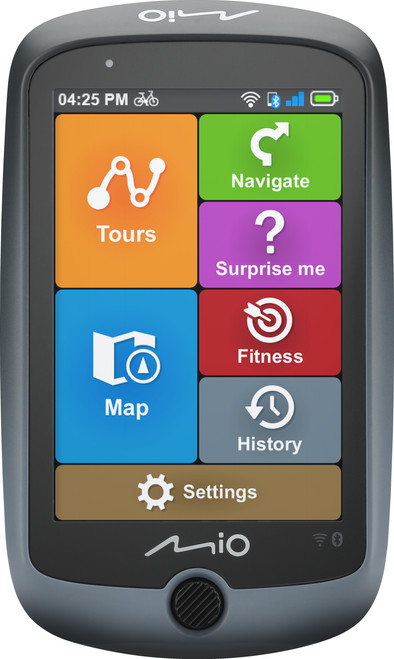
With the Surprise Me function, you can choose from 3 surprising routes and discover new places by bike.
Thanks to the Points of Interest function (POI), you can discover interesting places, toilets, restaurants, and other facilities along the way.
You stay informed of your messages and incoming calls, thanks to the notifications from your smartphone on the screen.
The device isn't ANT+ compatible, so it's not possible to connect multiple sensors at the same time.
The glossy screen is difficult to read on sunny days, because of reflections.
The Mio Cyclo Discover Connect bike navigation has a bright and colorful touchscreen from which you can read your route turn-by-turn. You can wirelessly upload your own routes or popular routes. Or of others from platforms such as Mioshare, CycleAgent, Komoot, Strava, and RouteYou via the built-in WiFi and Bluetooth. The system has maps of all of Europe, so you can also use it during your bike holiday. The NeverMiss function shows you useful places of interest or restaurants. This way, you can use your Cyclo Connect as a digital travel guide. If you're tired of the standard bike tour in your neighborhood, you can discover new places with the Surprise Me function. This gives you 3 suprising routes based on your preferences.
What they do not mention is the fact that you are not allowed to use the extension of the SD card in the Netherlands. That's a shame because you can set up something here, but the cyclo discover connect doesn't do anything with it. Which is also cumbersome that you always have to go through the procedure for pairing your phone. Because after turning off the device, the connection is canceled and you can perform the procedure again after turning it on. Visibility in direct sunlight is disappointing. What is also disappointing is the connection with the external parties for which you have to create accounts before you can use them and even then it does not go smoothly. My own experience is that it is better to download gpx files yourself and then put them in the correct directory via the computer in order to be able to use them. There are also relatively few options for what you can do with the fixed routes.
F.N. Bijl
10 June 2022
Automatically translated from Nederlands
Directions in rural areas are clear, you can easily find your way. In the city the directions are sometimes confusing. In the bright sun, the screen is difficult to read because of the phrase that is reflected. The WIFI and Bluetooth connections work fine, but don't expect modern smartphone speed. The same goes for the response speed of the buttons.
Andre
24 May 2022
Automatically translated from Nederlands
Despite the advertising, I have to report that this device is NOT supported with IOS (apple mobile phone or computer). The device is unusable for me. the na
Johny Six
12 June 2022
Automatically translated from Nederlands

