Samsung The Frame 85LS03A (2021)
Never available again
View alternatives in the sidebar
According to our television expert
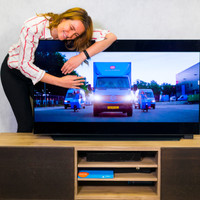
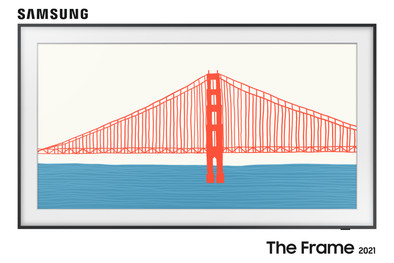
The Samsung The Frame QLED 85LS03A (2021) is a television that you can also use as a painting or photo frame. Thanks to the thin design and removable frame, it blends into your interior seamlessly. You can put The Frame on leg stands or mount it close to the wall among your other paintings with the included Slim Fit Wall Mount. You connect the TV to the One Connect Box with a thin, almost invisible cable. Connect this box to a socket and all your peripherals. That way, there won't be a tangle of cables running from your TV to the TV cabinet.
In the Samsung Art Store, you have access to hundreds of art pieces to display when the TV is switched off. Or you can choose to display your own photos on the TV via your smartphone. You never have to look at a 'black hole' in the living room again. The QLED screen of the The Frame TV provides a realistic viewing experience, thanks to the 1 billion colors (10-bit) and 100Hz refresh rate. As a result, every subtle color difference is displayed clearly. In addition, the screen uses a sensor to adjusts the brightness and color temperature to the ambient light.
Screen size | 85 inches | |
Image quality | Very good | |
Smart platform | Tizen | |
Refresh rate | 100 Hz | |
Screen type | LED-LCD | |
Sharpness | 4K (UHD) |
5 stars
106
4 stars
97
3 stars
8
2 stars
2
1 star
0
Although we liked our old TV, we still wanted a bigger screen. However, all of us in the family find that black surface on the wall very ugly. An acquaintance told us about Samsung the Frame. My interest was quickly aroused. After a long process of reading and viewing reviews, we decided to order the 50 inch Frame 2021. The thinner design really appealed to us. Last week the TV was delivered and hung up by a 'delivery hero' from Coolblue.
INSTALLATION We are glad that the Coolblue employee hung up the TV. Compared to the 2020 version, the wall mounting is quite complicated: two plates must be precisely measured and fixed to the wall. There is no large template included, so with directions you have to measure everything exactly on the wall. It would have taken me a long time to do that myself. The Coolblue employee, however, managed this neatly. The first installation of the TV itself was very simple: you go through a number of steps. The TV immediately recognized the ziggo box, SONOS Beam and the Nintendo Switch. He did not recognize my old Mede8er media player. It is very easy to set manually.
IMAGE The colors pop off the screen in my eyes (especially compared to my old device). The intelligent mode is very bright and the colors are too saturated. Manually adjust the image to your liking with the 'Film' image setting. Now it looks pretty calm, yet very colorful. The black values of the Qled screen are of course not comparable with an OLED screen. In a non-dark room, however, the black values are not disappointing at all; in a dark room you see that black is not completely black, but quite acceptable.
SOUND The sound flows over my Sonos Beam. No experience with the sound from the TV.
SMART TV In the main menu you can list all the apps you use frequently. You can also place the HDMI sources there. The commonly used apps, such as YouTube, Netflix, Videoland and Prime video were already installed. Apps launch quickly. There is an 'appstore', but we haven't looked at it yet. Unfortunately, the main menu also advertises certain apps and other things. It's not large in view, but you do have to click past it when navigating the main menu. Unfortunately, that cannot be turned off, and that is very unfortunate.
ART MODE When the TV is off, you can project art or photos onto the screen. A fantastic function, because you don't have an empty black surface on the wall when the TV is turned off. This works more than reasonably. You can take out a (trial) subscription to the 'Art-store', where a large number of images are available. However, you can also easily put your own images on the Frame via your smartphone or USB stick. So I keep that 5 € per month for the subscription in my pocket. For example, high-resolution images of many works of art can be downloaded from the Rijksmuseum on the internet. The images are best if you put them exactly in 4K resolution (3840 x 2160 pixels) on the TV. The art mode looks quite realistic in a lit room. A breath of fresh air! In a dark room you can see better that it is a TV with backlight lighting. We ordered the free list this weekend from Samsung's promo website. That was an unnecessarily difficult process: there was a whole list of frames to choose from, but in the end the choice was only three colors for this size and version. Chosen for the Teak color. Curious what it would look like then!
CONCLUSION A very nice TV, and meets expectations! We are happy with it.
Cor Wit
7 June 2021
Automatically translated from Dutch
Fantastic image and nice to be able to choose a painting or photo when the TV is off
Martijn
20 June 2021
Automatically translated from Dutch
Compared to the 2020 model, the 2021 frame has a thinner screen and a sharper image. In addition, the art mode has been improved with a higher internal memory. This makes it nicer to use your own photos
Vik
6 July 2021
Automatically translated from Dutch
Product number | 891246 |
Manufacturer code | QE85LS03AAUXXN |
Brand | Samsung |
Warranty | 2 years |
Processing of your defect | Carry-in warranty |
Image quality | Very good | |
Screen type | LED-LCD | |
Screen size | 85 inches | |
Sharpness | 4K (UHD) | |
Refresh rate | 100 Hz | |
Color depth | 1 billion colors (10-bit) | |
Recommended for television use | Optimal gaming, Stream series and movies, Watch standard channels |
Quality viewing angle | Standard | |
Pixel structure | RGB | |
Local dimming | ||
Type local dimming | Edge lit | |
HDR support | ||
Type of HDR | HDR10, HDR10+, HLG | |
Input lag | 9,6 ms |
Smart TV | ||
Smart platform type | Extensive | |
Smart platform | Tizen | |
Not supported popular apps | Ziggo GO | |
Built-in WiFi | ||
Bluetooth | ||
DLNA | ||
AirPlay | ||
AirPlay version | AirPlay 2 | |
Media player |
Built-in soundbar | ||
Number of speakers | 2 | |
Continuous/nominal total output capacity (RMS) | 40 W | |
Subwoofer | ||
Q-Symphonyq | ||
Dolby Atmos support |
One Connect Box | ||
Ambient Mode | ||
Art Mode | ||
Sleep timer | ||
Light sensor | ||
Pivotable stand |
Controls via app | ||
Controlled via Android app | ||
Controlled via Apple app | ||
Samsung One Remote | ||
Voice control |
CI/CI+ slot | ||
Digital tuner | ||
Digital video signal | Cable (DVB-C), Digitenne (DVB-T), Digitenne (DVB-T2), Satellite (DVB-S), Satellite (DVB-S2) | |
DVB-T Twin tuner | ||
DVB-S Twin tuner |
Antenna connector | ||
Female HDMI Type A port version | 2.0, 2.1 | |
HDMI eARC | ||
Digital optical connector | ||
Headphone jack | ||
USB port | ||
Component video connector | ||
Composite connector | ||
Network connector | ||
RCA connector | ||
VGA connector |
VESA mount option | ||
VESA mount | 600x400mm | |
Including TV mount |
Energy label | G | |
Energy consumption per 1000h | 188 kWh | |
Energy consumption HDR per 1000h | 334 kWh |
Color | Black | |
Height | 108,5 cm | |
Width | 190,4 cm | |
Depth | 26,9 cm | |
Weight | 44,2 kg | |
Height including stand | 122,2 cm | |
Width including stand | 190,4 cm | |
Depth with stand | 34,7 cm | |
TV stand type | 2 stands | |
Leg stands adjustable in height | ||
Leg stands adjustable in width | ||
Stand height | 3,7 cm | |
Total weight including stand | 45,1 kg | |
Year introduced | 2021 | |
Product line | The Frame |