





anything for a smile
BlueBuilt Imperium
Choose your mouse

5 stars
26
4 stars
28
3 stars
12
2 stars
4
1 star
1
Connection options
Ergonomics
Accuracy
Size
Design
The BlueBuilt Imperium Wireless Ergonomic Bluetooth Mouse is a handy mouse that I can easily connect to 3 devices. The ergonomic design means my wrist is less likely to bother me.
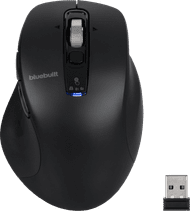
First impression The BlueBuilt Imperium comes in a cardboard box. On the back of the box there is a QR code that sends me directly to a useful article that explains how to connect the mouse. The box also contains a manual, a charging cable and the mouse itself. I really like the feel of the mouse because it is made of soft plastic. The appearance of the mouse is simple, but sleek. It's also not heavy, which makes it easy for me to take with me from home to work.
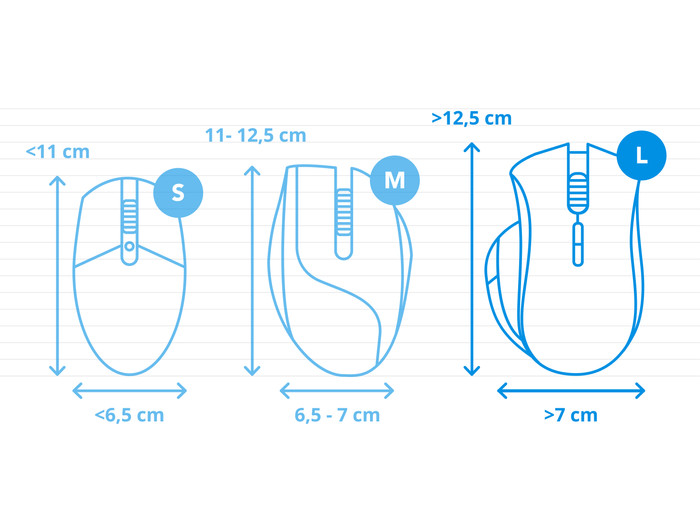
Large, but comfortable What strikes me is that the mouse is quite large, but fits comfortably in the hand. I have smaller hands and I work with a smaller mouse, so I had to get used to the larger size. The BlueBuilt mouse has an ergonomic shape. This way I can easily rest my thumb on the mouse. It also has a handy grip, so I don't have to twist my hand much to hold it properly.
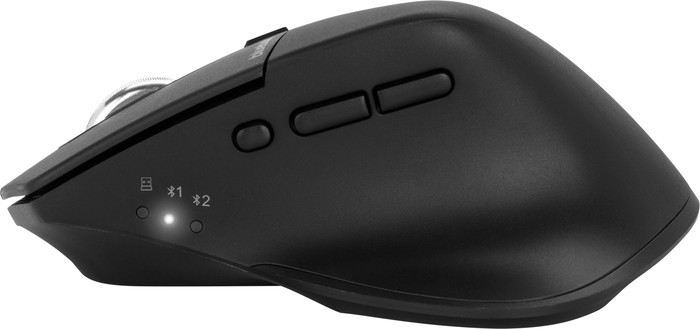
Connection to multiple devices I connect the mouse to my laptop in different ways. I choose to connect it via the USB receiver. This means the mouse is immediately connected and I can get started right away. You also connect the mouse via Bluetooth. In total you connect the mouse to 3 devices, which I find useful. This way, I don't have to switch between different mice after work when I start working on my personal laptop. Via the lights on the side I can quickly see which laptop the mouse is connected to.
Just click The mouse clicks nicely. It has a softer clicking sound, which I like. The scroll wheel does make a little more noise when I scroll. I quickly navigate my screens with this mouse. With the DPI button I can easily choose which speed of the mouse I like. There are 4 speeds, but the third speed setting is my personal preference. Unfortunately, this BlueBuilt mouse does not have a horizontal scroll function. The mouse also has two thumb buttons near the thumb. I'm not used to this, because my old mouse doesn't have that. Still, I find it useful and I notice that I will use it more often.
Deanne. Muizen specialist
5 August 2024
Automatically translated from Nederlands
De BlueBuilt Imperium Draadloze Ergonomische Bluetooth Muis is een handige muis die ik makkelijk met 3 apparaten verbind. Door het ergonomische ontwerp krijg ik minder snel last van mijn pols.
Eerste indruk De BlueBuilt Imperium wordt geleverd in een kartonnen doos. Op de achterkant van de doos staat een QR code die mij direct stuurt naar een handig artikel dat mij uitlegt hoe ik de muis aansluit. In de doos zit ook een handleiding, een oplaadkabel en de muis zelf. Ik vind de muis erg fijn aanvoelen, omdat hij gemaakt is van zacht kunststof. Het uiterlijk van de muis is simpel, maar strak. Hij is ook niet zwaar, waardoor ik hem makkelijk meeneem van huis naar werk.
Groot, maar comfortabel Wat mij opvalt is dat de muis vrij groot is, maar wel prettig in de hand ligt. Ik heb zelf wat kleinere handen en ik werk met een kleinere muis, dus ik moest wennen aan het grotere formaat. De BlueBuilt muis heeft een ergonomische vorm. Zo rust ik makkelijk mijn duim op de muis. Ook heeft hij een handige grip, waardoor ik mijn hand niet veel hoef te draaien om hem goed vast te houden.
Verbinding met meerdere apparaten De muis verbind ik op verschillende manieren met mijn laptop. Ik kies ervoor om hem via de usb ontvanger aan te sluiten. Daardoor is de muis direct verbonden en ga ik gelijk aan de slag. Je verbindt de muis ook via bluetooth. In totaal verbind je de muis met 3 apparaten, wat ik handig vind. Zo wissel ik na werk niet met verschillende muizen als ik op mijn persoonlijke laptop aan de slag ga. Via de lampjes aan de zijkant zie ik snel met welke laptop de muis is verbonden.
Klikken maar De muis klikt prettig. Hij heeft een zachter klikgeluid, wat ik fijn vind. Het scrollwiel maakt wel iets meer geluid als ik scrol. Ik navigeer snel over mijn schermen met deze muis. Met de dpi knop kies ik makkelijk welke snelheid van de muis ik fijn vind. Er zijn 4 snelheden, maar de derde snelheidsstand heeft mijn persoonlijke voorkeur. Helaas heeft deze BlueBuilt muis geen horizontale scrollfunctie. De muis heeft bij de duim ook nog twee duimknoppen zitten. Dit ben ik niet gewend, want mijn oude muis heeft dat niet. Toch vind ik het handig en merk ik dat ik het vaker ga gebruiken.
Deanne. Muizen specialist
31 July 2024
Lousy quality, second copy in a row that no longer scrolls within a few months of normal use
Hans
4 November 2024
Automatically translated from Nederlands
Our digital expert will help you, but it can sometimes make mistakes, like humans do.
According to our mouse expert
Work comfortably: the ergonomic design keeps your arm, hand, and wrist in a natural position.
More freedom of movement: because the mouse is wireless, you can use it anywhere.
Keep a USB port free: thanks to Bluetooth, you can connect the mouse to your computer without a USB dongle.
No fast scroll wheel: scrolling through large spreadsheets and long pages takes more time.
No horizontal scrolling: you'll navigate spreadsheets and pages less easily without a horizontal scroll wheel.
Product number | 920302 | |
|---|---|---|
Manufacturer code | BBIMP23 | |
Brand | BlueBuilt | |
Warranty | 5 years | |
Processing of your defect | Via Coolblue |
Mouse model | Standard | |
|---|---|---|
Input | Optical | |
Number of buttons | 7 | |
Ergonomic design | ||
Type of ergonomics | Standard ergonomic | |
Left or right-handed | Right-handed | |
Maximum dots per inch (DPI) | 2400 dpi | |
Adjustable DPI | ||
Mouse controls | Buttons, Scroll wheel | |
Suitable for gaming | ||
Scroll fast | ||
Rechargeable | ||
Programmable buttons | ||
Lighting peripherals | ||
Silent mouse | ||
Horizontal scrolling | ||
Mouse surface | Any surface | |
Product family | Imperium |
Connection type | Wireless | |
|---|---|---|
Type of wireless connection | USB and Bluetooth | |
Bluetooth version | 5.0 | |
Nano receiver | ||
Number of devices that can be paired | 1 - 3 | |
Type of USB port | USB-C |
Plug and Play | ||
|---|---|---|
Compatible with operating system | ChromeOS, Windows, iPadOS, macOS |
Power supply type | Rechargeable battery | |
|---|---|---|
Battery level indicator | ||
Replaceable battery |
Color | Black | |
|---|---|---|
Mouse size | Large | |
Width | 8,4 cm | |
Height | 5,05 cm | |
Depth | 12,5 cm | |
Material | Plastic | |
Finish | Matte | |
Weight | 120 g |
BlueBuilt products have the best price-quality ratio because we've put them together ourselves. Based on product data, feedback from customers, and our own product knowledge. In other words, good products. We are so confident, that we'll even give you an extra long warranty. Read everything on BlueBuilt.

Retail price
€ 54,99€ 49,99
Retail price
€ 54,99€ 49,99
Current product

Wireless
Wireless
Wireless
Wireless
Wireless
Black
Black
Black
Black
Black
Retail price
€ 54,99€ 49,99
Retail price
€ 69,99€ 59,-
€ 55,-
Retail price
€ 99,-€ 67,99
Retail price
€ 99,99€ 72,90
Delivered tomorrow
Delivered tomorrow