

anything for a smile
Black
|
Keyboard

Installation ease
Ergonomics
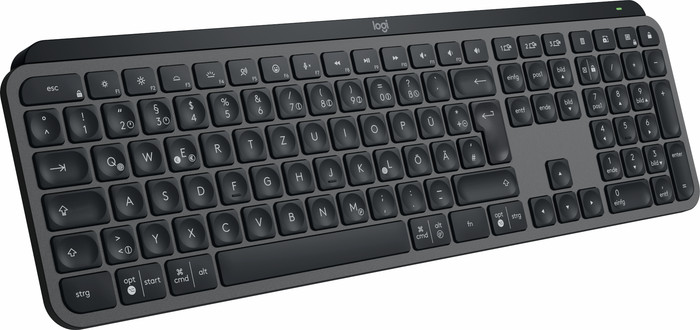
The Logitech MX Keys S Graphite Qwerty is a top-class keyboard where every detail has been thought of. It has a layout for both Windows and macOS and I connect it to up to 3 devices via Bluetooth. This makes it a versatile keyboard. In addition, the smart lighting automatically adjusts to the ambient light. The keyboard is quite large and heavy, so I don't like to take it with me to another workplace. Still, I think this is a good choice for a workplace with different devices.
First impression In the box I find the keyboard, a Logi Bolt receiver, a USB-A to USB-C charging cable and the manual. When unpacking, you immediately notice that the keyboard feels sturdy. I do find it a bit heavy. I therefore do not take the MX Keys S from the office to my home workplace or vice versa. If you want this, Logitech also has a compact version without a numeric block. In any case, it fits perfectly on my desk and I use it with all my devices.
Connect with 3 devices One of the biggest plus points of this keyboard is the bluetooth connection. I slide the on/off button on the top side and open the settings of the MacBook I use for work. Here I connect the MX Keys S directly to my laptop. I repeat these steps with my iPad and my own Windows desktop. With the buttons with the numbers 1, 2 and 3 I quickly switch between these devices. This works very smoothly. When I turn the keyboard back on, it automatically connects to the last selected device. So I will quickly pick up where I left off.
Work on Windows and macOS The MX Keys S has membrane keys with a scissor mechanism. Logitech calls it PerfectStroke keys. Most keys have a concave shape, so my fingertips rest comfortably on the keys. While typing, I notice how quiet the keyboard is. I find that I type quickly and comfortably on the MX Keys S, even for extended periods at a time. This makes it suitable for both work and home. Another plus point is the layout. The keyboard has a Windows and macOS layout. As a result, I always find the right keys on both my MacBook and my Windows computer. With keyboards that don't have this I sometimes press the wrong key. Furthermore, the MX Keys S has smart keyboard lighting. As soon as my hands come close to the keyboard, the backlight turns on automatically. The light also automatically adjusts to the ambient light, so it always has the right brightness. This works very nicely.
Personalize the keys I like to organize my workplace as efficiently as possible, so that I can work productively. Fortunately, I can also do this with the Logi Options+ software. With the new Smart Action function I can personalize my keys and easily create routines. For example, I like to use existing templates, but I also create my own Smart Actions. For example, I always start the day with my own Spotify playlist. With the push of a button, my music starts playing. That's a nice start.
Elaine. IT accessoires specialist.
18 July 2023
Automatically translated from Nederlands
Beautiful and solid product. A bit pricey perhaps for a keyboard, but you do buy quality. Includes bolt USB connector and charging USB-C cable.
Christian
11 March 2024
Automatically translated from Nederlands
Stable and sturdy keyboard with a fast response to the input. Is perfect for everyday use.
Pedro
4 August 2023
Automatically translated from Nederlands
Our digital expert will help you, but it can sometimes make mistakes, like humans do.
According to our keyboard expert
The keyboard has PerfectStroke keys, which were made for your fingertips and make every keystroke feel smooth and responsive
The keyboard backlight adjusts itself automatically to the ambient light, and it lights up when your hands get close.
Just like the MX Master mouses, you can connect the MX Keys to multiple devices at the same time and switch between these devices with the push of a button.
If you want to use the mouse and keyboard optimally, you need external Logitech software.
Work fast, comfortably, and efficiently on the Logitech MX Keys S Graphite. The keys are shaped to your fingertips, so you can type quickly and smoothly. It's also silent, so you can concentrate on you work. The keyboard backlight only turns on when your fingers get close to the keys, just like with its predecessor: the MX Keys. This new model adjusts the brightness of the light to the ambient light. You can also connect the MX Keys S to up to 3 devices via Bluetooth or with the included Logi Bolt receiver. That way, you can work on your Windows laptop, MacBook, and iPad at the same time. Switch devices with the touch of a button. You can get the most out of your MX Keys S with the Logi Options+ software. Set up shortcuts, light settings, and connect it to your Master 3S mouse.
Retail price
€ 119,99€ 91,90
Retail price
€ 119,99€ 91,90
Product number | 930944 | |
|---|---|---|
Manufacturer code | 920-011565 | |
Brand | Logitech | |
Warranty | 2 years | |
Processing of your defect | Via Coolblue |
Keyboard layout | QWERTZ | |
|---|---|---|
Geographic keyboard layout | DE layout | |
Physical keyboard layout | ISO | |
Typing comfort | Mid-range | |
Backlit keyboard | ||
Spill-resistant | ||
Color lighting | White | |
Number of colors lighting | 1 | |
Brightness of backlight adjustable | ||
Programmable keys | ||
Multimedia shortcuts | ||
Flat keys | ||
Suitable for gaming | ||
Mechanical keyboard |
Connection type | Wired, Wireless | |
|---|---|---|
Type of wireless connection | USB and Bluetooth | |
Bluetooth version | 5.1 | |
Nano receiver | ||
Type of USB port | USB-C | |
Cable length | 1 m |
Keyboard size | 100% (Complete) | |
|---|---|---|
Keyboard composition | Keyboard, Numpad | |
Type of ergonomics | Not ergonomic | |
Ergonomic design | ||
Height | 13,16 cm | |
Width | 43 cm | |
Depth | 2 cm | |
Wrist rest | ||
Color | Black | |
Weight | 0,81 kg |
Gaming keyboard suitable for activity type | Console gaming, On the go and LAN parties | |
|---|---|---|
Gaming keyboard suitable for game type | All-round games, MMORPG & MOBA |
Power supply type | Rechargeable battery, USB port PC/laptop |
|---|
Current product

Wired, Wireless
Wireless
Retail price
€ 119,99€ 91,90
Retail price
€ 169,99€ 127,90
Delivered tomorrow
Delivered tomorrow
Coolblue takes care of everything, from taking out an insurance to repairs
For almost all accidents
More coverage in case of damage than your standard warranty
No deductible
First, add your keyboard to your shopping cart. On the next page, choose the Protection Plan below. You always have a 30-day return window and pay no deductible in case of damage.
2-year Protection Plan
€ 7,99
one-time3-year Protection Plan
€ 11,99
one-time