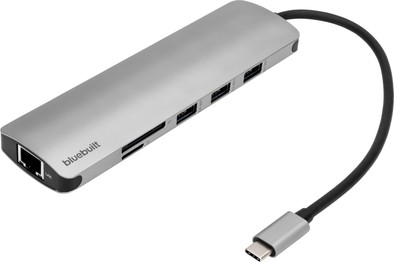
BlueBuilt 9-in-1 Dual HDMI Docking Station with USB-C
Never available again
View alternatives in the sidebar
Insure your dock for laptops
Coolblue takes care of everything, from taking out an insurance to repairs
For almost all accidents
More coverage in case of damage than your standard warranty
No deductible
How do I insure my dock for laptops?
First, add your dock for laptops to your shopping cart. On the next page, choose the Protection Plan below. You always have a 30-day return window and pay no deductible in case of damage.
2-year Protection Plan
€ 7,99
one-time3-year Protection Plan
€ 8,99
one-time

What is BlueBuilt?
BlueBuilt products have the best price-quality ratio because we've put them together ourselves. Based on product data, feedback from customers, and our own product knowledge. In other words, good products. We are so confident, that we'll even give you an extra long warranty. Read everything on BlueBuilt.

Specifications
Product
Product number | 933694 | |
|---|---|---|
Manufacturer code | BBDS9IN1 | |
Brand | BlueBuilt | |
Warranty | 5 years | |
Processing of your defect | Via Coolblue |
Suitable for laptop type
Made for laptop models | Apple MacBook, Chromebook, Microsoft Surface, Windows laptop |
|---|
Ports of docking statio
Laptop docking station suitable for | Connect 1 monitor, Connect 2 monitors and a Chromebook, Connect 2 monitors and a Windows laptop | |
|---|---|---|
Extra functionalities docking station | Charge laptop via own charger, Charge phone via docking station, Connect headphones, Connect wired network | |
Type of main connector | USB-C | |
Supported video technology on Docking Station | MST, SST | |
Number of USB ports | 4 | |
USB function | Charge, Charging an external device, Data transfer, Device connection, Play media, Power source, Record audio | |
Type of USB port | Standard USB-A, USB-C | |
Number of female standard USB-A ports | 3 | |
Female standard USB-A port version | 3.0 | |
Power standard USB-A port | 5 W | |
Number of USB-C ports | 1 | |
Protocol Female USB-C port | USB electricity | |
Power USB-C port | 100 W | |
Fast charging USB-C port | ||
Total available video outputs | 2x HDMI | |
Number of HDMI connectors | 2 | |
Female HDMI Type A port version | 2.0 | |
Number of Ethernet ports | 1 | |
Ethernet speed | Gigabit Ethernet (1000Mbps) | |
Number of headphone jacks | 1 | |
Type of headphone connection | 3.5mm (TRRS) | |
Memory card reader | ||
Memory card | SD | |
Number of connectable monitors | 2 | |
Maximum image resolution 1 monitor | 4K (3840x2160) | |
Maximum refresh rate 1 monitor | 60 Hz | |
Maximum image resolution 2 monitors | 4K (3840x2160) | |
Maximum refresh rate of 2 monitors | 30 Hz |
Physical properties
Color | Gray | |
|---|---|---|
Height | 1,5 cm | |
Width | 4,3 cm | |
Depth | 15 cm | |
Weight | 95 g |