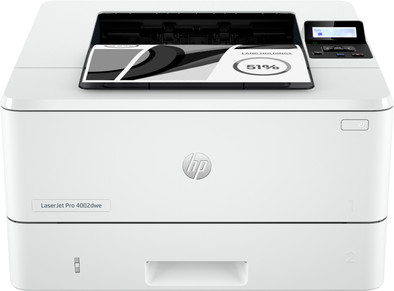
HP LaserJet Pro 4002dw
Never available again
View alternatives in the sidebar
View alternatives in the sidebar
With Coolblue Extended Warranty, you are protected against costs due to quality defects of your printer for the next 4 years. During the entire term, we will reimburse up to the original purchase price. You can easily add the Extended Warranty in your shopping cart.
€ 39,99
one-timeAdd your printer to your shopping cart. In the next step, you can add the Extended Warranty. You can exchange or return your purchase for free within 30 days.
Product number | 936131 | |
|---|---|---|
Manufacturer code | 2Z606F | |
Brand | HP | |
Warranty | 2 years | |
Processing of your defect | Via Coolblue |
Printer size | Medium | |
|---|---|---|
Width | 38,1 cm | |
Depth | 35,7 cm | |
Height | 21,6 cm | |
Color | White | |
Weight | 8,22 kg |
Printer type | Printing only | |
|---|---|---|
Photo printer | ||
Print quality photos | Low | |
Portable (mobile use) | ||
Recommended for use printers | Business printing |
Usage costs for 1 page | 3 eurocents | |
|---|---|---|
Toner cartridge line | HP 149 | |
Print technology | Laser | |
Type of ink | Toner cartridges | |
Number of cartridges/toner cartridges | 1 | |
Color printer | ||
Print speed black (ISO) | 40 ppm | |
First black page ready after | 6 seconds | |
Speed class | Excellent | |
Maximum print resolution height | 1200 dpi | |
Maximum print resolution width | 1200 dpi | |
Maximum print size | A4 | |
Automatic duplex printing | ||
Borderless printing | ||
Maximum print size duplex printing | A4 |
Scan functionality | ||
|---|---|---|
Automatic duplex scanning | ||
Automatic document feeder (ADF) | ||
OCR |
Copying functionality |
|---|
Fax functionality |
|---|
Built-in screen | ||
|---|---|---|
Color screen | ||
Touchscreen |
Compatible with operating system | Android, ChromeOS, Linux, Windows, Windows Phone, iOS, macOS | |
|---|---|---|
Connection type | Wired, Wireless | |
Apple AirPrint | ||
Email print | ||
WPS (Wireless Protected Setup) | ||
Female standard USB-A port version | 2.0 | |
Ethernet port | ||
Number of Ethernet ports | 1 | |
NFC | ||
Built-in WiFi | ||
WiFi frequency printers | 2.4GHz, 5GHz | |
WiFi direct | ||
Bluetooth | ||
USB port |
Location paper input | Front | |
|---|---|---|
Manual input tray | ||
Photo paper drawer | ||
Output capacity output drawer | 150 | |
Maximum print size standard paper tray | A4 | |
Input capacity standard paper tray | 250 | |
Number of standard paper trays | 2 |
Memory card reader |
|---|
anything for a smile
Our digital expert will help you, but it can sometimes make mistakes, like humans do.
According to our printer expert
Print large files quickly: you won’t wait long for large print jobs thanks to the excellent speed class.
Save paper: you automatically print on both sides, so you use less paper.
Print without a router: you can connect your laptop or smartphone directly to the printer thanks to WiFi Direct.
No scanning or copying: you only print documents, because this printer doesn’t scan or copy.
No color printing: you can only print documents in black and white, because this printer isn’t a color printer.
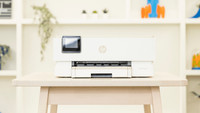
With the HP LaserJet Pro 4002dw I have a fast single function printer that fits on my desk. The printer does not copy or scan.
Installation and toners What immediately struck me is that the printer is compact for an office printer. My desk is 160 centimeters wide and it fits here with ease. I install the printer using software I download from the HP website. This is quite easy because the toner is already installed in the printer. This HP printer has a dynamic security chip. This means you only use original HP toners. It is therefore not possible to use non-original toners for this printer.
To connect I connect via the office WiFi or to the printer's own WiFi network. The printer comes with a USB cable that I can also use for wired printing. This plug-and-play experience makes printing a lot easier. I plug the cable into my printer and laptop, and I immediately print out my documents.
High speed The LaserJet Pro 4002dw is a single function printer, which means it does not copy or scan. He only focuses on printing in black and white. The printer promises to print 40 pages per minute. After the first few rounds of testing, I check the printer's speed. I print a file of 40 single-sided pages in one minute and 6 seconds. If I print double-sided, it takes longer because the printer has to turn the paper. The recommended print volume of this printer is a maximum of 4,000 pages per month. This recommended volume ensures that the printer lasts as long as possible. Because of this, I recommend this printer for small offices. For a larger office where there is a lot of printing, I would choose a model with a higher recommended print volume.
Double-sided printing and space for paper With this printer I automatically print double-sided. This means that the printer automatically turns the paper over and prints on both sides. This allows me to halve my paper consumption. This is of course better for the environment, but also saves money. The printer has 2 paper trays, so I can store a lot of paper at the same time. When one tray runs out of paper, the LaserJet 4002dw automatically picks paper from the other tray.
Kayleigh. Printer specialist.
11 January 2024
Automatically translated from Nederlands
It seems impossible to set up wireless printing. The instructions that come with it are worthless and HP also does not provide sufficient support online. There are no detailed instructions anywhere. I installed a new operating system on my Macbook Air just to be able to download the app and now that I have finally downloaded the app I can't get any further with it.
Birgit
10 July 2024
Automatically translated from Nederlands
I am very pleasantly surprised with this HP printer. The printer was delivered in a sturdy box and was very easy to install, connecting it to WiFi, my laptop and the iPad was a piece of cake. The print speed is great and the quality of the prints is exceptionally good. Very happy with this purchase for my work from home office!
Karin
1 February 2024
Automatically translated from Nederlands