SteelSeries Alias microphone



anything for a smile

USB

5 stars
6
4 stars
3
3 stars
0
2 stars
0
1 star
0
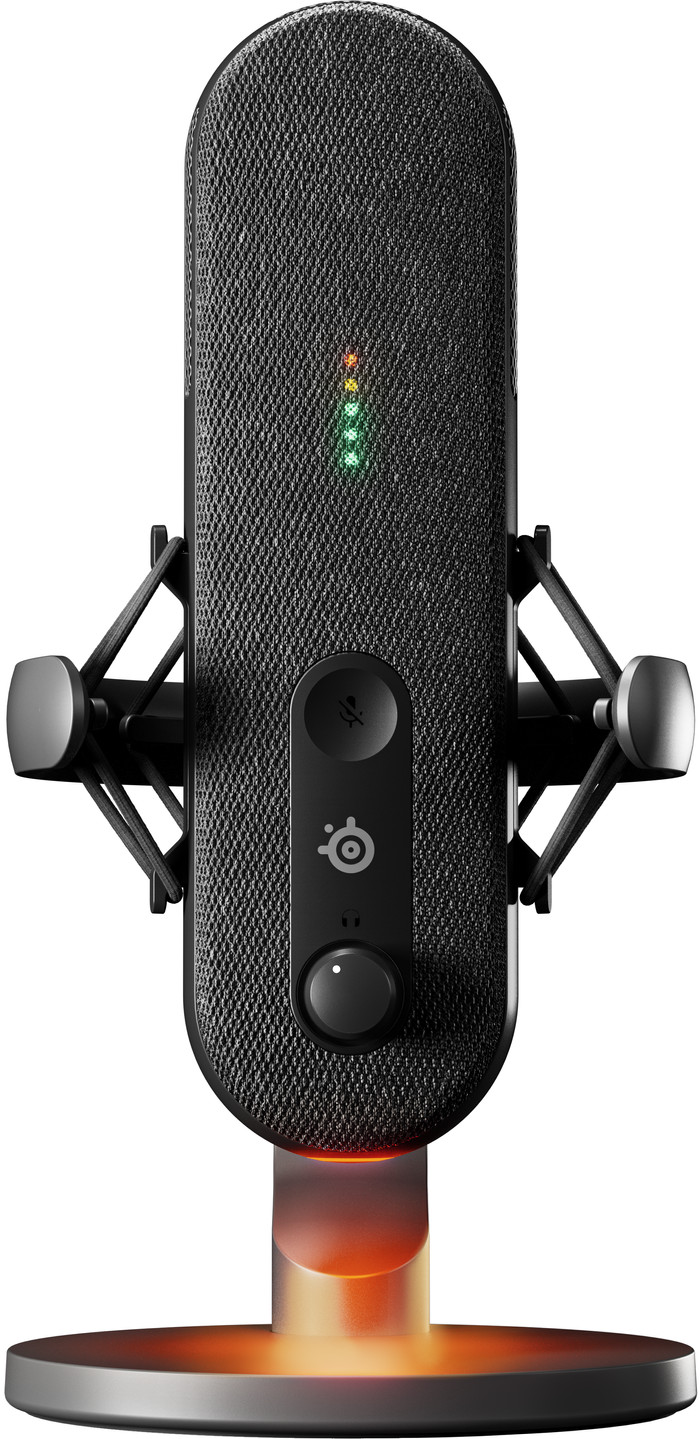
The SteelSeries Alias is a streaming microphone with clear sound. The box contains a microphone, USB cable and a table tripod. I connect the microphone to my laptop or PC via the USB cable.
Design This is a nice streaming microphone with a minimalist design. The microphone has a fabric layer. This makes the microphone look different than most streaming microphones. However, the design is a bit longer in shape, making it less compact than most streaming microphones. The microphone itself has a mute button, a dial for the headset volume and a dial for my microphone volume. The microphone has a general swivel screw that fits any microphone arm or stand. This means I also use the SteelSeries Alias with my current microphone arm.
Recordings This is a cardioid streaming microphone. This means that the microphone records the sound from the front. Because of this, I notice that if I don't talk directly into the microphone, the sound sounds further away. The recording is best when the microphone is directly in front of my mouth. The sound is then very clear and I am clearly audible to my viewers. I use the button on the back to change the volume input of the microphone. This is useful because I don't need separate software to change this.
SteelSeries GG software I set up my audio channels for my stream via the SteelSeries GG software with SteelSeries Sonar. This allows me to easily adjust the different sound channels, such as making the party chat louder or quieter. However, setting up this software does take some time, so keep this in mind when you connect the microphone for the first time. I also have different configurations for each audio channel to choose from. For example, in the game channel I choose between different games, each of which has its own equalizer. This means I don't have to set it all up myself.
Are you looking for a nice streaming microphone with a unique look and clear sound? Then choose the SteelSeries Alias that looks great during your stream.
Prescious. Gaming specialist.
3 November 2023
Automatically translated from Nederlands
I recently had the chance to test the SteelSeries Alias USB Gaming/Stream Microphone and came away impressed. As an avid gamer and streamer, I was looking for a microphone that could capture my voice clearly and accurately. The Alias exceeded my expectations with its large capsule, which is three times larger than that of standard microphones. This ensures that my voice is picked up perfectly from every angle, which is crucial when gaming and streaming. As for sound quality, the Sonar software is a game changer. The user-friendly interface makes it easy to customize my audio experience. The AI noise cancellation helps me convey my voice clearly, even in noisy environments. The physical construction of the microphone is also very good. The sturdiness and sleek design make it a durable choice for my gaming setup. In addition, the vibration damper ensures that the microphone remains stable, even in the heat of the moment. The LED lighting with mute status is a nice extra that helps me keep an eye on noise levels.
MaartenM
26 November 2023
Automatically translated from Nederlands
I had the opportunity to test this microphone last month, and I list my findings and experiences below:
Ease of use / ease of connection: The Steel Series Alias microphone is very easy to connect to a PC. It requires 1 USB-C cable from the PC to the microphone and then it already works. The buttons on the microphone ensure that the microphone is easy to handle and you do not need any separate software. need to work with it. It is very nice to be able to mute and unmute the microphone with the touch sensitive button with one light press. If the microphone is muted, you will notice this by a red cross that appears in the microphone housing. This means that you don't think you are talking to friends, but that you are still muted without realizing it (this happens regularly to my friends with other microphones)
Sound quality: The microphone sounds very good. I did some tests with my headset microphone and the alias and let me put it this way, the difference is enormous. Where my headset microphone sounds like that of a pilot in a busy cabin, the alias sounds like I'm in a studio. However, the alias is very sensitive, so the tapping of my keyboard is picked up while gaming. Fortunately, Discord has good built-in filtering so others are not bothered by it.
Design / strength The design of the alias is compact and very sturdy, the stand to which the microphone is attached is easily adjustable and is very stable on the desk.
Software (Sonar) I hardly used the Sonar software in which the steel series alias can be fully configured during my testing. It is a very extensive free program, but the steel series already sounds fantastic with the standard settings it is a nice microphone for the people who want to take their sound to another level
Remco Scholten
26 November 2023
Automatically translated from Nederlands
Application microphone | Gaming, Podcasts, Streaming | |
|---|---|---|
Directional characteristic | Cardioid | |
Microphone recording type | Unidirectional | |
Type of microphone connection | USB |
According to our studio microphone expert
Thanks to the directional characteristic, you won't be bothered by ambient noise in your recordings.
You connect the device to your laptop or computer via the USB output, so there's no need for a sound card.
With the included table stand, you can place the microphone on your desk and point it towards your mouth.
This microphone doesn't come with a pop filter.
Retail price
€ 229,99€ 176,90
Retail price
€ 229,99€ 176,90
Product number | 937454 | |
|---|---|---|
Manufacturer code | 61601 | |
Brand | SteelSeries | |
Warranty | 2 years | |
Processing of your defect | Via Coolblue |
Bit rate | 24 Mbit/s | |
|---|---|---|
Sample frequencies | 48 kHZ | |
Frequency response range | 50 - 20000 Hz |
Transducer | Condenser | |
|---|---|---|
Directional characteristic | Cardioid | |
Number of recording modes | 1 | |
Microphone recording type | Unidirectional | |
Application microphone | Gaming, Podcasts, Streaming | |
Wireless microphone system |
Mute button | ||
|---|---|---|
Adjustable high pass filter |
Size thread adapter microphone clip | 3/8 inches | |
|---|---|---|
Tripod included | ||
Type of tripod | Table stand |
Type of microphone connection | USB | |
|---|---|---|
Headphone jack | ||
Type of headphone connection | 3.5mm (TRS) |
Height | 23 cm | |
|---|---|---|
Width | 11 cm | |
Depth | 13 cm | |
Weight | 0,93 kg | |
Material | Fabric, Metal, Plastic |
Current product

Gaming, Podcasts, Streaming
Gaming, Meetings, Podcasts, Presenting, Stage vocals, Streaming, Studio
Gaming, Meetings, Podcasts, Presenting, Streaming, Studio
Gaming, Meetings, Podcasts, Presenting, Streaming
Gaming, Meetings, Podcasts, Presenting, Streaming, Studio
Unidirectional
Mono
Mono
Mono
Mono
USB
USB, XLR
3.5mm jack, USB, XLR
USB
3.5mm jack, USB, XLR
Cardioid
Cardioid
Cardioid
Cardioid
Cardioid
Retail price
€ 229,99€ 176,90
Retail price
€ 229,99€ 165,90
Retail price
€ 269,-€ 193,90
Retail price
€ 209,-€ 170,90
Retail price
€ 269,-€ 184,99
Delivered on Friday
With Coolblue Extended Warranty, you are protected against costs due to quality defects of your studio microphone for the next 4 years. During the entire term, we will reimburse up to the original purchase price. You can easily add the Extended Warranty in your shopping cart.

€ 9,99
one-timeAdd your studio microphone to your shopping cart. In the next step, you can add the Extended Warranty. You can exchange or return your purchase for free within 30 days.
Delivered on Friday


