HP 690 Rechargeable Wireless Mouse
Never available again
View alternatives in the sidebar
View alternatives in the sidebar
If you purchase of a laptop or desktop, you receive 1 year of Norton 360 Deluxe for free. One day after purchase, you'll receive an email with a personal voucher code. Go to the promotional Terms and Conditions for more information.

Product number | 946007 | |
|---|---|---|
Manufacturer code | 7M1D4AA#ABB | |
Brand | HP | |
Warranty | 2 years | |
Processing of your defect | Via Coolblue |
Mouse model | Standard | |
|---|---|---|
Input | Optical | |
Number of buttons | 7 | |
Ergonomic design | ||
Type of ergonomics | Not ergonomic | |
Left or right-handed | Left-handed, Right-handed | |
Maximum dots per inch (DPI) | 4000 dpi | |
Adjustable DPI | ||
Mouse controls | Buttons, Scroll wheel | |
Suitable for gaming | ||
Scroll fast | ||
Rechargeable | ||
Programmable buttons | ||
Number of programmable buttons | 6 | |
Lighting peripherals | ||
Silent mouse | ||
Horizontal scrolling | ||
Mouse surface | Matte surface | |
Product family | 600 |
Connection type | Wireless | |
|---|---|---|
Type of wireless connection | Bluetooth | |
Bluetooth version | 5.1 | |
Nano receiver | ||
Number of devices that can be paired | 1 - 3 | |
Type of USB port | USB-C |
Plug and Play | ||
|---|---|---|
Compatible with operating system | ChromeOS, Windows, macOS |
Power supply type | Rechargeable battery | |
|---|---|---|
Battery level indicator | ||
Replaceable battery | ||
Battery included |
Color | Black | |
|---|---|---|
Mouse size | Small | |
Width | 10,86 cm | |
Height | 3,83 cm | |
Depth | 6,11 cm | |
Material | Plastic | |
Finish | Matte and glossy | |
Weight | 88,7 g |
anything for a smile
Our digital expert will help you, but it can sometimes make mistakes, like humans do.
According to our mouse expert
You can charge this mouse with USB-C as well as QI or a wireless charger, so you need less chargers.
You can connect the mouse via Bluetooth and use the mouse with up to 3 devices at the same time.
With the tiltable scroll wheel, you can scroll both vertically and horizontally.
The optical sensor works less smoothly on smooth surfaces, so you need a mouse pad.
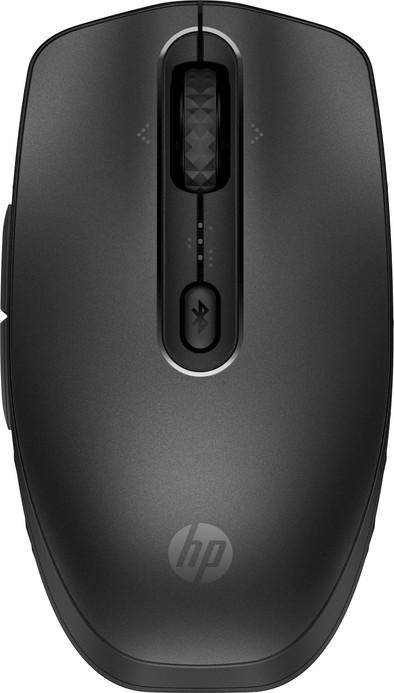
You can use the HP 690 Rechargeable Wireless Mouse at every work place and you can charge it easily. You can charge it with the included USB-C cable as well as via a wireless or QI charger. So you need less chargers. You can connects this mouse to up to 3 devices via Bluetooth. For example, use it at the office, your home office, and your private computer. The HP 690 has a tiltable scroll wheel, so you can scroll vertically and horizontally. You can also set the programmable buttons yourself via the HP Accessory Center app. So you can work even more productively with this mouse.
5 stars
6
4 stars
6
3 stars
1
2 stars
0
1 star
0
Connection options
Ergonomics
Accuracy
Size
Design
The HP 690 Rechargeable Wireless Mouse is a nice Bluetooth mouse for everyday use. I quickly connect it to up to 3 devices and charge it wirelessly via Qi. The buttons are silent, so no one is bothered by clicking noises. This only applies to the standard mouse buttons, because the thumb buttons are unfortunately not silent.
First impression When I take the mouse out of the packaging, I immediately notice that both the mouse and the charging cable are in a fabric bag. This is not only more durable, but also provides extra protection when I take them with me in my bag. The box also contains a quick start guide and other papers. Nice and simple, I like that. This way I can get started quickly.
Connect wirelessly to 3 devices I see it more and more and it is also possible with the HP 690: connect the mouse to multiple devices. I find this very useful, because I only need one mouse for my work laptop and desktop at home, for example. Ultimately, I become a bit attached to the mouse that I use every day. I find it extra convenient that the 690 only connects via Bluetooth. This way I don't forget to remove a USB receiver from a device. I can easily switch between my devices using the button behind the scroll wheel.
Fast charging via Qi or USB C Fortunately, the battery of this mouse lasts a long time. However, I am not very good at charging my mouse, so I sometimes end up with an empty battery while working. A big advantage of this mouse is that I charge it via USB-C or even wirelessly via Qi. Both charging options work quickly, so I can quickly get back to work.
Easy navigation with the thumb buttons With the 2 thumb buttons of this mouse I can navigate between pages very quickly. Clicking to the previous page is smooth, so it doesn't matter if I accidentally click wrong. Unfortunately, these buttons are not as quiet as the standard buttons, but the sound is not disturbing either. It is something to take into account if you are looking for a mouse where all buttons are silent. Still, I enjoy clicking through my working day with this wireless HP 690 mouse.
Elaine. Muizen specialist.
16 May 2024
Automatically translated from Nederlands
Connecting it is a bit of a hassle, but then it is a nice mouse. The biggest advantage is that the mouse connects to your laptop with Bluetooth, so you don't need any strange protruding USB converters. Or a cable that, like the one from my previous mouse that was chewed by the cat (how appropriate). What does make connecting a hassle: you have to install the software, connect and then you can also choose how to set the buttons on the side of the mouse. For example, to always start your mail, to go to the end of the document/spreadsheet/text line. Doing that requires some concentration, but in the end it is perfectly doable without in-depth programming knowledge. In use it is a very light mouse. Not too big so that all the buttons can be used and not too small so that my hand fits around it, but doesn't crush it completely. It also makes almost no noise when you click on the keys. Switching it on and off (which is sensible because you would otherwise have to charge it so often) is easy. So far (use: intensively for a week) it has not been necessary to charge it.
Rsch
19 November 2024
Automatically translated from Nederlands
The 690 Rechargeable Wireless Mouse is an excellent choice for both professionals and casual users looking for a reliable and stylish mouse. This mouse stands out for its ergonomic design, which ensures a comfortable grip, even after hours of use. The wireless connectivity is reliable and smooth, without any delays or dropouts. An often mentioned point of criticism with the 690 Rechargeable Wireless Mouse is the battery life. Although the mouse is wireless and rechargeable, the battery does not last as long as hoped. All in all, the 690 Rechargeable Wireless Mouse is an excellent investment for those looking for a functional, durable and stylish mouse. The combination of comfort, technology and ease of use makes this mouse a must-have for every computer user.
Nadine
21 November 2024
Automatically translated from Nederlands