anything for a smile
Wireless, with magnetic wrist rest
In this version

5 stars
7
4 stars
8
3 stars
1
2 stars
2
1 star
1
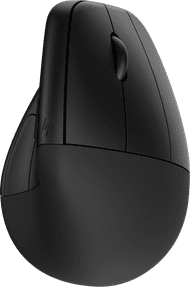
The HP 920 Ergonomic Wireless Mouse with Magnetic Wrist Rest is a vertical ergonomic mouse that also includes a magnetic wrist rest. The handy thumb buttons allow me to navigate through pages even faster. Thanks to the ergonomic shape, I can scroll, navigate and click all day long without irritation on my hand or wrist. I do think it is a shame that the buttons are not silent.
Removable magnetic wrist rest One of the most important and, in my opinion, most special features of this mouse is the removable palm rest. Thanks to the magnets in the mouse and wrist rest, I can quickly and easily click it onto the mouse. I immediately notice that this increases my pulse slightly. This makes the mouse fit even more comfortably in my hand and my wrist is supported in every position. Because the wrist rest is easily removable, I can easily take the mouse with me in my bag. Furthermore, the mouse has a vertical design, which I find takes some getting used to. I immediately noticed that the vertical model fits very comfortably in the hand. At the end of the working day I have no pain in my hand or wrist, which is a sign that this form is working well.
Connect wirelessly to 3 devices I like to use my mouse on multiple devices, such as my desktop at home and my work laptop. Fortunately, this is also possible with the HP 920. There is a USB A receiver hidden in the mouse, so I always store it properly. This connects the mouse to my desktop. Then I still have 2 Bluetooth channels available for other devices. So I also connect the mouse to my work laptop via Bluetooth. Both connection options work smoothly and cause no delays.
Navigate quickly with the thumb buttons The mouse has 2 buttons on the left that I use to quickly navigate between pages. Sometimes I click wrong, but with these buttons I quickly get back to where I was. There is also a button right under my thumb. This takes me straight from my browser to the desktop, where I have my Google Chat open while I work. This saves swiping on the touchpad of my laptop and is surprisingly convenient. Normally I use a mouse with silent buttons, but this HP doesn't have that. I think that's a shame, because a silent mouse is just a little more pleasant for the office. Fortunately, the buttons are not very loud, so I still enjoy using it at work. I think the HP 920 is an ideal ergonomic mouse for every usage situation.
Elaine. Muizen specialist.
16 May 2024
Automatically translated from Nederlands
My husband was allowed to test this mouse and this was good for his mouse arm. In the beginning it was very hard to get used to and he even had a bit more trouble. Now that he is used to it he is very happy with it and it helps him.
Caroline
19 December 2024
Automatically translated from Nederlands
No more forearm pain with this mouse.
Sander
13 August 2026
Automatically translated from Nederlands
Our digital expert will help you, but it can sometimes make mistakes, like humans do.
According to our mouse expert
Work comfortably: the ergonomic design keeps your arm, hand, and wrist in a natural position.
More freedom of movement: because the mouse is wireless, you can use it anywhere.
Keep a USB port free: thanks to Bluetooth, you can connect the mouse to your computer without a USB dongle.
No quiet buttons: this means you'll hear more clicking sounds while you work.
No fast scroll wheel: scrolling through large spreadsheets and long pages takes more time.
Product number | 946008 | |
|---|---|---|
Manufacturer code | 6H1A4AA#ABB | |
Brand | HP | |
Warranty | 2 years | |
Processing of your defect | Via Coolblue |
Mouse model | Vertical | |
|---|---|---|
Input | Laser | |
Number of buttons | 6 | |
Ergonomic design | ||
Type of ergonomics | Vertical | |
Left or right-handed | Right-handed | |
Maximum dots per inch (DPI) | 4000 dpi | |
Adjustable DPI | ||
Mouse controls | Buttons, Scroll wheel | |
Suitable for gaming | ||
Scroll fast | ||
Rechargeable | ||
Programmable buttons | ||
Number of programmable buttons | 5 | |
Lighting peripherals | ||
Silent mouse | ||
Horizontal scrolling | ||
Mouse surface | Matte surface | |
Product family | 900 |
Connection type | Wireless | |
|---|---|---|
Type of wireless connection | USB and Bluetooth | |
Bluetooth version | 5.3 | |
Nano receiver | ||
Number of devices that can be paired | 3 | |
Type of USB port | USB-C |
Plug and Play | ||
|---|---|---|
Compatible with operating system | ChromeOS, Windows, iPadOS, macOS |
Power supply type | Rechargeable battery | |
|---|---|---|
Battery level indicator | ||
Replaceable battery | ||
Battery included |
Color | Black | |
|---|---|---|
Mouse size | Small | |
Width | 7,6 cm | |
Height | 7,7 cm | |
Depth | 11,2 cm | |
Material | Plastic | |
Finish | Matte | |
Weight | 167 g |
Coolblue takes care of everything, from taking out an insurance to repairs
For almost all accidents
More coverage in case of damage than your standard warranty
No deductible
First, add your mouse to your shopping cart. On the next page, choose the Protection Plan below. You always have a 30-day return window and pay no deductible in case of damage.
2-year Protection Plan
€ 7,99
one-time3-year Protection Plan
€ 8,99
one-time
Retail price
€ 99,99€ 66,95
Retail price
€ 99,99€ 66,95
Current product
Wireless
Wireless
Wireless
Wireless
Wireless
Black
Black
Black
Black
Pink
Retail price
€ 99,99€ 66,95
Retail price
€ 99,99€ 68,90
Retail price
€ 69,99€ 59,90
Retail price
€ 69,99€ 58,95
Retail price
€ 69,99€ 58,95
Delivered tomorrow
Delivered tomorrow