Lenovo Digital Pen 2
- Be the first to know when this product is in stock

Product number | 952422 | |
|---|---|---|
Manufacturer code | GX81J19850 | |
Brand | Lenovo | |
Warranty | 2 years | |
Processing of your defect | Via Coolblue |
Material | Plastic, Wood | |
|---|---|---|
Color | Gray |
Number of styli | 1 | |
|---|---|---|
Pen functionality | ||
Made for brand | Lenovo | |
Compatible with product type | Laptop |
anything for a smile
According to our stylus expert
You can work on your creative projects even more precisely with a stylus.
Thanks to the pressure-sensitive tip, you can draw both thick and thin lines.
You can charge the stylus wirelessly via the back of your tablet.
You can only use the Lenovo Digital Pen 2 on Lenovo laptops with at least Windows 10.
You need an AAAA battery, which isn't included.
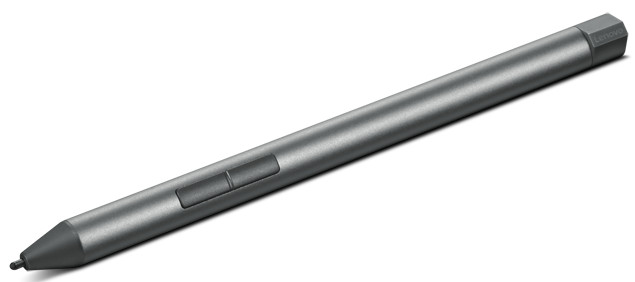
With the Lenovo Digital Pen 2, you can make sketches and note, and edit photos in detail. Thanks to the special tip, it feels just like writing on paper. This way, you can sign a document naturally. The Digital Pen 2 has 2 useful side buttons. You can turn the stylus into an eraser with the lower button, so you can correct mistakes right away. The upper button works the same as a right mouse click. That's useful when you want to select something. You can connect the stylus easily via Bluetooth with your Lenovo laptop. When the pan is empty, you can twist off the end pen and replace the battery for a new one.
5 stars
0
4 stars
1
3 stars
0
2 stars
0
1 star
0
Returned because of the battery
Me
17 May 2025
Automatically translated from Nederlands
