ASUS ZenWiFi BT10 1-pack
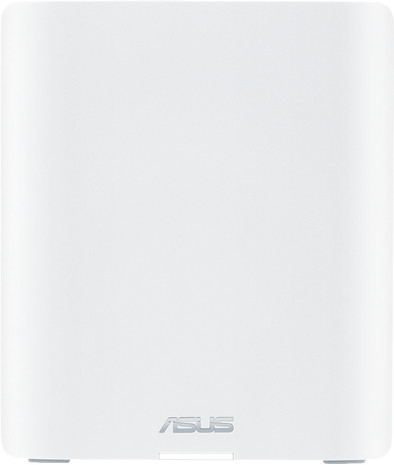
Never available again
View alternatives in the sidebar
View alternatives in the sidebar
With Coolblue Extended Warranty, you are protected against costs due to quality defects of your expansion for routers for the next 4 years. During the entire term, we will reimburse up to the original purchase price. You can easily add the Extended Warranty in your shopping cart.
€ 19,99
one-timeAdd your expansion for routers to your shopping cart. In the next step, you can add the Extended Warranty. You can exchange or return your purchase for free within 30 days.
Product number | 955548 | |
|---|---|---|
Manufacturer code | 90IG08Y0-MO3C60 | |
Brand | ASUS | |
Warranty | 3 years | |
Processing of your defect | Via Coolblue |
Can be expanded with extra stations | ||
|---|---|---|
Maximum number of stations | 9 | |
WiFi standards | Wireless A (WiFi 2), Wireless AC (WiFi 5), Wireless AX (WiFi 6), Wireless AX (WiFi 6E), Wireless AXE (WiFi 6E), Wireless B (WiFi 1), Wireless BE (WiFi 7), Wireless G (WiFi 3), Wireless N (WiFi 4) | |
Suitable for outdoors |
Fastest WiFi standard | Wireless BE (WiFi 7) | |
|---|---|---|
Built-in WiFi | ||
Frequency bands | Tri-band | |
2.4GHz band speed | 688 Mbit/s | |
5GHz band speed | 5764 Mbit/s | |
Speed of 6Ghz band | 11529 Mbit/s | |
WiFi on/off switch | ||
Signal transmission | Omnidirectional | |
Number of WiFi antennas | 9 |
Maximum ethernet speed | 10000 Mbit/s | |
|---|---|---|
Wired Ethernet backhaul | ||
Ethernet speed | 10Gb Ethernet (10,000Mbps) | |
Network connector | ||
Number of Ethernet ports | 3 | |
PoE support | ||
USB port | ||
Type of USB port | Standard USB-A | |
Number of USB ports | 1 |
Mobile data connection | No | |
|---|---|---|
SIM card slot |
Quality of Service (QoS) | ||
|---|---|---|
MIMO | ||
MU-MIMMO | ||
UPnP AV support | ||
Seamless roaming | ||
Beamforming | ||
Port forwarding | ||
LACP Link aggregation |
Parental controls | ||
|---|---|---|
WLAN security | 802.1X, WEP, WPA, WPA-PSK, WPA2, WPA2-PSK, WPA3, WPA3 Personal | |
Firewall | ||
Firewall type | DoS, NAT Firewall, SPI Firewall | |
Guest network | ||
VPN support | ||
VPN server | ||
VPN client | ||
VPN passthrough |
Mounting possible | ||
|---|---|---|
Height | 15,8 cm | |
Depth | 7,18 cm | |
Width | 18,6 cm | |
Weight | 0,85 kg | |
Color | White | |
Material | Plastic |
Power supply type | Power grid |
|---|
anything for a smile
Frequency bands | Tri-band | |
|---|---|---|
WiFi standards | Wireless A (WiFi 2), Wireless AC (WiFi 5), Wireless AX (WiFi 6), Wireless AX (WiFi 6E), Wireless AXE (WiFi 6E), Wireless B (WiFi 1), Wireless BE (WiFi 7), Wireless G (WiFi 3), Wireless N (WiFi 4) | |
Ethernet speed | 10Gb Ethernet (10,000Mbps) | |
Number of Ethernet ports | 3 | |
Suitable for outdoors |
According to our expansion for routers expert
This system supports WiFi 7, so you can reach much higher speeds and are less bothered by interference from the neighbors.
The router has 10Gbps network connectors, so you can even use it with the fastest internet connections.
You can expand this WiFi mesh system with extra points to get even better coverage in your house.
You can only use the router as an expansion and not as a standalone.
You need compatible devices to take advantage of all the improvements of WiFi 7, but the WiFi points always establish an improved connection with each other.
Thanks to this mesh system, my devices always connect to the strongest Wi-Fi signal. Wired devices also have super-fast internet, but only one Ethernet cable is included, so I have to provide extra cables myself.
Quick and easy installation I first download the Asus app on my phone. It guides me through the installation process step by step. I connect the main router to my modem with the included Ethernet cable. I place the additional station upstairs and connect it wirelessly to the main router. This way, I don't have to run any cables. You can also install it wired, but you'll need to buy an extra Ethernet cable for that. Only one is included with this mesh system. The app gives me tips on where to place the routers for the most stable signal. Finally, I create a new Wi-Fi network.
Fast internet on wired and wireless devices The router has Wi-Fi 7 and distributes the signal across three frequency bands. This allows me to connect multiple devices online without them interfering with each other on the network. For example, I can watch a series on my phone while downloading a game on my laptop, without any Wi-Fi glitches. My devices automatically connect to the station with the strongest signal. This way, my internet never drops when I walk around the house with my phone. The wired internet is also very fast thanks to the 10 GB ports. I do need my own Ethernet cable for this as well. The signal from the stations reaches very far and even penetrates floors and walls. For example, I don't have a station in the attic, but my phone still gets a stable signal with at least 3 bars there.
Extra safe internet for children The app shows me exactly which devices are connected to the network. There are also parental control settings. This allows me to set time schedules for each device. For example, the internet on my laptop is only enabled in the afternoon and disconnected late at night. I can even create a separate SSID network for children or guests to connect to. This way, I don't have to configure each device individually.
Isa
24 November 2025
Automatically translated from Nederlands
The product was installed quickly, but there are a lot of setting options, so you do need to have some technical knowledge. What I particularly like is that I can set online and offline times per device.
Remco
20 October 2026
Automatically translated from Nederlands
The device is paired with the ASUS ZenWiFi BT10 (3PK). The reason for purchasing it was that I turned off Wi-Fi on my phone because 5G was faster. This set is expensive to buy, but definitely worth it. The reason for choosing the outdoor antenna is that my house is too well insulated and therefore I couldn't get Wi-Fi in the garden. I am very happy with this system; the mesh works perfectly and switches seamlessly between the nearest Wi-Fi point. The app is well-organized and anticipates, for example, an IoT network, allowing you to create a separate network. It is ideal for smart devices that do not need access to your home network but do use the internet.
Robert Rademaker
29 July 2026
Automatically translated from Nederlands
