Written by Giovanni
Edited on
12 July 2024
·
15:23
Solve sound issues with your Astro headset microphone
Does not the microphone of your Astro gaming headset work? Or does the microphone rustle? Annoying, but this can be solved in most cases. In this article I help you to solve the problem, so you can chat game undisturbed.
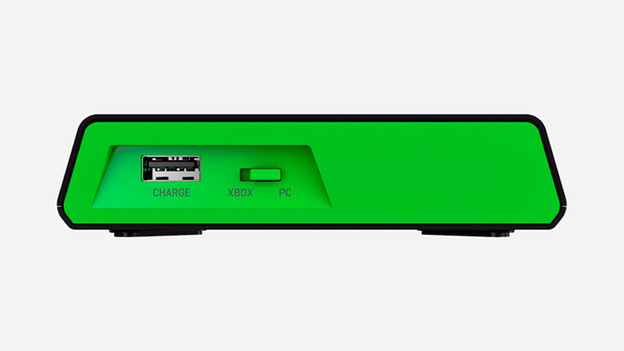
Step 1. Checklist
Use the checklist below to check that all applications are correct.
- Is the base station set to the correct mode?
- For PS4: Switch mode to PS4 or Console.
- For Xbox: Switch mode to Xbox or Console.
- For PC / Mac: Switch mode to PC.
- Is the volume of the gaming headset microphone turned up? If not, open it.
- Are the sound settings of the microphone correct on the PS4, Xbox or PC / Mac?

Step 2. Check firmware
You have set the base station and the volume of the microphone correctly, but the gaming headset still does not work? Then the problem is probably with the software. It may be that the firmware of the gaming headset is no longer up-to-date, it needs to be updated. If the firmware is up-to-date, it can also be found in the software audio settings. You adjust this via the Astro Gaming software.
Article by Giovanni
Gaming Expert.

