
Written by Maurits
Edited on
25 August 2026
·
09:04
Get started with your Samsung earbuds
Samsung has released different wireless earbuds that work together seamlessly with the Galaxy smartphones. In this article, you can read how you can use your Samsung earbuds as well as possible. You'll know how to put your earbuds in your ears correctly and how to easily connect them to your phone, for example.

Get started with your Samsung earbuds
With these 4 tips, you'll know how to use your Samsung earbuds as well as possible.
Tip 1: connect to your phone
Tip 2: put in your earbuds
Tip 3: make sure you have a good connection
Tip 4: download the app

Tip 1: connect to your phone
You can connect your Galaxy Buds wirelessly to your smartphone or tablet via Bluetooth. Do you have a Samsung phone? Holt the case with earbuds close to your phone and open the case. The earbuds quickly connect. In the article below, we'll explain step by step how to connect the earbuds with your Android or iOS device.
Tip 2: put in your earbuds
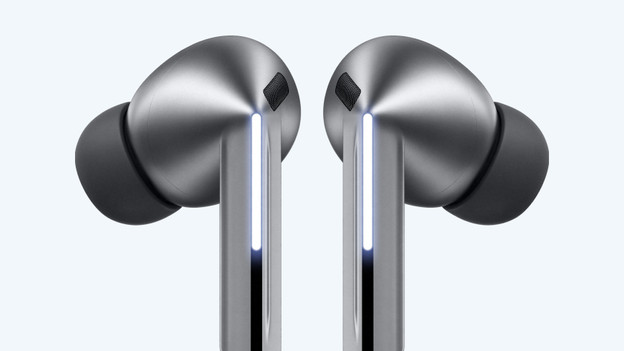
The Galaxy Buds3 Pro and Buds FE are in-ear earbuds. They go directly into your ear canal. In-ear earbuds block off the outside world better than earbuds that don't go into your ear canal. Samsung includes multiple earbud tip sizes. This way, you can always find an earbud size that fits your ears. The Buds3 are earbuds that go into your ear cup, but partly leave your ear canal free. This allows you to hear more of your environment.

Tip 3: make sure you have a good connection
You can connect the Samsung earbuds to your Samsung phone in no time, but it's also important that they're connected properly. If the connection isn't good, you can try the following:
- Turn off any Bluetooth devices near you.
- Don't stand too close to appliances like fridges and microwaves, because they can interfere with the Bluetooth signal.
- Hold your smartphone in your hand or in your front pocket, don't put it in your bag or back pocket.
- Turn the earbuds off and on again.
If this doesn't help, reset the earbuds. You can do this in the Galaxy Wearable app.
Tip 4: download the app
You can adjust the sound settings with the Samsung Wearables app. Set treble, mids, and bass, for example. You can also set the noise canceling to your liking. With the Samsung Galaxy Buds3 Pro and Buds3, you can also set up Galaxy AI in the Wearables app.

