
Written by Megan
Edited on
2 April 2024
·
07:28
Which Samsung tablet do you have?
Samsung tablets are very similar, both in terms of looks and name. Check the model number of you Samsung tablet to be sure which tablet you have. That way, you make sure you buy the correct cover. You can find the model number on the back of your tablet and in the menu.
Get started with finding the model number
You can find the model number in the settings, and at the back of some tablets.
1: via the settings 2: via the casing

Tip 1: look up the model number via the settings
1: swipe up on your home screen for all apps. Choose 'Settings'. 2: scroll all the way down and choose 'About tablet'. 3: in 'Device name', you can find which model you have. Under 'Model number', you can find the number, which starts with 'SM-'. Compare this number to the numbers at the bottom of this article.
Go to settings.
Scroll down.
Select 'Info tablet'.
Find the model number in the tablet.


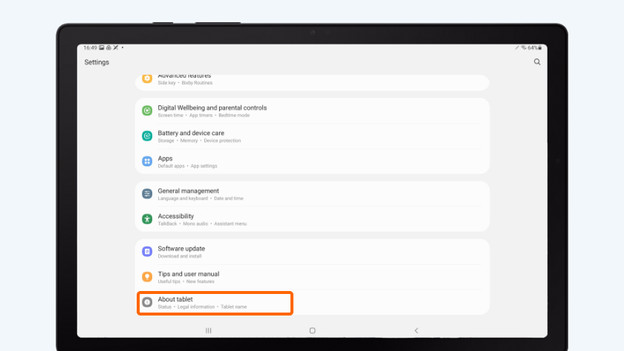


Tip 2: look for the model number on the casing
Some older Samsung tablets have the model number on the back in small numbers. You can often find it at the bottom, close to the charging port. The model number consists of 6 characters, and it starts with 'SM-'.
All Samsung tablet model numbers
| Type of Samsung tablet | Serial number |
|---|---|
| Samsung Galaxy Tab 4 7.0 | SM-T230, SM-T235, SM-T230NU |
| Samsung Galaxy Tab A 7.0 (2016) | SM-T280, SM-T285 |
| Samsung Galaxy Tab A 8.0 (2018) | SM-T387, SMT387W, SM-T387V |
| Samsung Galaxy Tab A 8.0 (2019) | SM-T290, SM-T295 |
| Samsung Galaxy Tab 10.5 | SM-T590, SM-T595 |
| Samsung Galaxy Tab 10.1 (2018/2016) | SM-T580, SM-T585, SM-P580, SM-P585, SM-P585Y |
| Samsung Galaxy Tab 10.1 (2019) | SM-T515, SM-T510 |
| Samsung Galaxy Tab A7 (2020) | SM-T500, SM-T505 |
| Samsung Galaxy Tab A7 Lite (2021) | SM-T225, SM-T220 |
| Samsung Galaxy Tab A8 (2021) | SM-X200, SM-X205 |
| Samsung Galaxy Tab S8 | SM-X700, SM-X706 |
| Samsung Galaxy Tab S8 Plus | SM-X800, SM-X806 |
| Samsung Galaxy Tab S8 Ultra | SM-X900, SM-X906 |
| Samsung Galaxy Tab S7 | SM-T870, SM-T875, SM-T876B |
| Samsung Galaxy Tab S7 Plus | SM-T970, SM-T976B |
| Samsung Galaxy Tab S7 FE | SM-T730, SM-T733, SM-T736B |
| Samsung Galaxy Tab S6 | SM-T860, SM-T865 |
| Samsung Galaxy Tab S6 Lite | SM-P615, SM-P610, SM-P613, SM-P619 |
| Samsung Galaxy Tab S5e | SM-T725, SM-T720 |
| Samsung Galaxy Tab S4 | SM-T830, SM-T835 |
| Samsung Galaxy Tab S3 | SM-T820, SM-T825 |
| Samsung Galaxy Tab S2 | SM-T715, SM-T710, SM-T719, SM-T713 |
| Samsung Galaxy Tab Active Pro | SM-T540, SM-T547 |
| Samsung Galaxy Tab Active 2 | SM-T395 |
| Samsung Galaxy Tab Active3 | SM-T575 |
| Samsung Galaxy Tab S9 | SM-X710NZAAEUB, SM-X710NZEAEUB, SM-X710NZAEEUB, SM-X710NZEEEUB, SM-X716BZAAEUB, SM-X716BZAEEUB |
| Samsung Galaxy Tab S9 Plus | SM-X816BZAAEUB, SM-X816BZAEEUB, SM-X810NZAAEUB, SM-X810NZEAEUB, SM-X810NZAEEUB, SM-X810NZEEEUB |
| Samsung Galaxy Tab S9 Ultra | SM-X916BZAAEUB, SM-X916BZAEEUB, SM-X910NZAAEUB, SM-X910NZEAEUB, SM-X910NZ, SM-X910NZEEEUBAEEUB |
| Samsung Galaxy Tab S9 FE | SM-X510NZAAEUB, SM-X510NZSAEUB, SM-X510NLGAEUB, SM-X510NLIAEUB, SM-X510NZAEEUB, SM-X510NZSEEUB, SM-X516BZAAEUB, SM-X516BZAEEUB, SM-X510NLGEEUB |
| Samsung Galaxy Tab S9 FE Plus | SM-X610NZAAEUB, SM-X610NZSAEUB, SM-X610NZAEEUB, SM-X616BZAAEUB, SM-X616BZAEEUB, SM-X610NLGAEUB, SM-X610NLGEEUB, SM-X610NLIAEUB, SM-X610NZSEEUB |
| Samsung Galaxy Tab A9 | SM-X110NZAAEUB, SM-X110NZSAEUB, SM-X110NDBAEUB, SM-X110NZAEEUB, SM-X110NZSEEUB, SM-X110NDBEEUB, SM-X115NZAAEUB, SM-X115NZAEEUB |
| Samsung Galaxy Tab A9 Plus | SM-X210NZAAEUB, SM-X210NZSAEUB, SM-X210NDBAEUB, SM-X210NZAEEUB, SM-X210NZSEEUB, SM-X210NDBEEUB, SM-X216BZAAEUB, SM-X216BZAEEUB |

