Written by Ruben
Edited on
13 October 2025
·
14:58
How do you place the water filter in your Siemens EQ9?
If you place a water filter in your Siemens EQ9, you make sure the limescale is filtered from your water. This way, the piped don't get blocked as often, so you don't have to descale your appliance as much. In this article, you can see how to place the water filter step by step.
Get started with the water filter
In this video, we'll give a step-by-step explanation on how to place the water filter in your Siemens EQ9. We'll go through these steps:
1: prepare the water filter 2: install the water filter
Requirements:
- Siemens water filter
- 1L container
How often should you replace the water filter?
You replace your water filter every 2 months, or when you coffee machine notifies you. That always depends on the hardness of your tap water, and how many cups of coffee you drink per day.


Step 1: prepare the water filter
- Take the water filter and set the hardness with the ring, where A is soft and C is hard
- Rinse the water filter under the faucet
- Press 'Menu' and start the water filter setup

Step 2: install the water filter
1: use the coffee spoon to help you install the water filter 2: place the water filter in the water tank and firmly press it until you hear a click 3: fill the water tank with tap water 4: place the tank back 5: place the 1L container under the coffee nozzle 6: press 'Confirm' to continue with the program 7: the machine activates the filter 8: after 2 minutes the machine is ready for use
Get all the maintenance products you need
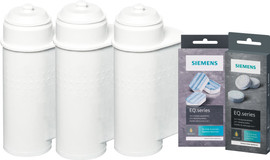
- Siemens Maintenance Pack 6 Months
Maintain your machine for half a year.
Extends the lifespan and prevents defects.
More affordable to purchase than separate products.
From
€ 79,90
- Siemens Maintenance Pack 1 Year
Maintain your machine for 1 year.
Extends the lifespan and prevents defects.
More affordable then 2 maintenance packs of half a year.
From
€ 136,90

Article by Ruben
Coffee Machine Expert.

