
Written by Marijn
Edited on
27 January 2025
·
13:10
How do you fix the flashing numbers of your SMEG stove?
Is the oven function of your SMEG stove not working and are the numbers on the display blinking? Set the time first, or the oven won't work. Read how to easily set the time in this article.
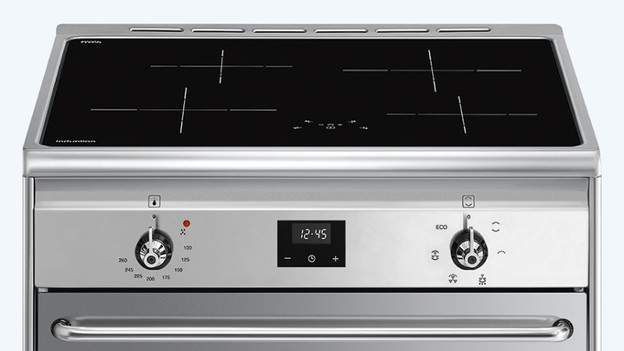
Set the time in 3 steps
If your SMEG stove is brand new of the power was just out, you have to set the time on your oven first. Go through the steps below to do that.
- Step 1: press the 'Clock' button
- Step 2: set the time
- Step 3: wait 7 seconds
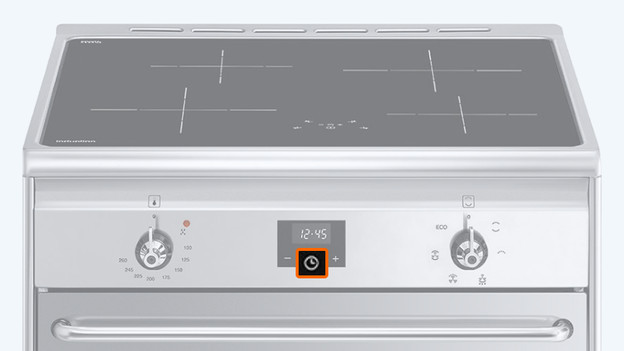
Step 1: press the 'Clock' button
Press and hold the 'Clock' button for 2 seconds. The dot between the hours and minutes will start blinking.
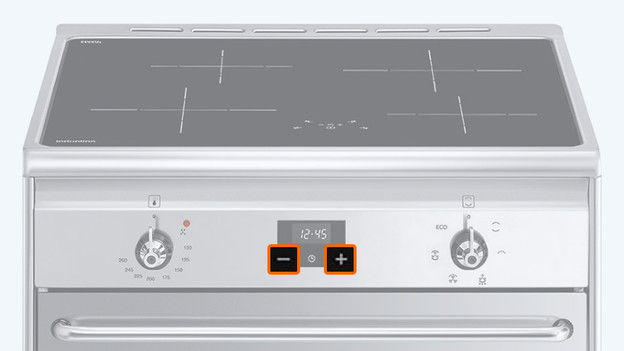
Step 2: set the time
You can set the time with the 'plus and minus' button. You can increase the value with the plus side and decrease it with the minus side. If you press and hold these buttons, you can set the time faster.

Step 3: wait 7 seconds
Did you set the time correctly? Release the buttons and wait 7 seconds. When the dot between the hours and minutes stops blinking, you've successfully set the time. The stove will now display a symbol, indicating that the oven is ready for use.

