
Written by Maurits
Edited on
1 August 2025
·
15:21
How do you safely listen to music with your headphones?
Your hearing is valuable. That's why you want to keep it healthy and not get tinnitus due to loud music. For example, turn on the volume limit on your phone. In this article, we'll give more tips on how to listen to your music safely.

Get started with safe music listening
In this article, we'll give you 4 tips on how to listen to music safely.
- Tip 1a: set a volume limit on your iPhone.
- Tip 1b: set a volume limit on your Android smartphone.
- Tip 2: don't put the volume too loud.
- Tip 3: take off your headphones on a regular basis.
- Tip 4: turn on noise canceling in crowded areas.
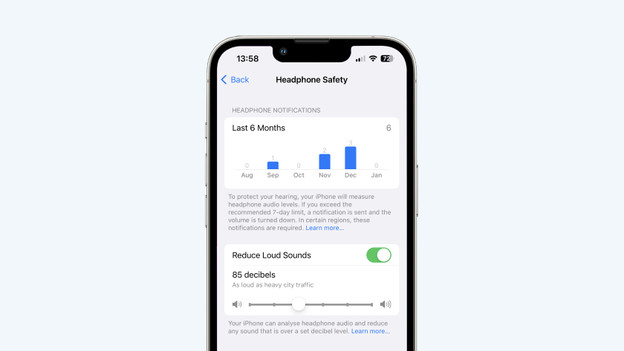
Tip 1a: set up a volume limit on your iPhone
With a volume limit, you can reduce the number of decibels your headphones produces. You can set a volume limit via the settings of your iPhone. First, go to 'Sounds & Haptics'. Go to 'Headphone Safety' and turn on 'Reduce Loud Audio'. Now use the slider to determine the number of decibels you want to hear. Experts recommend no louder than 85dB.
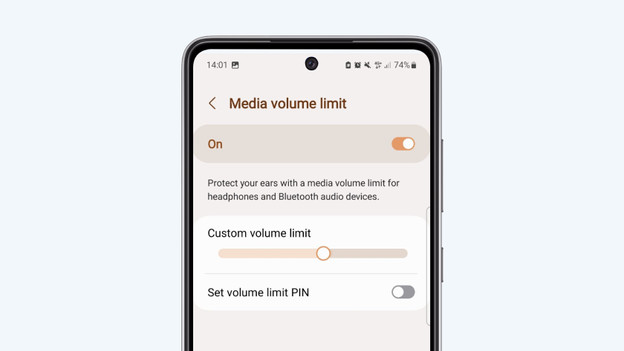
Tip 1b: set up a volume limit on your Android smartphone
First, go to the settings of your Android smartphone. Choose 'Sound and vibrate' and select 'Volume'. Tap on the 3 dots at the top right and tap 'Limit Media Volume'. Choose the number of decibels you want to hear. Experts recommend no louder than 85dB.

Tip 2: don't turn the sound up too loud
Don't put the volume of your headphones too loud. We recommend you to set the sound of your headphones to 70% of the total volume. That way, you protect your hearing from too loud noise.

Tip 3: take off your headphones regularly
Don't listen to music with your headphones for too long back to back. Schoonenberg HoorSupport uses the 60/60 rule for this. This rule states you use your headphones on 60% of the volume and take a break after 60 minutes. This means you take off your headphones every 60 minutes and take a break from your music for a couple of minutes.

Tip 4: turn on noise canceling in crowded areas
If you have headphones with noise canceling, turn on the noise canceling in crowded areas. This technology strongly reduces ambient noise. Thanks to this, you won't have to turn up the volume of your headphones unnecessarily. You can do this via the app or the button on the ear cup.

