Written by Giovanni
Edited on
12 July 2024
·
15:23
How do you solve installation problems with your Razer headset?
Do you have set up problems with your Razor gaming headset? You can solve this by updating the Razer Synapse. We'll explain how to solve set up problems with your Razer headset here.
Solve set up problems with your Razer headset
Make sure the Razer Synapse gaming software is up to date. Go through the 2 steps on this page to solve the set up problems with your headset.
Step 1. Install Razer Synapse
Step 2. Update the software

Step 1: install Razer Synapse
Download the Razer Synapse gaming software first. Go to the link below and click 'Download now' to download Razer Synapse 3. Go through the Synapse installation process. Reboot the PC once you've installed Razer Synapse.
Step 2: update the software
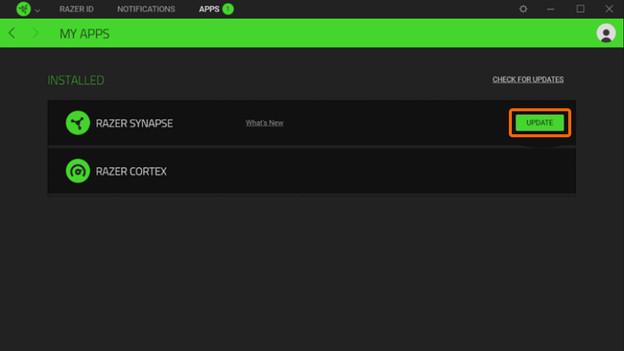
Open Razer Synapse. Check and install the latest update. You can do this as follows:
- Click the up arrow, at the bottom right of the taskbar.
- Right-click the Razer Synapse logo.
- Click the button to check for updates.
- If a new update is available, click 'Update'.
Connect your Razer headset, which is has now been set up correctly.
Check updates
Update razer

Article by Giovanni
Gaming Expert.