Written by Jesper
Edited on
21 April 2023
·
14:42
2 tips for when the battery of your smartphone no longer works
Doesn't your smartphone charge anymore? Sometimes, the problem is not your battery, bur something else. The USB port of your smartphone might be blocked, or your charger can be broken. In this article, we'll explain how to check and solve this.

Tips for a battery that doesn't work
There are different solutions to this problem. Go through these tips from top to bottom.
- Tip 1: try a different charger.
- Tip 2: clean the charging port.

Tip 1: try a different charger
It's possible that your smartphone is still working fine, but the charger is broken. Try charging another device with the same charger to rule this out. Does this other smartphone also not charge? Your charger is defective. To be completely sure, you can also try charging your own phone with a different charger and charging cable. Does that work? There's nothing wrong with your smartphone.
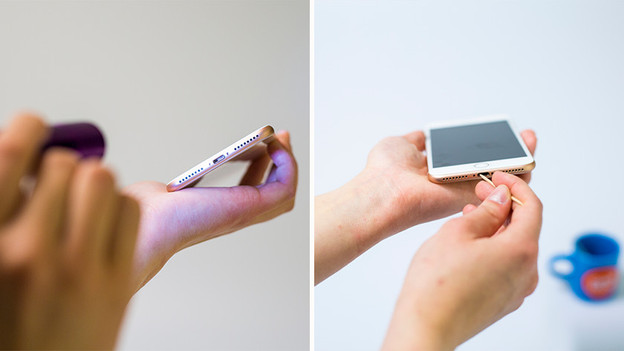
Tip 2: clean the charging port
Maybe the charger can't make contact, because there's dirt in the USB port of your smartphone. First, clean your charger port. You do this by blowing hard in the port or cleaning it with compressed air. Doesn't that work? Carefully scrape away the dirt in the USB port with a thin object such as a toothpick.
Article by Jesper
Smartphone Expert.