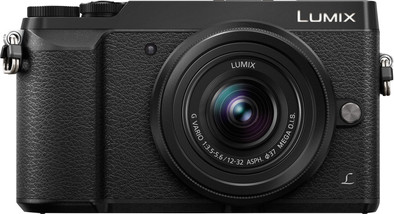
Panasonic Lumix DMC-GX80 Black + 12-32mm

Never available again
View alternatives in the sidebar
View alternatives in the sidebar
Product number | 715749 | |
|---|---|---|
Manufacturer code | DMC-GX80KEGK | |
Brand | Panasonic | |
Warranty | 2 years | |
Processing of your defect | Carry-in warranty |
Suitable for photographer type | Beginner | |
|---|---|---|
Camera usage situation | At home for family and friends, Vacation | |
Type of photography | Architecture and interior, Landscape, Traveling | |
Menu language | Dutch, English, French, German, Italian, Multilingual, Polish, Spanish, Turkish |
Lens mount | Micro Four Thirds mount | |
|---|---|---|
Zoom or prime lens | Zoom lens | |
Maximum focal length | 32 mm | |
Minimum focal length | 12 mm | |
Compatible with lens filter | ||
Filter size | 37 mm | |
Type of autofocus | Contrast detection | |
Autofocus included lens | ||
Image stabilization included lens | ||
Lens type | Standard, Wide-angle |
Type of image sensor | Micro four thirds | |
|---|---|---|
Crop factor | 2 | |
Effective number of megapixels | 16 MP |
Image processor type | Venus Engine Image Processor | |
|---|---|---|
Photo file format | JPEG, RAW | |
Video file format | MPEG-4 AVCHD (H.264) | |
Audio file format | aac | |
Type of image definition support | Full HD (1080p), Ultra HD (4K), VGA | |
Maximum number of photos per second | 8 fps | |
IBIS | ||
Number of focus points | 49 |
Memory card | SD | |
|---|---|---|
SD memory card version | SD, SDHC, SDHC UHS, SDXC, SDXC UHS | |
Expandable storage capacity up to | 128 GB |
Internal flash | ||
|---|---|---|
Guide number | 4,2 | |
Wireless flash control |
Screen size | 3 inches | |
|---|---|---|
Fully tiltable screen | ||
Touchscreen | ||
Number of pixels | 2764800 pixels |
Viewfinder | ||
|---|---|---|
Viewfinder type | Electronic | |
Viewfinder size | 0,4 inch |
USB port | ||
|---|---|---|
HDMI connector | ||
Microphone connector | ||
Type of microphone connection | Hot shoe | |
Hot shoe type | Hot shoe |
Built-in WiFi | ||
|---|---|---|
Bluetooth | ||
NFC | ||
GPS sensor |
Power supply type | Rechargeable battery | |
|---|---|---|
Battery technology | Lithium-ion | |
Replaceable battery | ||
Battery type | Panasonic DMW-BLG10/DMW-BLG10E | |
Battery/battery capacity | 1025 mAh |
Weight | 426 g | |
|---|---|---|
Height | 7,06 cm | |
Depth | 4,39 cm | |
Width | 12,2 cm | |
Material | Plastic | |
Color | Black |
Water-resistant | ||
|---|---|---|
Dust removal system |
anything for a smile
Type of image sensor | Micro four thirds | |
|---|---|---|
Camera usage situation | At home for family and friends, Vacation | |
Type of image definition support | Full HD (1080p), Ultra HD (4K), VGA | |
Suitable for photographer type | Beginner | |
Viewfinder | ||
IBIS | ||
Built-in WiFi | ||
Effective number of megapixels | 16 MP |
According to our mirrorless camera expert
The lack of the low pass filter results in razor-sharp images.
You can take accurate photos of fast actions, thanks to the high number of frames per second.
Recording in 4K quality results in realistic footage.
You can't take photos from difficult angles, because the viewfinder isn't tiltable.
There's no memory card included.
With the Panasonic Lumix DMC-GX80 mirrorless camera, you can take detailed photos in all situations. Because there's no low pass filter, the 16-megapixel sensor takes sharp photos with a lot of detail. You don't miss a single action moment when you photograph at 40 fps or record in 4K. With the 4K Photo function, you can store images from videos as 8-megapixel as photos. That way, you have photos and videos of the action. Thanks to the electronic viewfinder, you're not bothered by reflections. You can effortlessly photograph landscapes and tall buildings with the included 12-32mm lens.
5 stars
11
4 stars
9
3 stars
1
2 stars
0
1 star
0
Picture quality
Design
Options
I am not a professional photographer and enter this field as a hobby. Before this I had an SLR (Canon 600D) and was a bit tired of bringing a giant bag everywhere.
After seeing the Panasonic GX80 and reading something about it, I decided to switch to a system camera. I now own a number of works of the Panasonic GX80 and have taken quite a few photos with it. The GX80 is a lot smaller in size, but weighs almost as much as my Canon. This makes the GX80 feel qualitative and durable.
Someone who has never had and/or uses an SLR or a system camera will be shocked the first time by all the buttons etc. This should not be an obstacle if you want to go a little further than just quickly shooting a photo. Nowadays there is a lot of information and, for example, tutorials on how to best deal with all options. In fact, that's how I discovered the functions of my canon.
As mentioned before, the GX80 is very compact compared to my Canon and where I almost needed a separate backpack for this, I can now manage with a small protective cover. I got a 12-32 lens with the GX80 and this is also in favor of the compactness. As far as zoom is concerned, this is more than enough for me. Do you want something more? Then you have plenty of alternatives under the name Micro Four Third lenses. After all, the lens determines the quality of the photo and you could use different lenses for different settings.
The basic functions on the GX80 are not very different from my Canon. For example, the standard elements such as aperture, shutter speed, ISO value and all other settings can be changed to your own taste under the Manual (M) function. If you do not want to perform these operations, you can simply use the Auto mode, which in fact allows you to take excellent photos.
Post Focus: With the Post Focus of the GX80 you have the luxury of determining the focus afterwards. You take a photo where you can then indicate on the screen which objects should have the focus. This way you can save 1 photo several times from different perspectives. Nice function and good tool for the hobbyists among us.
Presets: Personally, I found SCN stand cool and easy to use. Without having any experience and knowledge of photography, it is already possible to take very nice photos in different settings. For example, I had used a timelapse effect in the dark along the highway. You get a long shutter speed and the cars passing by look like nice lines on the road surface. For the mobile phone app feel, the ”artistic” mode can be used. In addition, I also found it useful that a panorama function with good guidance is built in.
4K Photo You shoot a series of photos and can choose the best one afterwards. This is very useful when you want to capture a fun moment from an action-packed action. Tried this out recently at a football game and with the kids on the beach. Here you get all kinds of fun and funny scenes. The disadvantage is that the photos are saved as 8 MP quality. Therefore, much larger prints are not included for this function.
WIFI: The Panasonic Image app can be downloaded for your mobile phone (Apple and Android supported). You can then use a Wi-Fi connection, which sets up the GX80, to remotely control the GX80 in different positions, because you also get to see the images live on your phone. In addition, this function also allows you to download the photos directly to your phone if you want to use them directly for social media, for example.
And last but not least What I do miss is a fully rotatable screen, because I did have this on my Canon. The flash is also not very effective if the distance is already a bit too large, my Canon's was a bit stronger. If you need the flash often, I recommend buying an external one. I also like that the GX80 can be charged directly with a USB cable without removing the battery.
In summary, I think it is a super nice camera with many functions. Do you want to shoot beautiful photos without the body of an SLR? Then this is a good choice!
PY
24 August 2016
Automatically translated from Nederlands
After a long comparison, I finally opted for a system camera instead of an SLR. The wearing comfort was ultimately the deciding factor to go for a system camera instead of an SLR in the same price range. An SLR may have a larger sensor, but with the MOS sensor in the GX80 I don't think the difference in quality of photos is very big (for what I do with it).
I mainly use the camera for street photography and for festivals and parties. The 12-32 kit lens is sufficient for this work. The zoom range of this lens is somewhat limited, but sufficient for me. It is nice that the camera remains comfortably compact together with this lens. But if you are planning to go on safari, I advise you to opt for a travel lens.
Making videos with the GX80 is also more than good. He does that in 4K quality. I regret that there is no connection for an external microphone and that you cannot turn the tilting screen towards you when filming yourself. But if you are going to use the camera mainly for photography and occasionally want to make a video, it will suffice.
If you have made a 4K video you can select a fragment and export it as an 8MP jpeg photo. The quality of the photo is sufficient for a website, on social media or as a small photo in a photo book.
In addition to 4K video, the camera also has 4K photo. There are a number of nice functions such as 4K burst and post-focus. With 4K burst, the camera shoots a series of photos at 30 fps when you press the shutter button, until you release the shutter button. This is great when you want to photograph (fast) moving objects. You can then choose the exact moment from a series of photos and save that moment as a photo.
Post-focus works in much the same way. The camera also takes a series of photos at 30fps, but then 30 different focus points. That way you can shift the focus point after shooting the photo. A great feature for creative shooting and macro photography.
There is also WiFi on this camera which I really like. Via the Panasonic APP you can put photos directly on your phone and share them quickly. In addition, you can also operate your camera via the APP, which is handy when taking selfies and videos.
The tilting screen is responsive and the menu is intuitive. It is a pity that the screen is not rotatable.
The sling feels a bit stiff and after a while it hurts my neck. Especially on hot days it quickly starts to irritate. My girlfriend is less bothered by that, so it can also be personal.
Even though there are a few minor drawbacks, I am very satisfied with the Panasonic GX80. For the advanced photographer and for the amateur who wants something more than a compact camera, I can recommend the GX80 without a doubt.
HenkDoKa
28 August 2016
Automatically translated from Nederlands
I recently became a father and managed to photograph the little one beautifully without much knowledge of cameras. Useful options such as Post focus, with which you can determine afterwards which element in the photo you want to focus on. And Focus stack, with which you can capture moving images well, because it shoots multiple photos at lightning speed and you can choose which one you like best. A huge plus is the image stabilization. This works so well that a tripod is unnecessary.
The camera fits comfortably in the hand, but is a bit heavy. Despite the fact that the camera has a touchscreen, which works very well, it has more buttons and wheels than I'm used to from a digital camera. This probably indicates that I still have plenty to discover. For a beginner like me, this is a camera that you can get started with right away, but which you can get even more out of over time. I can't imagine that I would have to switch to another camera in the coming years, because I think this camera is future-proof with all its possibilities.
Sander
23 October 2016
Automatically translated from Nederlands