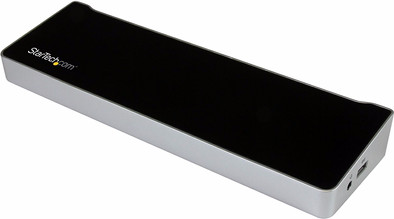
StarTech USB 3.0 Triple Monitor Docking Station Laptops

Never available again
View alternatives in the sidebar
View alternatives in the sidebar
Product number | 740098 | |
|---|---|---|
Manufacturer code | USB3DOCKH2DP | |
Brand | Startech | |
Warranty | 2 years | |
Processing of your defect | Carry-in warranty |
Made for laptop models | Chromebook, Microsoft Surface, Windows laptop |
|---|
Laptop docking station suitable for | Connect 1 monitor, Connect 2 monitors and a Chromebook, Connect 2 monitors and a Windows laptop, [Charge phone], [Connect Headphones], [Work with wired internet] | |
|---|---|---|
Type of main connector | USB-A | |
Supported video technology on Docking Station | DisplayLink | |
Number of USB ports | 6 | |
USB function | Charging an external device, Data transfer, Device connection, Play media, Software updates | |
Type of USB port | Standard USB-A, Standard USB-B (3.0 form) | |
Number of female standard USB-A ports | 5 | |
Female standard USB-A port version | 3.0 | |
Power standard USB-A port | 15 W | |
Number of female standard USB-B (3.0 form) ports | 1 | |
Female standard USB-B (3.0 form) port version | 3.0 | |
Number of HDMI connectors | 1 | |
Female HDMI Type A port version | 2.0 | |
Number of Ethernet ports | 1 | |
Ethernet speed | Gigabit Ethernet (1000Mbps) | |
Type of DisplayPort connector | standard DisplayPort | |
Number of Female Standard DisplayPort 1.4 ports | 2 | |
Version Female Standard DisplayPort port | 1.4 | |
Number of headphone jacks | 1 | |
Type of headphone connection | 3.5mm (TS) | |
Memory card reader | ||
Number of connectable monitors | 2 | |
Maximum image resolution 1 monitor | 4K (3840x2160) | |
Maximum refresh rate 1 monitor | 30 Hz | |
Maximum refresh rate of 2 monitors | 30 Hz |
Cable length | 1 m | |
|---|---|---|
Color | Black | |
Height | 3,4 cm | |
Width | 8,2 cm | |
Depth | 27 cm | |
Weight | 0,376 kg |
anything for a smile
5 stars
5
4 stars
6
3 stars
1
2 stars
0
1 star
0
It is still a docking station that is not connected via a USB-C. My laptop does have a USB-C port, but it doesn't support video expansion yet. That's why I was looking for a docking station that connected with USB A 3.0 and that was able to power at least 2 screens in HD. This docking does that excellently. It is even possible with 3 screens + laptop... . One downside is that my laptop cannot be powered from the docking station. So in my case the laptop also needs to be connected to the power cable.
Patrick De Wachter
25 January 2020
Automatically translated from Nederlands
Nothing to remark at all. Just download the driver (or install it from the supplied CD-ROM, but who still has that?) and start playing. Use it in combination with 2 x a dell displayport 1080p monitor and even with 4 screens (TV, 2x monitor and laptop) it works flawlessly. If one of the monitors is turned off, the signal is automatically disconnected. Top product. Maybe pricey but definitely worth the money if you often take your laptop with you and can turn it into a full-fledged workstation within 3 seconds.
Bart Ziengs
18 June 2017
Automatically translated from Nederlands
I am very satisfied with the docking station. Does what it should.
Tom Theys
18 January 2018
Automatically translated from Nederlands
Type of main connector | USB-A | |
|---|---|---|
Number of connectable monitors | 2 | |
Type of USB port | Standard USB-A, Standard USB-B (3.0 form) | |
Cable length | 1 m |
The StarTech USB 3.0 Triple Monitor Docking Station Laptops functions on all Windows laptops and MacBook models with a USB-C port which sends a video signal This is how you can check if your laptop has a suitable USB-C port.
According to our dock for laptops expert
With this dock, you can connect 3 extra monitors to your laptop.
You can charge your phone via the USB-A port of this dock.
You can quickly transfer the data from a memory card to your laptop via the memory card port.
You can't charge a laptop with this dock.