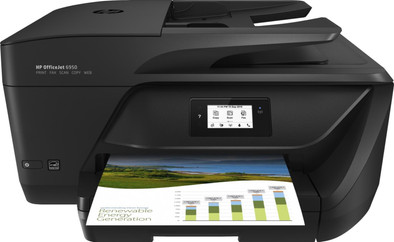
HP OfficeJet 6950 e-All-in-One
Never available again
View alternatives in the sidebar
View alternatives in the sidebar
With Coolblue Extended Warranty, you are protected against costs due to quality defects of your printer for the next 4 years. During the entire term, we will reimburse up to the original purchase price. You can easily add the Extended Warranty in your shopping cart.
€ 24,99
one-timeAdd your printer to your shopping cart. In the next step, you can add the Extended Warranty. You can exchange or return your purchase for free within 30 days.
Product number | 785025 | |
|---|---|---|
Manufacturer code | P4C85A#BHC | |
Brand | HP | |
Warranty | 2 years | |
Processing of your defect | Carry-in warranty |
Printer size | Medium | |
|---|---|---|
Width | 46,4 cm | |
Depth | 39 cm | |
Height | 22,9 cm | |
Color | Black | |
Weight | 7,7 kg |
Printer type | All-in-one | |
|---|---|---|
Photo printer | ||
Portable (mobile use) | ||
Recommended for use printers | Business printing |
Cartridge line | HP 903 | |
|---|---|---|
Print technology | Inkjet | |
Number of cartridges/toner cartridges | 4 | |
Color printer | ||
Print speed black (ISO) | 16 ppm | |
Print speed color (ISO) | 9 ppm | |
First black page ready after | 12 seconds | |
Speed class | Good | |
Maximum print resolution height | 1200 dpi | |
Maximum print resolution width | 4800 dpi | |
Maximum print size | A4 | |
Automatic duplex printing | ||
Borderless printing | ||
Maximum print size duplex printing | A4 |
Scan functionality | ||
|---|---|---|
Maximum optical scan resolution width | 1200 dpi | |
Maximum optical scan resolution height | 1200 dpi | |
Scanner type | File scanner, Flatbed scanner | |
Maximum scan size | A4 (21x29.7cm) | |
Automatic document feeder (ADF) | ||
Maximum paper size ADF | A4 | |
Scan sizes | A4 | |
Scan speed (PPM) | 5 ppm | |
Color depth output | 8 bpp | |
Scan to | PC (network), USB | |
ADF capacity | 35 | |
OCR |
Copying functionality | ||
|---|---|---|
Copy speed black (ISO) | 22 Hz | |
Copy speed color (ISO) | 22 Hz | |
Maximum copy resolution height | 600 dpi | |
Maximum copy resolution width | 600 dpi |
Fax functionality | ||
|---|---|---|
Color fax |
Built-in screen | ||
|---|---|---|
Color screen | ||
Touchscreen |
Suitable for HP+ | ||
|---|---|---|
Suitable for HP Instant Ink |
Compatible with operating system | Windows, iOS, macOS | |
|---|---|---|
Connection type | Wired, Wireless | |
Apple AirPrint | ||
Email print | ||
WPS (Wireless Protected Setup) | ||
Female standard USB-A port version | 2.0 | |
Number of Ethernet ports | 0 | |
NFC | ||
Built-in WiFi | ||
WiFi direct | ||
Bluetooth | ||
USB port |
Manual input tray | ||
|---|---|---|
Photo paper drawer | ||
Output capacity output drawer | 60 | |
Maximum print size standard paper tray | A4 | |
Input capacity standard paper tray | 225 | |
Number of standard paper trays | 1 |
Memory card reader |
|---|
anything for a smile
Print technology | Inkjet | |
|---|---|---|
Printer type | All-in-one | |
Color printer | ||
Automatic duplex printing | ||
Maximum print size | A4 | |
Automatic document feeder (ADF) | ||
WiFi direct |
According to our printer expert
It's a 4-in-1 printer, which means you can also scan, copy, and fax in addition to printing.
Thanks to the automatic document feeder (ADF), the printer scans and copies a stack of paper in 1 go.
This printer also supports HP Instant Ink, so you automatically receive new cartridges before they run out.
It doesn't have an Ethernet port, so you can't connect the printer with a network cable.
The HP OfficeJet 6950 e-all-in-one is a comprehensive color inkjet printer for offices. Perform multiple tasks such as scanning, copying and printing at a high print resolution of 4800 by 1200 DPI. You can also send a print job from your phone or tablet via WiFi. Your prints will automatically be ready for you. In addition, you can print up to 35 pages at once, thanks to the automatic print input (ADF). Because this printer has separate color cartridges, you only replace the cartridges that are empty. Via the 5.5cm screen, you can adjust some settings so that your prints are to your liking. In addition, the printer supports HP Instant Ink. You won't run out of ink for 3 months, thanks to the HP Instant Ink trial period.
Installation ease
Options
Print quality
I've had this printer for almost a month now and I really like it! You can install it via software on a computer, but this didn't work very well for me. Then I entered everything manually on the screen of the printer. Since then everything works perfectly.
Sending print jobs is perfect from Windows and MacOS computers. This also works fine from an iPhone or iPad. Mail printing is super easy by sending an email to the printer's email address.
Scanning and copying is perfect, via the ADF and the Flatbed scanner. You can also scan to your mobile or tablet using the HPsmart app.
Double-sided (and almost borderless) printing is also super handy. Just don't mess around with your fresh prints while the printer is still busy with double-sided printing. To print the 2nd side, the printer swallows the page just printed. If you sit with your hands between the prints, the printer takes several sheets inside. This means you have to remove the sheets from the printer, and your printer can jam if you don't fix this properly. If this happens to you, you can also open a valve from the cartridge compartment and remove the leaves here!
Finally, I just turned off HP Direct. This is a function with which your printer appears in your WiFi selection menu on your devices. This allows anyone (with the password) to use your printer to print. I personally found this quite disturbing, but if it doesn't bother you, you should leave it like that. You can get to a menu of your printer by entering the IP address of your printer in your web browser. In this menu you can then turn off HP Direct.
All in all, this is a very good, fast but also quiet printer. All the negatives are of course a bit of a nitpick. This is simply a great printer for relatively little money. So if you're in doubt: stop doubting, it's worth every penny!
Wouter Kukler
3 September 2018
Automatically translated from Nederlands
Just good
M van den Berg
8 October 2017
Automatically translated from Nederlands
Without printing, the cartridge is already empty.
jacob weggemans
28 October 2019
Automatically translated from Nederlands