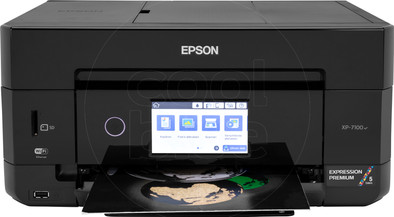
Epson Expression Premium XP-7100
Never available again
View alternatives in the sidebar
View alternatives in the sidebar
With Coolblue Extended Warranty, you are protected against costs due to quality defects of your printer for the next 4 years. During the entire term, we will reimburse up to the original purchase price. You can easily add the Extended Warranty in your shopping cart.

€ 24,99
one-timeAdd your printer to your shopping cart. In the next step, you can add the Extended Warranty. You can exchange or return your purchase for free within 30 days.
Product number | 822589 | |
|---|---|---|
Manufacturer code | C11CH03402 | |
Brand | Epson | |
Warranty | 2 years | |
Processing of your defect | Carry-in warranty |
Printer size | Small | |
|---|---|---|
Width | 39 cm | |
Depth | 33,9 cm | |
Height | 19,1 cm | |
Color | Black | |
Weight | 8,2 kg |
Printer type | All-in-one | |
|---|---|---|
Photo printer | ||
Print quality photos | Good | |
Portable (mobile use) | ||
Recommended for use printers | Printing at home, Printing photos |
Cartridge line | Epson 33 | |
|---|---|---|
Usage costs for 1 page | 18 eurocents | |
Print technology | Inkjet | |
Type of ink | Cartridges | |
Number of cartridges/toner cartridges | 5 | |
Color printer | ||
Print speed black (ISO) | 15,8 ppm | |
Print speed color (ISO) | 11 ppm | |
First black page ready after | 10 seconds | |
Speed class | Good | |
Maximum print resolution height | 1440 dpi | |
Maximum print resolution width | 5760 dpi | |
Maximum print size | A4 | |
Automatic duplex printing | ||
Borderless printing | ||
Maximum print size duplex printing | A4 |
Scan functionality | ||
|---|---|---|
Automatic duplex scanning | ||
Maximum optical scan resolution width | 1200 dpi | |
Maximum optical scan resolution height | 4800 dpi | |
Scanner type | Flatbed scanner | |
Maximum scan size | A4 (21x29.7cm) | |
Automatic document feeder (ADF) | ||
Maximum paper size ADF | A4 | |
Scan sizes | A4 | |
Scan speed (PPM) | 1 ppm | |
Color depth output | 24 bpp | |
Scan to | Dropbox, FTP, Google Docs, Microsoft SharePoint Connector, PC (network), SD card, USB | |
ADF capacity | 30 | |
OCR |
Copying functionality | ||
|---|---|---|
Copy speed black (ISO) | 8 ppm | |
Copy speed color (ISO) | 4 ppm |
Fax functionality |
|---|
Built-in screen | ||
|---|---|---|
Color screen | ||
Touchscreen |
Compatible with operating system | Android, ChromeOS, Linux, Windows, Windows Phone, iOS, macOS | |
|---|---|---|
Connection type | Wired, Wireless | |
Apple AirPrint | ||
Email print | ||
WPS (Wireless Protected Setup) | ||
Female standard USB-A port version | 2.0 | |
Ethernet port | ||
Number of Ethernet ports | 1 | |
NFC | ||
Built-in WiFi | ||
WiFi frequency printers | 2.4GHz | |
WiFi direct | ||
Bluetooth | ||
USB port |
Location paper input | Back, Front | |
|---|---|---|
Manual input tray | ||
Photo paper drawer | ||
Output capacity output drawer | 30 | |
Input capacity photo paper tray | 20 | |
Maximum print size standard paper tray | A4 | |
Input capacity standard paper tray | 100 | |
Maximum print size photo paper tray | 10x15, 13x18, 20x25, A4, A5, B5 | |
Number of standard paper trays | 2 |
Memory card | SD, SDHC, SDXC | |
|---|---|---|
Memory card reader |
anything for a smile
Print technology | Inkjet | |
|---|---|---|
Printer type | All-in-one | |
Color printer | ||
Automatic duplex printing | ||
Maximum print size | A4 | |
Automatic document feeder (ADF) | ||
WiFi direct |
According to our printer expert
You can print, scan, and copy with this all-in-one printer.
With a print resolution of 5760x1440 DPI, you can print photos in good quality as well.
Thanks to the automatic document feeder (ADF), the printers scans and copies a stack of paper in one go.
With an average consumption of € 0.176 per page, this printer isn't economical.
The Epson Expression Premium XP-7100 is an all-in-one inkjet printer especially designed for printing photos. Thanks to the 5 individual cartridges, you can print photos with a nice contrast and without a white border. Use the automatic document feeder (ADF) to scan a stack of paper and easily combine it into one digital document. You can store the photo paper and printing paper in 2 separate paper trays. The printer has a large touchscreen, which you can use to print photos without needing your computer. Finally, you can use the XP-7100 to make calendars and greeting cards and print them on printable CDs and DVDs.
Note: do you want to print a photo on photo paper? Place the back with the logo facing up in the printer.
Installation ease
Options
Print quality
I am happy with this Epson printer. It works well and easily. This printer is not cheap but offers value for money.
There is a reasonably clear quick start manual in the package. Blue tape indicates where to remove packaging material on the device. The printer was then easy to install via the Epson website. Ink cartridges are included. It is a WiFi printer, but I use it via a USB cable (the USB printer cable is not included in the package, so you have to buy it).
The printer has 2 paper trays in the device itself (they do not protrude). Photo paper can be loaded in the top tray as standard. A4 paper in the lower tray. Under the bottom tray is a slide to print CDs. At the back you can fold out something to manually feed special paper. If you don't use that holder permanently, it is neatly hidden in the device.
On top is a flap under which the sheet feeder is located. I have already made copies via that sheet feeder without the PC being connected. You then operate the printer via the digital screen at the front. I found the operation clear and easy. I have already scanned pages to PDF. This was done quickly and easily via the sheet feeder and the scan menu on the PC. You can set everything in that menu, such as color or black and white, resolution, double-sided scanning, remove blank pages and the folder in which you want to save the document.
Photo prints are sharp and have good color. Whether the ink retains its color well in a sunny room, I do not know. I don't have the device enough for that yet.
It is useful that Epson gives its ink series a picture. The '33/33XL' ink cartridges of this printer are part of the Orange series. New Epson ink cartridges are unfortunately quite expensive and not available at all bookstores. Still, I go for brand patterns. My experience with cheaper inks for my previous Canon printer is that those inks discolor faster. You don't want that for your photos. Epson offers an option that allows them to keep track of when your ink has run out. I don't use it for privacy reasons.
The printer is not silent, you can hear that it is printing. You can choose a quieter mode, but printing will then be slower. I personally don't mind the sound because I don't print all day long.
You can download or simply read the digital manual of the printer on the site below. I did that beforehand to orientate myself on the possibilities of use of this printer. https://www.usermanual.com/Epson-EXPRESSION-PREMIUM-XP-7100/manual-5-675259.html
VanMonique
2 December 2019
Automatically translated from Nederlands
I've only had this printer for a week, but it's excellent. It is nicely compact, the prints and scans are of very good quality, the individual cartridges are economical to use, and the operation is very simple. I chose this model because it has an Ethernet connection, so even if the Wi-Fi goes down, I can still use the printer over my wired network. In addition, the printer is connected to a Mac with a printer cable, so it must be very strange not to be able to print/scan. I find it a bit difficult to pull out the paper tray. The installation can also be improved. After I unpacked and turned the printer on, it made a disturbing noise and gave an error code. After some searching I found out that there was still packaging material inside.
RJ
9 July 2019
Automatically translated from Nederlands
Not yet extensively tested. But it works fine on all PCs and with the apps on Android and IOS. Print quality and speed excellent. I am happy with ADF. And compact too. Sound is fine (have turned on the quieter mode). Install is fine if you just let Windows 10 search. If you look at the epson website, it is first a bit of searching for what you might need. And you can also get 'house brand' ink for it
Hans
30 January 2019
Automatically translated from Nederlands