Never available again
View alternatives in the sidebar
View alternatives in the sidebar
With Coolblue Extended Warranty, you are protected against costs due to quality defects of your monitor for the next 5 years. During the entire term, we will reimburse up to the original purchase price. You can easily add the Extended Warranty in your shopping cart.

€ 17,99
one-timeAdd your monitor to your shopping cart. In the next step, you can add the Extended Warranty. You can exchange or return your purchase for free within 30 days.
Product number | 839742 | |
|---|---|---|
Manufacturer code | 328E1CA/00 | |
Brand | Philips | |
Warranty | 3 years | |
Processing of your defect | Via Coolblue |
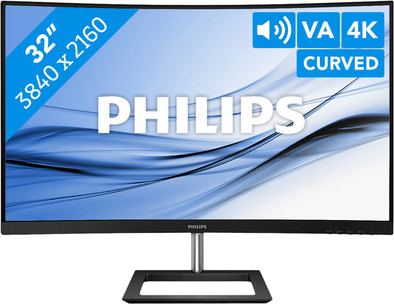
Screen size | 32 inches | |
|---|---|---|
Recommended display resolution | 3840x2160 | |
Sharpness | 4K (UHD) | |
Aspect ratio | Standard (16:9) | |
Refresh rate | 60 Hz | |
Response time | 4 ms | |
Panel type | VA panel | |
Brightness | 250 cd/m2 | |
Local dimming | ||
HDR support | ||
Contrast ratio | 2500 | |
Touchscreen | ||
Screen reflection | Anti-glare | |
Blue light filter | ||
Flicker-free technology | ||
Color space | sRGB | |
sRGB color coverage percentage | 122 % | |
Color depth | 1 billion colors (10-bit) | |
Adaptive Sync | ||
Resolution width | 3840 pixels | |
Resolution height | 2160 pixels | |
Anti-reflection type | Anti glare | |
Horizontal viewing angle | 178 ° |
Height | 52,3 cm | |
|---|---|---|
Width | 70,9 cm | |
Depth | 28,1 cm | |
Weight | 7,71 kg | |
Color | Black | |
Including stand | ||
Material | Plastic | |
Cable management | ||
Appearance | Neutral | |
Curved | ||
Screen curve | 1500 R |
Number of HDMI connectors | 2 | |
|---|---|---|
Number of Female HDMI type A 2.0 ports | 2 | |
Number of headphone jacks | 1 | |
Type of headphone connection | 3.5mm (TRRRS) | |
Number of Female Standard DisplayPort 1.2 ports | 1 | |
Number of female standard VGA ports | 1 | |
Number of female 3.5mm TRRRS Audio Jack port | 1 |
Included by default | DisplayPort cable, HDMI cable | |
|---|---|---|
Not included by default | USB-C cable |
Adjustable in height | ||
|---|---|---|
Tiltable | ||
Pivotable stand | ||
Pivot function | ||
VESA mount option | ||
VESA mount | 100x100mm |
Energy label | G | |
|---|---|---|
Energy consumption standby | 0,5 W | |
Energy consumption active | 49,3 W | |
Energy consumption per 1000h | 39 kWh | |
Annual energy consumption | 56,94 kWh | |
Annual energy costs | 22,78 euros |
Built-in speakers | ||
|---|---|---|
Sound system | Stereo | |
Webcam | ||
Split screen | ||
Kensington lock | ||
Best tested |
Recommended for use | Image editing and graphic design, Internet, email, and text processing, Watching movies in 4K |
|---|
anything for a smile
Our digital expert will help you, but it can sometimes make mistakes, like humans do.
According to our monitor expert
A lot of detail on screen: enjoy sharp images and a lot of detail thanks to the 4K resolution.
Comfortable viewing angle: you can work comfortably with the tiltable screen.
No separate speakers needed: thanks to the built-in speakers, you can listen to music or a podcast while you work.
No USB-C port: you can't connect a second monitor or peripherals to the monitor.
No built-in webcam: because the monitor doesn’t have a built-in webcam, you’ll need a separate one if you want to make video calls.
Installation ease
User friendliness
Image quality
Price-quality ratio
Design
ideal screen for connecting as an extension for a laptop. Also very good and ideal size to watch movies/series.
Tielemans Ronny
10 October 2019
Automatically translated from Nederlands
I had been looking for an affordable monitor with 4K for a long time. Unfortunately, prices everywhere went up due to the corona crisis. But because my wife and I both have to work from home, we still needed an extra monitor and so we bought it.
The short installation manual was good and the extensive manual was also clear. When securing the foot, make sure that you put it on properly.
Connecting to the PC is no problem at all and Windows 10 immediately recognizes the large 4K monitor. Separate drivers for the monitor are available from Philips, for better adjustment, but they are not necessary. The extra software that you can download from Philips does not add much to the use if you have Windows 10. For older versions of Windows, it may be possible. be useful. The great thing about this monitor is that there are 2 x HDMI2 connections available. Most other monitors in this price range only have 1 HDMI connection and we needed 2. It also contains stereo speakers, which can be set via the OSD settings (sound on/off/louder/softer) or can even be set directly via the buttons at the bottom edge of the screen.
For 'normal' use we set the Windows screen settings to 150%, making the letters and icons larger, because at 100% it is all very small. For games this is not necessary (just like with Adobe Lightroom) and with old games (legacy) it can even lead to problems. You can solve this by pressing the 'High DPI settings' button on the icon/program properties under Compatibility. On the next screen you can then check "Ignore high DPI scaling". After that, the game will start in the correct mode.
For photo editing (in our case with Adobe Lightroom) this monitor is really very good. You can literally see a lot more, both in numbers of small photos (Grid view) and the large photos themselves (Enhanced view or Loupe image).
NOTE: If you are considering this monitor, make sure that your PC/Laptop can handle high resolutions and that you have the correct connection for it. Only HDMI2 or DisplayPort1.2 are suitable for these high resolutions on this screen and if your PC/Laptop can only handle HDMI1.x it will not work.
Besides the power cable, a Displayport cable, HDMI cable and sound cable are also included. TIP: If you now have a monitor, replace the power cable with the new cable that came with this monitor. This one stays in place better than the old one (in our case).
Eric Lotgerink
20 April 2020
Automatically translated from Nederlands
Very nice screen, ideal for 1080P games on playstation for example!
Siem
7 November 2019
Automatically translated from Nederlands

