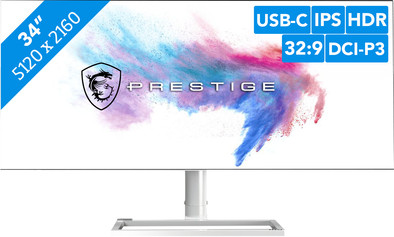
Never available again
View alternatives in the sidebar
View alternatives in the sidebar
With Coolblue Extended Warranty, you are protected against costs due to quality defects of your monitor for the next 5 years. During the entire term, we will reimburse up to the original purchase price. You can easily add the Extended Warranty in your shopping cart.
€ 116,99
one-timeAdd your monitor to your shopping cart. In the next step, you can add the Extended Warranty. You can exchange or return your purchase for free within 30 days.
Product number | 840385 | |
|---|---|---|
Manufacturer code | 9S6-3DA19A-001 | |
Brand | MSI | |
Warranty | 3 years | |
Processing of your defect | Via Coolblue |
Screen size | 34 inches | |
|---|---|---|
Recommended display resolution | 5120x2160 | |
Sharpness | 5K | |
Aspect ratio | Ultrawide (21:9) | |
Refresh rate | 60 Hz | |
Response time | 8 ms | |
Panel type | IPS panel | |
Brightness | 450 cd/m2 | |
Local dimming | ||
HDR support | ||
Contrast ratio | 1200 | |
Touchscreen | ||
Type of HDR | DisplayHDR 600 | |
Screen reflection | Anti-glare | |
Blue light filter | ||
Flicker-free technology | ||
Color space | DCI-P3 | |
Color depth | 1 billion colors (10-bit) | |
Adaptive Sync | ||
Resolution width | 5120 pixels | |
Resolution height | 2160 pixels | |
Anti-reflection type | Anti glare | |
Horizontal viewing angle | 178 ° |
Height | 36,04 cm | |
|---|---|---|
Width | 81,7 cm | |
Depth | 5,83 cm | |
Weight | 8,2 kg | |
Color | White | |
Including stand | ||
Material | Metal | |
Cable management | ||
Appearance | Neutral | |
Curved |
Number of HDMI connectors | 2 | |
|---|---|---|
Number of Female HDMI type A 2.0b connectors | 2 | |
Number of headphone jacks | 1 | |
Type of headphone connection | 3.5mm (TRRRS) | |
Number of USB-C ports | 1 | |
Number of Female Standard DisplayPort 1.4 ports | 2 | |
Number of female standard USB-A ports | 3 | |
Female standard USB-A port version | 3.2 | |
Number of female standard USB-B (3.0 form) ports | 1 | |
Number of female 3.5mm TRRRS Audio Jack port | 1 | |
Type of USB port | Standard USB-A, Standard USB-B (3.0 form), USB-C | |
Number of USB ports | 5 | |
Suitable for daisy chaining | ||
Type of USB cable included | USB-C to USB-C | |
USB-C dock | ||
Maximum USB-C dock power | 15 W |
Included by default | DisplayPort cable, HDMI cable, USB-C cable |
|---|
Adjustable in height | ||
|---|---|---|
Tiltable | ||
Pivotable stand | ||
Pivot function | ||
VESA mount option | ||
VESA mount | 100x100mm |
Energy label | G | |
|---|---|---|
Energy consumption standby | 0,31 W | |
Energy consumption active | 60 W | |
Energy consumption per 1000h | 50 kWh | |
Annual energy consumption | 73 kWh | |
Annual energy costs | 29,2 euros |
Built-in speakers | ||
|---|---|---|
Webcam | ||
Split screen | ||
Kensington lock | ||
Best tested |
Recommended for use | Internet, email, and text processing, Office work |
|---|
anything for a smile
Sharpness | 5K | |
|---|---|---|
Curved | ||
Aspect ratio | Ultrawide (21:9) | |
Refresh rate | 60 Hz | |
Response time | 8 ms | |
Panel type | IPS panel | |
Color depth | 1 billion colors (10-bit) | |
Built-in speakers |
According to our monitor expert
Thanks to the ultrawide 5K2K resolution, you have 33% more screen space than on a 'regular' 4K screen to open multiple windows next to each other.
This monitor displays colors brightly and realistically thanks to DisplayHDR 600 and the large sRGB and DCI-P3 coverage for photo and video editing.
You can set your own preferences with the included Creator OSD software.
You need a large desk for this screen.
This monitor works better with a Windows laptop than with a MacBook.
All your creative projects come to life with the MSI Prestige PS341WU. This ultrawide 34-inch 5K monitor is specially designed for demanding creative professionals. The large screen gives you a lot of space for all your windows. This can be useful if you often edit photos and videos, because you'll see more detail. You can also view and edit all your HDR content thanks to the DisplayHDR 600 certification. The monitor is guaranteed to achieve a high peak brightness and a 10-bit HDR color representation, so you'll see all colors and details on the screen. On top of that, you can set the screen to your preferences with the included Creator OSD software. This software has been specifically developed for creative professionals. You can use the software to save various workflows, so you're always prepared to get the job done.
Installation ease
Image quality
Price-quality ratio
Design
This is a great screen! Highly recommended for photo and video editing.
Unfortunately, it does not support upstream data over the USB-C connection, so you have to connect a second (USB) cable to use your connected peripherals. In addition, the power supply over USB-C is too low to charge your laptop. Therefore, I would not recommend it for use with a MacBookPro or similar laptop.
The software to set the monitor (brightness, contrast, volume, ...) and the firmware to upgrade is only available for windows. So users of an apple with an M1 chip - on which you cannot install windows - have no other choice than to get a Windows PC to upgrade the 'old' firmware with which the device comes.
The monitor does not have built-in speakers. It does have a built-in DAC with audio in/out connections, so theoretically you could connect some active speakers to it.
It is a beautiful screen ideal for video editing, but it is less suitable for other applications. I wouldn't recommend it for MacBook users, especially those with an Apple Silicon chip.
Unfortunate ..
Mark Minnoye
18 February 2021
Automatically translated from Nederlands
It's just that this is the only 34 inch 5k2K screen. And then one more phenomenal image quality. The front view is very beautiful. Those are 3 good reasons why you should buy this screen. And also should not hesitate to buy. The advantage of a 34k 5k2k is that you can place the screen at 50cm from your nose. So if you want to use an ultrawide on a limited desk space... this is your choice! With 169ppi you can see razor sharp right in front of your face. In my case a 39incher or a 40incher would never have worked, and I think this is true for owners of a 40incher.
However, don't expect a "spic & span" HP or Dell experience. For the rest, this is a mixed bag of weird choice of materials, weird design, weird logos, and weird stuff. Asia all the way.
Kudos to MSI for the good supporting W11 software. The OSD menu with joystick is a pleasure. Connection to Desktop (via DP) and at the same time to Laptop (USB 3.1) is a breeze. Laptop does not charge via the screen. Screen is not suitable as a dock, in other words. Which would have been nice for this price.
The hardware is a mixed bag. The technical execution of the foot, tilt / swivel is certainly OK. For example, the screen does not show the dance when I lean on my desk (that was the case with my Dells, which caused the webcam to shudder). The white material choice, I have my doubts about that. The foot is in metal, the support in metal covered with white/beige plastic. There are silver and copper tones. The round cover (connection screen and support) is made of a kind of white plastic that is less beige than the rest of the back. The white cover is beige, but a slightly lighter shade than the rest of the back. And that cover plate is a mess. For a piece of hardware that is aimed at (semi) professionals who get a kick out of the right colors... a very strange choice of material if you ask me.
Updating the firmware... I've started it. I stopped. There is an MSI Youtube channel that provides clarity (well?) here. In short: the instructions are very long (there are many steps), and they are absolutely unclear (many comments indicate additional steps). And according to some, they lead to bricked devices. So we don't.
MSI. A poco loco. But it does what it's supposed to do... deliver very good image quality.
Jurgen
11 August 2022
Automatically translated from Nederlands
Unfortunately mine is not working at all. Whenever I connect that to my laptop, it shows a flashing image for a fraction of a second and goes dark.
Far
1 December 2020