Epson Workforce WF-2860
Never available again
View alternatives in the sidebar
View alternatives in the sidebar
With Coolblue Extended Warranty, you are protected against costs due to quality defects of your printer for the next 4 years. During the entire term, we will reimburse up to the original purchase price. You can easily add the Extended Warranty in your shopping cart.
€ 24,99
one-timeAdd your printer to your shopping cart. In the next step, you can add the Extended Warranty. You can exchange or return your purchase for free within 30 days.
Product number | 840951 | |
|---|---|---|
Manufacturer code | C11CG28402 | |
Brand | Epson | |
Warranty | 2 years | |
Processing of your defect | Carry-in warranty |
Printer size | Medium | |
|---|---|---|
Width | 37,5 cm | |
Depth | 34,7 cm | |
Height | 23 cm | |
Color | Black | |
Weight | 6,4 kg |
Printer type | All-in-one | |
|---|---|---|
Photo printer | ||
Portable (mobile use) | ||
Recommended for use printers | Business printing, Printing at home |
Cartridge line | Epson 502 | |
|---|---|---|
Print technology | Inkjet | |
Number of cartridges/toner cartridges | 4 | |
Color printer | ||
Print speed black (ISO) | 14 ppm | |
Print speed color (ISO) | 7,5 ppm | |
First black page ready after | 10 seconds | |
Speed class | Standard | |
Maximum print resolution height | 1200 dpi | |
Maximum print resolution width | 4800 dpi | |
Maximum print size | A4 | |
Automatic duplex printing | ||
Borderless printing |
Scan functionality | ||
|---|---|---|
Maximum optical scan resolution width | 1200 dpi | |
Maximum optical scan resolution height | 2400 dpi | |
Scanner type | Flatbed scanner | |
Maximum scan size | A4 (21x29.7cm) | |
Automatic document feeder (ADF) | ||
Maximum paper size ADF | A4 | |
Scan sizes | A4, A5, A6 | |
Scan speed (PPM) | 5 ppm | |
Color depth output | 200 bpp | |
Scan to | Dropbox, Evernote, FTP, Google Docs, Microsoft SharePoint Connector, PC (network), SD card, USB | |
ADF capacity | 30 | |
OCR |
Copying functionality |
|---|
Fax functionality | ||
|---|---|---|
Color fax |
Built-in screen | ||
|---|---|---|
Color screen | ||
Touchscreen |
Suitable for HP+ |
|---|
Compatible with operating system | Android, ChromeOS, Linux, Windows, Windows Phone, iOS, macOS | |
|---|---|---|
Connection type | Wireless | |
Apple AirPrint | ||
Email print | ||
WPS (Wireless Protected Setup) | ||
Number of Ethernet ports | 1 | |
NFC | ||
Built-in WiFi | ||
WiFi direct | ||
Bluetooth | ||
USB port |
Manual input tray | ||
|---|---|---|
Photo paper drawer | ||
Output capacity output drawer | 30 | |
Maximum print size standard paper tray | A4 | |
Input capacity standard paper tray | 150 | |
Number of standard paper trays | 1 |
Memory card reader |
|---|
anything for a smile
Print technology | Inkjet | |
|---|---|---|
Printer type | All-in-one | |
Color printer | ||
Automatic duplex printing | ||
Maximum print size | A4 | |
Automatic document feeder (ADF) | ||
WiFi direct |
According to our printer expert
It's a 4-in-1 printer, so you can scan, copy, and fax in addition to printing.
Thanks to the automatic document feeder (ADF), the printer scans and copies a stack of paper in one go.
You can print your documents wirelessly on this printer via Apple AirPrint and Email Print.
If you want to print more than 10 pages per minute in color, get a printer with a faster print speed.
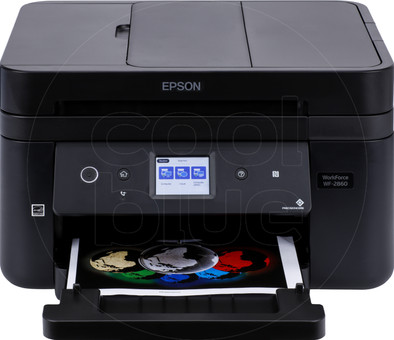
The Epson WorkForce WF-2860 is a compact all-in-one inkjet printer for a small office or home use. You can print wirelessly from your laptop, PC, or smartphone via WiFi and send print jobs with Apple AirPrint and email. You can choose whether to print, copy, fax, or scan the document via the built-in color touchscreen. Thanks to the automatic document feeder with a capacity of 30 sheets, you don't have to manually add paper. The flatbed scanner keeps your document in place while it scans. This allows the WF-2860 to scan your documents and send them to your PC or laptop quickly.
It's user-friendly.
Jinke Deblauwe
7 March 2021
Automatically translated from Nederlands
We were looking for a printer with which we could easily print wirelessly, with previous printers that promised that, it never worked. And now we even print wirelessly from smartphones or tablets. We also regularly use the scanner or copy function, which is now possible with 30 pages in one go and you don't have to do it page by page.
Sarah
25 February 2020
Automatically translated from Nederlands
Want to use it longer before I make a further judgment
Andre Burger
24 October 2020
Automatically translated from Nederlands