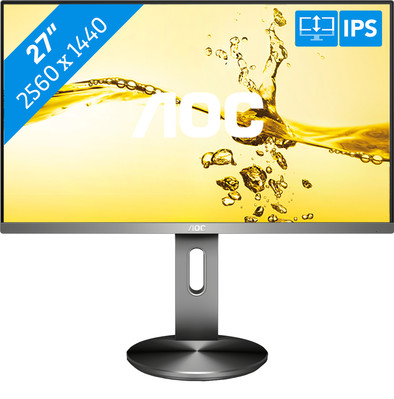
Never available again
View alternatives in the sidebar
Coolblue Extended Warranty for your monitor
With Coolblue Extended Warranty, you are protected against costs due to quality defects of your monitor for the next 5 years. During the entire term, we will reimburse up to the original purchase price. You can easily add the Extended Warranty in your shopping cart.

- During the entire term, we'll refund you up to the original purchase price.
- Receive CoolblueCredit worth the purchase price if a repair or replacement isn't possible
- No deductible or other additional charges
- 30-day return window
€ 16,99
one-timeHow can I buy Extended Warranty?
Add your monitor to your shopping cart. In the next step, you can add the Extended Warranty. You can exchange or return your purchase for free within 30 days.
Want to know more?
Specifications
Product
Product number | 862018 | |
|---|---|---|
Manufacturer code | Q2790PQE | |
Brand | AOC | |
Warranty | 2 years | |
Processing of your defect | Carry-in warranty |
Screen
Screen size | 27 inches | |
|---|---|---|
Recommended display resolution | 2560x1440 | |
Sharpness | Quad HD (1440p) | |
Aspect ratio | Standard (16:9) | |
Refresh rate | 60 Hz | |
Response time | 4 ms | |
Panel type | IPS panel | |
Brightness | 350 cd/m2 | |
Local dimming | ||
HDR support | ||
Contrast ratio | 1000 | |
Touchscreen | ||
Screen reflection | Anti-glare | |
Blue light filter | ||
Flicker-free technology | ||
Color space | sRGB | |
Color depth | 17 million colors (8-bit) | |
Adaptive Sync | ||
Resolution width | 2560 pixels | |
Resolution height | 1440 pixels | |
Anti-reflection type | Anti glare | |
Horizontal viewing angle | 178 ° |
Physical properties
Height | 53,1 cm | |
|---|---|---|
Width | 61,5 cm | |
Depth | 20 cm | |
Weight | 6,1 kg | |
Color | Black | |
Including stand | ||
Material | Plastic | |
Cable management | ||
Appearance | Neutral | |
Curved |
Connectors and connections
Number of HDMI connectors | 2 | |
|---|---|---|
Number of Female HDMI type A 1.4 ports | 2 | |
Number of headphone jacks | 1 | |
Type of headphone connection | 3.5mm (TS) | |
Number of Female Standard DisplayPort 1.2 ports | 1 | |
Number of female standard USB-A ports | 2 | |
Female standard USB-A port version | 3.0 | |
Number of female standard VGA ports | 1 | |
Number of female 3.5mm TS Audio Jack ports | 1 | |
Type of USB port | Standard USB-A | |
Number of USB ports | 2 |
Included
Included by default | DisplayPort cable, HDMI cable | |
|---|---|---|
Not included by default | USB-C cable |
Adjustability
Adjustable in height | ||
|---|---|---|
Tiltable | ||
Pivotable stand | ||
Pivot function | ||
VESA mount option | ||
VESA mount | 100x100mm |
Energy consumption
Energy label | E | |
|---|---|---|
Energy consumption standby | 0,5 W | |
Energy consumption active | 25 W | |
Energy consumption per 1000h | 21 kWh | |
Annual energy consumption | 30,66 kWh | |
Annual energy costs | 12,26 euros |
Other properties
Built-in speakers | ||
|---|---|---|
Webcam | ||
Kensington lock | ||
Best tested |
Quality properties
Recommended for use | Internet, email, and text processing, Office work, Watching movies in Full HD | |
|---|---|---|
Result Stiftung Warentest | Good |

