Never available again
View alternatives in the sidebar
View alternatives in the sidebar
With Coolblue Extended Warranty, you are protected against costs due to quality defects of your monitor for the next 5 years. During the entire term, we will reimburse up to the original purchase price. You can easily add the Extended Warranty in your shopping cart.
€ 43,99
one-timeAdd your monitor to your shopping cart. In the next step, you can add the Extended Warranty. You can exchange or return your purchase for free within 30 days.
Product number | 885184 | |
|---|---|---|
Manufacturer code | 32UP550-W.AEU | |
Brand | LG | |
Warranty | 3 years | |
Processing of your defect | Carry-in warranty |
Screen size | 32 inches | |
|---|---|---|
Recommended display resolution | 3840x2160 | |
Sharpness | 4K (UHD) | |
Aspect ratio | Standard (16:9) | |
Refresh rate | 60 Hz | |
Response time | 5 ms | |
Panel type | VA panel | |
Brightness | 350 cd/m2 | |
Local dimming | ||
HDR support | ||
Contrast ratio | 3000 | |
Touchscreen | ||
Type of HDR | HDR10 | |
Screen reflection | Anti-glare | |
Blue light filter | ||
Flicker-free technology | ||
Color space | DCI-P3 | |
Color depth | 1 billion colors (10-bit) | |
Adaptive Sync | ||
Type of adaptive sync | FreeSync | |
Resolution width | 3840 pixels | |
Resolution height | 2160 pixels | |
Anti-reflection type | Anti glare | |
Horizontal viewing angle | 178 ° |
Height | 95,5 cm | |
|---|---|---|
Width | 71,4 cm | |
Depth | 23,9 cm | |
Weight | 8,4 kg | |
Color | White | |
Including stand | ||
Material | Plastic | |
Cable management | ||
Appearance | Neutral | |
Curved |
Number of HDMI connectors | 2 | |
|---|---|---|
Number of Female HDMI type A 2.0 ports | 2 | |
Number of headphone jacks | 1 | |
Type of headphone connection | 3.5mm (TS) | |
Number of USB-C ports | 1 | |
Number of USB 3.1 Female USB-C port | 1 | |
Number of Female Standard DisplayPort 1.4 ports | 1 | |
Number of female standard USB-A ports | 2 | |
Female standard USB-A port version | 3.0 | |
Number of female 3.5mm TS Audio Jack ports | 1 | |
Type of USB port | Standard USB-A, USB-C | |
Number of USB ports | 3 | |
Suitable for daisy chaining | ||
USB-C dock | ||
Maximum USB-C dock power | 96 W |
Included by default | DisplayPort cable, HDMI cable, USB-C cable |
|---|
Adjustable in height | ||
|---|---|---|
Tiltable | ||
Pivotable stand | ||
Pivot function | ||
VESA mount option | ||
VESA mount | 100x100mm |
Energy label | G | |
|---|---|---|
Energy consumption standby | 0,3 W | |
Energy consumption active | 55 W | |
Energy consumption per 1000h | 38 kWh |
Built-in speakers | ||
|---|---|---|
Sound system | Stereo | |
Webcam | ||
Split screen | ||
Kensington lock |
Recommended for use | Image editing and graphic design, Internet, email, and text processing, Office work, Watching movies in 4K |
|---|
anything for a smile
Sharpness | 4K (UHD) | |
|---|---|---|
Curved | ||
Aspect ratio | Standard (16:9) | |
Refresh rate | 60 Hz | |
Response time | 5 ms | |
Panel type | VA panel | |
Color depth | 1 billion colors (10-bit) | |
Built-in speakers |
According to our monitor expert
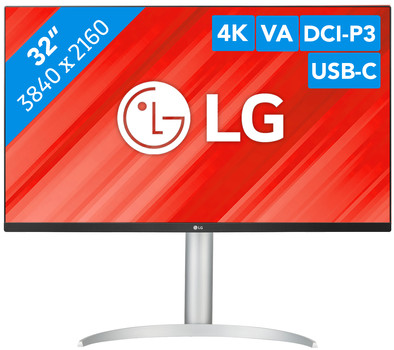
Connect and charge your external devices via the USB-C port on the monitor.
Edit photos and videos with true-to-life colors thanks to the HDR10 support and 90% coverage within the DCI-P3 color profile.
The 4K resolution projects images 2 times as sharp as with QHD and 4 times as sharp as with Full HD.
Without a monitor arm, it's not possible to adjust the monitor in height for an ergonomic working posture.
5 stars
4
4 stars
4
3 stars
3
2 stars
0
1 star
0
My experience is with a 16" MacBook Pro (via usb-c) and an Apple TV 4K (via HDMI).
Connect laptop: A USB-C cable is included, but it doesn't show an image and only charges your laptop. A review on Amazon showed that you need a thunderbolt 3 cable to get an image as well. This turned out to be the solution for me as well. Keep in mind that thunderbolt 3 cables are very expensive, not such a nice surprise if you get all the necessary cables included according to the description.
Once working, you have another challenge to get the colors right. My advice, turn off HDR in MacOS and use the "HDR Effect" setting in the display's drop-down menu. You can then calibrate the colors in MacOS. When you have HDR turned on in MacOS, there seems to be a gray haze over the image.
DDC/CI (adjusting brightness and volume via your computer) is supported, but not directly from MacOS. However, there are plenty of projects on github that will still make your brightness shortcuts work. Again not completely plug-and-play, but once set up fine.
Apple TV: Unlike MacOS, HDR works properly here. Calibrating colors also works fine through the Apple TV settings.
General: You have to switch between inputs manually via the button on the bottom of the housing.
They might as well have omitted the built-in speakers. This is of course no problem with external speakers.
Huge external power is included with this screen. I would have preferred a slightly thicker screen with internal power supply.
All in all, quite a bit of hassle to get everything set up and not as plug-and-play as the description suggests (compared to the now 10-year-old Thunderbolt display from Apple itself, downright ridiculous actually, but I don't think you can really escapes).
Olivier
15 August 2021
Automatically translated from Nederlands
I wouldn't choose this screen next time because the USB hub turns off when the screen goes into standby and then all devices (keyboard, mouse, camera, hard drive) are disconnected. You have to turn everything off and plug it back in again to get it connected again. So in practice you really don't have the convenience of one USB-C cable to your MacBook!
Johan Hobelman
9 February 2022
Automatically translated from Nederlands
I urgently needed a bigger and better screen because my current 24 inch screen was no longer sufficient. I hesitated for a long time between a 27" and a 32" screen, and was afraid that it would be too big. However, nothing could be further from the truth, it immediately feels like very comfortable working, with razor-sharp image quality. I don't regret my choice for a second
Kristof Van Steenberghe
19 January 2022
Automatically translated from Nederlands

