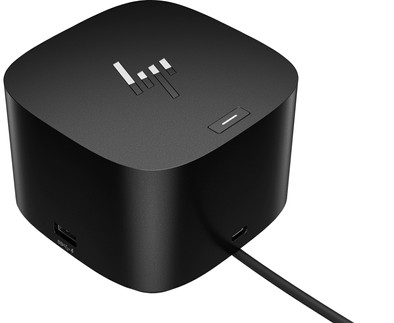
HP G4 Thunderbolt Docking Station 120W
Never available again
View alternatives in the sidebar
View alternatives in the sidebar
Product number | 912176 | |
|---|---|---|
Manufacturer code | 4J0A2AA#ABB | |
Brand | HP | |
Warranty | 2 years | |
Processing of your defect | Via Coolblue |
Made for laptop models | Apple MacBook, Chromebook, Windows laptop |
|---|
Laptop docking station suitable for | Connect 1 monitor, Connect 2 monitors and a Chromebook, Connect 2 monitors and a Windows laptop | |
|---|---|---|
Extra functionalities docking station | Charge laptop via docking station, Charge laptop via own charger, Charge phone via docking station, Connect wired network | |
Type of main connector | USB-C | |
Supported video technology on Docking Station | Thunderbolt 4 | |
Number of USB ports | 6 | |
USB function | Charge, Charging an external device, Data transfer, Device connection, Play media, Power source | |
Type of USB port | Standard USB-A, USB-C | |
Number of female standard USB-A ports | 4 | |
Female standard USB-A port version | 3.0 | |
Number of USB-C ports | 2 | |
Protocol Female USB-C port | USB, USB electricity | |
USB version Female USB-C port | 3.1, 4.0 | |
Number of USB 3.1 Female USB-C port | 1 | |
Total available video outputs | 1x DisplayPort, 1x HDMI | |
Number of HDMI connectors | 1 | |
Female HDMI Type A port version | 2.0 | |
Number of Ethernet ports | 1 | |
Ethernet speed | 2.5Gb Ethernet (2500Mbps) | |
Type of DisplayPort connector | standard DisplayPort | |
Number of Female Standard DisplayPort 1.4 ports | 1 | |
Version Female Standard DisplayPort port | 1.4 | |
Memory card reader | ||
Number of connectable monitors | 4 | |
Maximum image resolution 1 monitor | 4K (3840x2160) | |
Maximum refresh rate 1 monitor | 60 Hz | |
Maximum image resolution 2 monitors | 4K (3840x2160) | |
Maximum refresh rate of 2 monitors | 60 Hz | |
Maximum image resolution 3 monitors | 4K (3840x2160) | |
Maximum refresh rate 3 monitors | 60 Hz | |
Maximum image resolution 4 monitors | 4K (3840x2160) | |
Maximum refresh rate 4 monitors | 60 Hz |
Color | Black | |
|---|---|---|
Height | 6,8 cm | |
Width | 9,8 cm | |
Depth | 9,8 cm | |
Weight | 760 g |
anything for a smile
Extra functionalities docking station | Charge laptop via docking station, Charge laptop via own charger, Charge phone via docking station, Connect wired network | |
|---|---|---|
Type of main connector | USB-C | |
Total available video outputs | 1x DisplayPort, 1x HDMI | |
Number of connectable monitors | 4 | |
Type of USB port | Standard USB-A, USB-C |
According to our dock for laptops expert
With this dock, you can connect up to 4 4K monitors to your laptop.
HP Sure Start protects your connected devices from hackers.
You can charge your laptop with this dock via the USB-C port.
It's not suitable for laptops that need more than 100W of power.
You can't read files off a memory card with this docking station.
Turn your desk into the ultimate workspace with the HP G4 Thunderbolt Docking Station 120W. You can connect up to 4 4K monitors on this docking station, so you can create a lot more space for your windows. The dock also has a number of ports for your peripherals. Most connectors are at the back, so your workspace stays neat. You can connect an Ethernet cable in a workspace with poor wireless internet connection, so you can participate in online meetings with your colleagues problem-free. Thanks to HP Sure Start, your devices are secure. This prevents hackers from using the dock to attack your network and laptop. Administrators also have access from afar via a wired connection, thanks to the Intel vPro technology. This way, they can easily perform updates. With 120W, you can charge most laptops.
The HP G4 Thunderbolt Docking Station 120W works with all Windows laptops, Chromebook models, and MacBook models with USB-C ports that send a video signal. This is how you check whether your laptop has a suitable USB-C port.
Works great on my Macbook Pro M2. Took a while to get a second screen working. You need to connect one screen via HDMI/Displayport, and the second via the Thunderbolt/USB-C port (and not via the second Displayport).
Ivan
2 February 2025
Automatically translated from Nederlands
I had bought an expensive other brand for this that did not live up to the number of screens (3 on 4k) and was very slow. The HP G4, on the other hand, delivers on everything and I have not been able to find a single negative point.
Ben
12 February 2024
Automatically translated from Nederlands
Docking station is not usable with multiple screens. The GPU cannot handle intensive use, causing the screens to flicker/go black. Way too expensive for what it is!
Koen
5 February 2024
Automatically translated from Nederlands