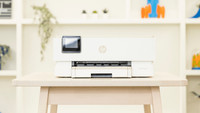
Brother MFC-J5340DWE





anything for a smile

No extra ink

5 stars
15
4 stars
11
3 stars
1
2 stars
0
1 star
0
Installation ease
Options
Print quality
With the Brother MFC-J5340DWE, I can print large files double-sided in no time and receive 4 months of free ink. The user-friendliness of EcoPro in the app could be improved.
Easy and fast installation The installation of the printer is easy with the supplied manual. I installed the printer in less than 10 minutes. The cartridge holder is conveniently located on the right front side of the printer. I easily click the cartridges into the holder. I connect the printer to my WiFi network, but this is actually not necessary because the printer has its own WiFi network. This connects your smartphone or computer directly to the printer. I also install the Brother Mobile Connect app on my smartphone. This way I can control all functions of the printer via the app.
4 months of free ink with EcoPro There is a QR code on the printer that I use to register the printer for a 4-month trial period for Brother EcoPro, Brother's ink service. With EcoPro, I pay a monthly fee for the number of pages I print and receive an ongoing warranty on the printer. I receive cartridges automatically at home. I can only sign up for this through the Brother Mobile Connect app, not through the Brother website. Signing up is going well. When I want to view my EcoPro data, I am sent from the app to a web page. So I can't view my data in the app itself.
Fast printer with useful features Brother promises that the printer prints about 28 black and white pages per minute. I tested this and it does indeed print about 28 single-sided pages per minute. I am therefore very positive about the speed. I recommend the printer for a medium-sized office. I am automatically copying multiple pages using the automatic document feeder. I put up to 50 sheets of paper in here at a time, making it quick and easy to print handouts for my colleagues. In addition, I save paper with automatic double-sided printing. The Brother MFC-J5340DWE first prints one side of the page, automatically turns the paper over and then prints the other side. I also print documents in A3 format with this printer. This is useful for printing posters, construction drawings and brochures, for example. The printer can scan, copy and fax up to A4 format.
Kayleigh. Printer specialist.
24 January 2023
Automatically translated from Nederlands
Easy device with many possibilities
Joep
20 February 2023
Automatically translated from Nederlands
This printer is my third in a row from Brother for good quality in 35 years
Freddy
27 February 2023
Automatically translated from Nederlands
Print technology | Inkjet | |
|---|---|---|
Printer type | All-in-one | |
Color printer | ||
Automatic duplex printing | ||
Maximum print size | A3 | |
Automatic document feeder (ADF) | ||
WiFi direct |
According to our printer expert
If you register this printer for Brother EcoPro, you'll receive free ink for a 4-month trial period.
It's an all-in-one printer, so you can also scan and copy in addition to printing.
Thanks to the automatic document feeder (ADF), the printer scans and copies a stack of papers in one go.
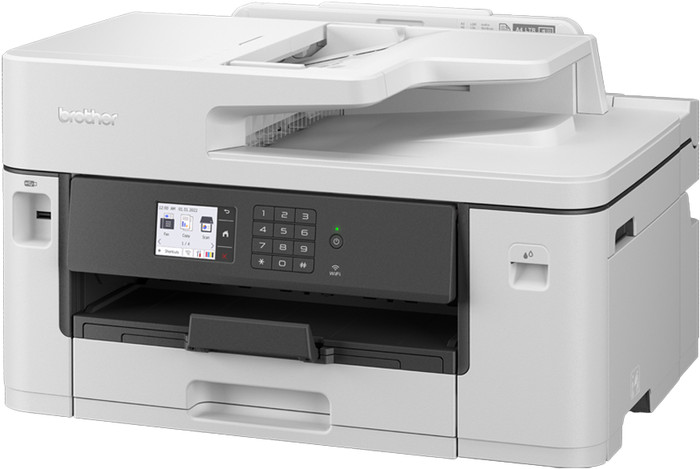
The printer is large and doesn't fit on your desk, so you have to place it on a separate table.
If you want to scan or copy a stack of papers in duplex in one go, choose a printer that supports DADF.
With the Brother MFC-J5340DWE, you get a 4-in-1 inkjet printer for a small or medium-sized office. This is a color printer, so you can also print your charts in color on A3 and A4 paper. Thanks to the print speed of 28 pages per minute, you don't have to wait long for longer work reports. You can scan, copy, and fax on an A4 size at the most. The printer has an automatic document feeder, so you can scan and copy up to 50 sheets in one go. You can save paper with the automatic duplex printing function. And you can send print jobs to the printer from your desk via WiFi Direct, email print, or Apple AirPrint. Download the Brother Mobile Connect app and control the printer from your smartphone or tablet.
Suitable for Brother EcoPro
This printer is suitable for Brother EcoPro, the Brother printing subscription. You automatically receive cartridges when your current cartridges are empty, and you can send empty cartridges back for free. In addition, you receive an ongoing warranty for your printer. Try Brother EcoPro for free with a 4-month trial period. More information on EcoPro? Read our advice article.
Retail price
€ 396,-€ 261,90
Retail price
€ 396,-€ 261,90
Product number | 921139 | |
|---|---|---|
Manufacturer code | MFCJ5340DWERE1 | |
Brand | Brother | |
Warranty | 2 years | |
Processing of your defect | Via Coolblue |
Printer size | Large | |
|---|---|---|
Width | 53 cm | |
Depth | 39,8 cm | |
Height | 30,5 cm | |
Color | Gray | |
Weight | 17 kg |
Printer type | All-in-one | |
|---|---|---|
Photo printer | ||
Print quality photos | Stand | |
Portable (mobile use) | ||
Recommended for use printers | Business printing |
Cartridge line | LC-422 | |
|---|---|---|
Usage costs for 1 page | 3 eurocents | |
Print technology | Inkjet | |
Type of ink | Cartridges | |
Number of cartridges/toner cartridges | 4 | |
Color printer | ||
Print speed black (ISO) | 28 ppm | |
Print speed color (ISO) | 28 ppm | |
First black page ready after | 5 seconds | |
Speed class | Excellent | |
Maximum print resolution height | 1200 dpi | |
Maximum print resolution width | 4800 dpi | |
Maximum print size | A3 | |
Automatic duplex printing | ||
Borderless printing | ||
Maximum print size duplex printing | A3 |
Scan functionality | ||
|---|---|---|
Automatic duplex scanning | ||
Maximum optical scan resolution width | 2400 dpi | |
Maximum optical scan resolution height | 1200 dpi | |
Scanner type | Barcode scanner, Book scanner, Business card scanner, File scanner, Flatbed scanner, Graphic scanner, Mobile scanner, Photo scanner | |
Maximum scan size | A4 (21x29.7cm) | |
Automatic document feeder (ADF) | ||
Maximum paper size ADF | A4 | |
Scan sizes | A4, A5, A6, A7 | |
Scan speed (PPM) | 25 ppm | |
Color depth output | 24 bpp | |
Scan to | Cloud, Dropbox, Email, Email address, Email server, Evernote, FTP, Folder, Google Docs, Image, MicroSD card, Network, PC (local), PC (network), PDF, PDF/A, SD card, USB | |
ADF capacity | 50 | |
OCR |
Copying functionality | ||
|---|---|---|
Copy speed black (ISO) | 25 ppm | |
Copy speed color (ISO) | 25 ppm | |
Maximum copy resolution height | 600 dpi | |
Maximum copy resolution width | 600 dpi |
Fax functionality | ||
|---|---|---|
Color fax |
Built-in screen | ||
|---|---|---|
Color screen | ||
Touchscreen |
Suitable for HP Instant Ink |
|---|
Compatible with operating system | Android, ChromeOS, Linux, Windows, iOS, macOS | |
|---|---|---|
Connection type | Wired, Wireless | |
Apple AirPrint | ||
Email print | ||
WPS (Wireless Protected Setup) | ||
Female standard USB-A port version | 2.0 | |
Ethernet port | ||
NFC | ||
Built-in WiFi | ||
WiFi frequency printers | 2.4GHz, 5GHz | |
WiFi direct | ||
Bluetooth | ||
USB port |
Location paper input | Back, Front | |
|---|---|---|
Manual input tray | ||
Photo paper drawer | ||
Output capacity output drawer | 100 | |
Maximum print size standard paper tray | A3 | |
Input capacity standard paper tray | 250 | |
Number of standard paper trays | 1 |
Memory card reader |
|---|
Current product

Excellent
Standard
Retail price
€ 396,-€ 261,90
Retail price
€ 369,90€ 214,90
Delivered tomorrow
Delivered tomorrow
With Coolblue Extended Warranty, you are protected against costs due to quality defects of your printer for the next 4 years. During the entire term, we will reimburse up to the original purchase price. You can easily add the Extended Warranty in your shopping cart.
€ 39,99
one-timeAdd your printer to your shopping cart. In the next step, you can add the Extended Warranty. You can exchange or return your purchase for free within 30 days.