


anything for a smile

Retail price
€ 379,99€ 280,95
Our choice for just internet in your entire house
3

Better model

I recently tested this TP-Link Deco BE25 WiFi 7 mesh set (in 3-pack). Before I could test this set, I used a WiFi5 (AC3000) set. The WiFi 7 set is at the same locations, with the same (partly) wired backhaul, to make a 'fair' comparison.
After receiving it, the installation was done in no time. Admittedly with the mobile app, because just like other Deco sets. The configuration can only be done via the app. You can access the web interface of the main deco, but you only see a status page there.
The Deco app offers many options and functionalities for the Deco set.
From VPN access, to setting up different networks (Guest Network/IoT Network) etc. New for me in combination with WiFi7 is the use of MLO, Multi-Link Operation (MLO), where your WiFi7 client can use multiple channels and therefore gets more throughput compared to a single link.
The coverage in the house is better than the previous WiFi 5 set. Due to the better coverage, you have a chance that your device will stay connected to a specific Deco for longer. But after turning on 'fast roaming' I no longer notice this. By connecting the main Deco wired to the first floor, and a wireless backhaul between the first and the attic; the speed throughout the house can be called very good.
Despite the capabilities of the set, it is noticeable that logically with a wired backhaul the speeds are significantly better than when using wireless backhaul. Perhaps a somewhat more expensive set with dedicated backhaul antennas offers a solution for the more demanding users.
Besides that, this BE25 set is a great starter and even low priced for a WiFi7 set. For people considering an upgrade from a WiFi5 set, the threshold is not too high with this set.
Kelly
25 March 2025
Automatically translated from Nederlands
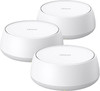
The TP-Link Deco BE25 Wi-Fi 7 mesh set is, as the name suggests, a Wi-Fi 7 set, which is of course backward compatible so that older devices can also simply connect. The package contains 3 Wi-Fi points, and 1 LAN cable is included to connect the main unit to your router. The other 2 receive the connection wirelessly and only need to be connected to the socket for power.
The Wi-Fi points are small and easy to install, although I would have preferred that they could be mounted on the wall as is now the case with my Ubiquiti set.
I have never installed 3 Wi-Fi points so quickly before. Using the DECO app on your mobile phone, everything was up and running in less than 10 minutes. Everything actually happens in the app, so all settings and configurations (SSID, channels, VPN, QOS) are done there. You connect the main unit to the app, the other 2 points are automatically found and added as soon as they have power. I have never seen it easier than this.
During testing, it was noticed that my Wi-Fi 7 devices lose their connection several times a day, which you can also see in the app (the connection then has to be re-established). But also that it switches back to Wi-Fi 6. The range between the mutual points is also disappointing, which means that I do not achieve the maximum speed, even though they are not very far apart.
The major advantages are therefore summarized: easy to install (anyone can do it), suitable for Wi-Fi 7 devices, suitable in a not too large home. Something still needs to be done about the loss/loss of the connection. I was allowed to test this set for Review.nl
RichardG
14 March 2025
Automatically translated from Nederlands
Finally, the Wi-Fi solution I've been searching for. No more switching access points or having a phone that keeps connecting to the worst access point. Important: the Wi-Fi on the old access point has to be turned off, otherwise, there will still be an access point that isn't part of the mesh network alongside the new mesh network.
I have the TP-Link Decos about 10 meters apart on the ground floor, and I can stream video throughout the house, even to the back of the garden, without any problems.
It works out of the box, but you can also set up the mesh network yourself and perform speed and signal tests using the TP-Link Deco app.
It's a shame, though, that an additional unit (and also the be25 outdoor version) is relatively expensive.
Patrick
6 August 2025
Automatically translated from Nederlands
Our digital expert will help you, but it can sometimes make mistakes, like humans do.
According to our router expert
High WiFi speeds: with WiFi 7, your devices always have the fastest WiFi connection.
Stable connection on 5GHz: on the 5GHz band, you can watch a series without lag.
1 WiFi network: the 3 WiFi stations form 1 large WiFi network, so you only have to remember 1 password.
Only for WiFi 7 devices: WiFi 7 only works with devices that support this WiFi standard.
Shorter range on 5GHz: the 5GHz band has a shorter range, so your WiFi gets worse when you're farther from the router.
Delivered tomorrow
Or
€ 24,39
p/m12 installments
Total amount
€ 292,70
7.9 % eff. interest p.a.
Retail price
€ 379,99€ 280,95
Product number | 958399 | |
|---|---|---|
Manufacturer code | Deco BE25(3-pack) | |
Brand | TP-Link | |
Warranty | 2 years | |
Processing of your defect | Via Coolblue |
Type router | Mesh WiFi system | |
|---|---|---|
WiFi speed class | High-end | |
Usage situation | Work from home | |
Living situation | Large apartment, Single-family home | |
Number of stations | 3 | |
Can be expanded with extra stations | ||
Built-in modem |
Fastest WiFi standard | Wireless BE (WiFi 7) | |
|---|---|---|
Frequency bands | Dual-band | |
WiFi speed | BE3600 | |
2.4GHz band speed | 688 Mbit/s | |
5GHz band speed | 2882 Mbit/s | |
Number of WiFi antennas | 4 |
Ethernet speed | 2.5Gb Ethernet (2500Mbps) | |
|---|---|---|
Network connector | ||
Maximum ethernet speed | 2500 Mbit/s | |
Number of Ethernet ports | 2 | |
SFP/GBIC ports | 0 | |
PoE support | ||
USB port |
Mobile data connection | No | |
|---|---|---|
SIM card slot |
Quality of Service (QoS) | ||
|---|---|---|
MU-MIMMO | ||
Seamless roaming | ||
Beamforming | ||
Port forwarding | ||
LACP Link aggregation |
Parental controls | ||
|---|---|---|
WLAN security | WEP, WPA, WPA-PSK, WPA2, WPA2-PSK, WPA3, WPA3 Personal | |
Firewall | ||
Firewall type | SPI Firewall | |
Guest network | ||
VPN support | ||
VPN server | ||
VPN client | ||
VPN passthrough |
Mounting possible | ||
|---|---|---|
Width | 15 cm | |
Height | 6,2 cm | |
Depth | 15 cm | |
Weight | 1,31 kg | |
Color | White | |
Material | Plastic |
Power supply type | Power grid |
|---|
With Coolblue Extended Warranty, you are protected against costs due to quality defects of your router for the next 4 years. During the entire term, we will reimburse up to the original purchase price. You can easily add the Extended Warranty in your shopping cart.
€ 14,99
one-timeAdd your router to your shopping cart. In the next step, you can add the Extended Warranty. You can exchange or return your purchase for free within 30 days.
Delivered tomorrow

