Cricut Explore 4 Essentials bundle
Never available again
View alternatives in the sidebar
Choose the best cutting machine that also cuts wood
Cricut Maker 4
Better model
View alternatives in the sidebar
Better model
Product number | 960891 | |
|---|---|---|
Manufacturer code | 2011287 | |
Brand | Cricut | |
Warranty | 2 years | |
Processing of your defect | Via Coolblue |
Color | Cream | |
|---|---|---|
Height | 24 cm | |
Width | 61,4 cm | |
Depth | 23,5 cm | |
Weight | 8,02 kg | |
Portable (mobile use) | ||
Maximum width of material | 33 cm | |
Maximum thickness of material | 1,6 cm | |
Cutting length | 3,6 m | |
Cutting speed | 358 mm/s | |
Connection type | Wired, Wireless | |
Bluetooth | ||
Controls via app | ||
Compatible with operating system | Android, Windows, iOS, iPadOS, macOS |
Workshops possible | ||
|---|---|---|
Works with card mat | ||
Also works without a cutting mat | ||
Support for smart materials | ||
Number of supported materials | 100 | |
Suitable for material type | Cardboard, Felt, Foil, Paper, Stickers, Vinyl | |
Number of tools | 6 | |
Functionality of the tools | Create folding lines, Cutting, Foil, Writing |
Included Cricut accessories | 5 sheets of transfer tape 30.5x30.5cm, 6 different colors of sheets Cricut Smart Iron-On 33x30.5cm, 6 different colors of sheets Cricut Smart Vinyl Permanent 33x30.5cm, 6 sheets of cardstock, Black Fine Point Pen (0.4mm), LightGrip Machine Mat, Magenta Fine Point Pen (0.4mm), Sample materials | |
|---|---|---|
EasyPress Mini included | ||
Spatula included | ||
Mini Weeder included | ||
Weeder included | ||
Small scraper included | ||
Scraper included | ||
Scoring stylus included | ||
Premium Fine-Point blade met casing included | ||
Joy blade with casing included |
anything for a smile
Connection type | Wired, Wireless | |
|---|---|---|
Portable (mobile use) | ||
Cutting length | 3,6 m | |
Number of supported materials | 100 | |
Maximum width of material | 33 cm | |
Support for smart materials |
According to our cutting machine expert
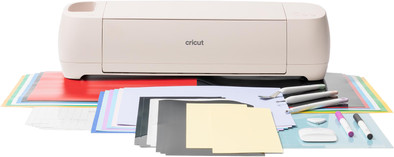
You can get everything for your Cricut with sheets of vinyl, iron, transfer tape, a tool set, and a cutting mat.
With the Cricut Explore 4, you can cut more than 100 materials.
You can use up to 6 tools, so you can write, crease, and apply foil.
If you want more options like engraving or making double folding lines, choose the Cricut Maker 4.
With the Cricut Explore 4 Essentials bundle, you can get everything for your projects. You also receive 6 Smart Vinyl sheets, 6 Smart Iron-On sheets, 6 hobby carton sheets, 5 transfer tape sheets, a tool set, and a cutting mat with this Explore 4. This way, you can make a print for your T-shirt, stickers, long wall decorations, and even more. From fine paper to hobby carton, you can cut more than 100 materials. The Explore 4 cuts 2 times faster than its predecessor. This way, you can make a stack of cards or multiple prints in a row. You can make cuts up to 3.6m long and 33cm wide. The Explore 4 measures if you have enough material for your creation beforehand. With the extra, separately available tools, you have even more options. For example, give a card a shiny detail with foil. Or make folding boxes with a roller knife.
Cricut Design Space
You can create your designs with the free Design Space software. Cricut Design Space is the design program by Cricut. A couple of ready-made projects are available for free. Do you want access to thousands of ready-made projects, images, and fonts? You need a paid subscription with Cricut Access. Or, upload a free design from the internet. You can use the canvas and create your own design with various shapes. Cricut Design Space guides you through your entire project.
I kept blaming my problems on my incompetence, but it turned out the machine was broken. The Cricut can do so much more, I just have to figure it all out.
Anita
25 February 2026
Automatically translated from Nederlands
I am very happy with it
Denise
15 February 2026
Automatically translated from Nederlands
It takes some figuring out, but it's doable. There are also plenty of videos on YouTube to help you get started!
What I do find a shame is that the manual is translated into 10 languages except Dutch!
Ankie
12 January 2026
Automatically translated from Nederlands