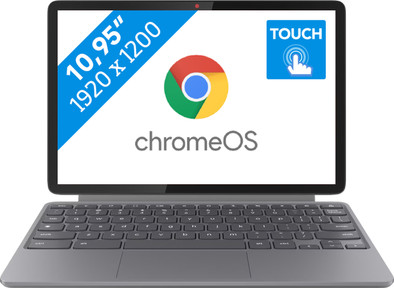
Lenovo Chromebook Duet 11M889 - ChromeOS - 10.95 inches - MediaTek Kompanio 838 - 8GB RAM/128GB

Never available again
View alternatives in the sidebar
View alternatives in the sidebar
ChromeOS is the operating system of Chromebooks. This differs from Windows and macOS. Due to this, some apps work differently. On this page, you can find details about the models. You can find information about Microsoft Office here. Buy a Chromebook and receive free trial periods for Google AI Pro, YouTube Premium, and NVIDIA GeForce NOW. Read more about all benefits here.

If you're looking for a new laptop, there's a large selection to choose from. This makes it difficult to choose the best one for you. We're happy to help you. Curious about what to keep in mind? Read our advice page.

Product number | 972722 | |
|---|---|---|
Manufacturer code | 83HH000NGE | |
Brand | Lenovo | |
Warranty | 2 years | |
Processing of your defect | Via Coolblue |
Screen size | 10,95 inches | |
|---|---|---|
Screen quality: laptops | Mid-range | |
Touchscreen | ||
Panel type | IPS panel | |
Sharpness | WUXGA | |
Resolution width | 1920 pixels | |
Resolution height | 1200 pixels | |
Refresh rate | 60 Hz | |
Aspect ratio | 16:10 | |
Screen reflection | Glossy | |
Color space | NTSC | |
Percentage color coverage NTSC | 72 % | |
Adaptive Sync | ||
Brightness | 400 cd/m2 | |
Blue light filter | ||
HDR support |
Processor | MediaTek Kompanio | |
|---|---|---|
Processor cores | Octa-Core (8) | |
Turbo speed | 2,6 GHz | |
Speed class laptops | Stand |
Neural Processing Unit (NPU) | MediaTek NPU 890 | |
|---|---|---|
TOPs | 4 | |
Microsoft Copilot+ PC | No |
Internal RAM | 8 GB | |
|---|---|---|
Memory composition | 1x 8GB | |
Memory slot 1 | 8 GB | |
Total number of RAM slots | 1 | |
Maximum internal memory | 8 GB | |
RAM type (DDR type) | DDR4 | |
Memory speed | 3733 MHz | |
Number of replaceable RAM slots | 0 | |
Number of free RAM slots | 0 | |
RAM expandable up to | 8 GB |
Total storage capacity | 128 GB | |
|---|---|---|
Storage type | eMMC | |
Hard drive type | eMMC | |
Number of replaceable storage slots | 0 | |
Number of free storage slots | 0 | |
Internal storage expandable up to | 128 GB |
Video card | Mali G57 | |
|---|---|---|
Video card brand | Head | |
Type of video card | Shared |
Operating system | Google ChromeOS | |
|---|---|---|
Operating system language | Multiple languages can be configured |
Recommended for use | Internet, email, and text processing, On the go |
|---|
Build quality laptops | Mid-range | |
|---|---|---|
Laptop model | 2-in-1, Laptop | |
Color | Blue | |
Material | Metal, Plastic | |
Metal type | Aluminum | |
Material top of laptop | Metal | |
Material keyboard casing laptop | Plastic | |
Material bottom of laptop | Metal | |
Height | 2,1 cm | |
Width | 27,3 cm | |
Depth | 17,3 cm | |
Weight | 1,1 kg |
Mobile data connection | No | |
|---|---|---|
WiFi standards | Wireless A (WiFi 2), Wireless AC (WiFi 5), Wireless AX (WiFi 6), Wireless B (WiFi 1), Wireless G (WiFi 3), Wireless N (WiFi 4) | |
Bluetooth | ||
Bluetooth version | 5.3 |
USB port | ||
|---|---|---|
Number of USB ports | 4 | |
Type of USB port | USB-C | |
Protocol Female USB-C port | DisplayPort Alternative Mode, USB, USB electricity | |
USB version Female USB-C port | 3.0 | |
Video output via USB-C possible | Yes | |
Number of USB 3.0 Female USB-C ports | 2 | |
HDMI connector | ||
DisplayPort connector | ||
VGA connector | ||
Network connector | ||
Thunderbolt connector | ||
Headphone jack | ||
Memory card reader |
Keyboard layout | QWERTZ | |
|---|---|---|
Physical keyboard layout | ISO | |
Numeric keypad | ||
Spill-resistant | ||
Backlit keyboard | ||
Mechanical keyboard | ||
Programmable keys | ||
Copilot test |
Built-in microphone | ||
|---|---|---|
Number of speakers | 2 | |
Sound reproduction | Stereo | |
Integrated computer speakers brand | Standard speakers |
Built-in camera | ||
|---|---|---|
Image definition webcams | Full HD (1080p) | |
Camera slider |
Battery capacity laptop | 29 Wh | |
|---|---|---|
Battery technology | Lithium polymer | |
Power connector input type (female) | USB Type C | |
Laptop wattage | 45 W | |
Charger included | ||
Power charger | 45 W |
Manufacturer's warranty |
|---|
TPM (Trusted platform module) | ||
|---|---|---|
Kensington lock | ||
Windows Hello | ||
Fingerprint identity sensor | ||
Security class laptops | Mid-range | |
Built-in privacy screen |
Extra installed software | ||
|---|---|---|
ISV certification |
anything for a smile
Screen size | 10,95 inches | |
|---|---|---|
Processor | MediaTek Kompanio | |
Internal RAM | 8 GB | |
Total storage capacity | 128 GB | |
Video card | Mali G57 | |
Recommended for use | Internet, email, and text processing, On the go | |
Panel type | IPS panel | |
Screen quality: laptops | Mid-range |
According to our laptop expert
You can easily disconnect this Chromebook from the keyboard and flexibly use it anywhere as both a laptop and tablet.
The MediaTek Kompanio 838 processor and 8GB RAM, ensure smooth multitasking and effortless processing of medium demanding tasks.
Thanks to the low 1.1kg weight, you can easily take this Chromebook with you.
You should choose a laptop with at least an Intel Core i5, AMD Ryzen 5, or MediaTek Kompanio processor to perform demanding tasks and graphic designs edits.
Because this Chromebook doesn't have keyboard backlight, the keys are hard to see when it's dark.
Note: apps can only be downloaded via the Google Play Store. Windows and Mac programs don't always work the same on a Chromebook. That's why you often use the web version of apps like Office, for example.
Flexibly work on your projects with the compact 10.95-inch Lenovo Chromebook Duet 11M889. Disconnect the keyboard from the touchpad and use it as a tablet. That way, you can benefit from the best of both worlds and easily take notes or make sketches. Prefer quickly typing on a keyboard? Reconnect the Chromebook to the keyboard. That way, you can smoothly work in different apps like Google Docs or Spreadsheets. The MediaTek Kompanio 838 processor and 8GB (DDR4) RAM offer enough performance for that. The model runs on ChromeOS, the fast and secure Google operating system. Your daily routine becomes easier thanks to the Google integration and pre-installed Google apps. With a 1.1kg weight, the Lenovo Chromebook is a true lightweight for on the go. This makes it ideal to take with you to a café or work on the train.
5 stars
0
4 stars
0
3 stars
0
2 stars
0
1 star
0