
Written by Lodi
Edited on
27 January 2025
·
13:10
How do you choose the right smartwatch size?
When you choose a smartwatch, it's important to keep the size in mind. No matter how beautiful the smartwatch is, it has to fit your wrist well. How do you know which size smartwatch suits you? In this article, we'll tell you what to keep in mind to purchase the right size smartwatch.
Measure your wrist
You can determine the right watch case size by measuring your wrist circumference.
- Wrap a tape measure around your wrist just above your wrist bone. This is the bump you feel on your wrist.
- Don't have a tape measure? Wrap a piece of string around your wrist and mark it where the string wraps all the way around. Now you can use a ruler to measure the distance from the end of the string to the marking.

Smartwatch sizes
| Size watch case | Size | Size smartwatch | Wrist circumference |
|---|---|---|---|
| Small | S | 41mm and smaller | 13 to 15cm |
| Average | M | 42 to 44mm | 15 to 17cm |
| Large | L | 45 to 48mm | 17 to 19cm |
| Extra large | XL | 49mm and larger | 19 to 22cm |

Sizes Apple Watch
The Apple Watch is available in various sizes. The height of the watch case determines the size:
- The largest model is the Apple Watch Ultra (2). This model is 49mm.
- The Apple Watch Series 10 is available in 42 and 46mm.
- The Apple Watch Series 9, 8, and 7 are available in 41 and 45mm.
- The Apple Watch SE (2022/2023/2204) is available in 40 and 40mm.
Keep in mind that not every watch strap is suitable for the same wrist circumference.
External features
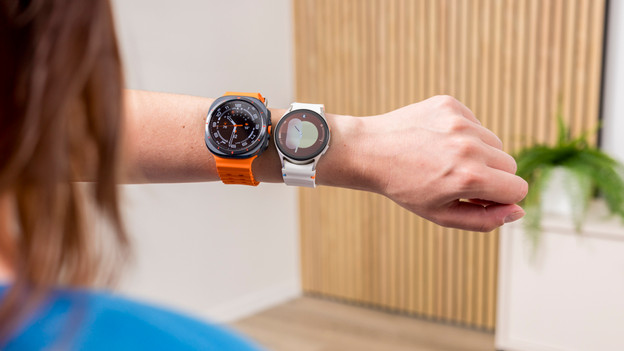
Aside from the width of the watch case, there are several other exterior features that determine how how big the smartwatch looks. A thick bezel around the screen will make a watch look bigger, for example. The thickness of the watch case and the width of the strap also influence the way the smartwatch looks on your wrist. And don't forget about the size of the buttons on the watch. Larger buttons make the watch look larger.
Article by Lodi
Smartwatch Expert.

