Written by Giorgos
Edited on
13 October 2022
·
07:19
What are the different aspect ratios of a monitor?
Monitors have different aspect ratios that all have their own advantages and disadvantages. For example, an ultrawide monitor offers more screen space, but you do need a large desk for it. In this article, you can read which different aspect ratios there are and what they offer.
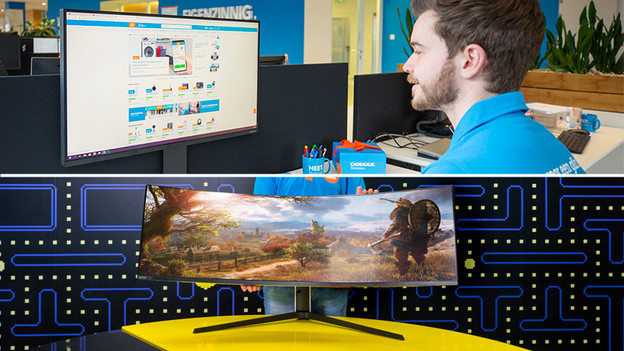
What's aspect ratio?
The aspect ratio indicates the ratio between the width and length of a screen. In total, there are 4 different aspect ratios.
- 4:3 monitors have a rectangular shape and aren't very common. This ratio is mainly used in the United States.
- 16:9 monitors are the standard in Europe. These monitors are most common and are suitable for every situation.
- 21:9 monitors are also known as ultrawide monitors. These offer about one third extra screen space.
- 32:9 monitors are known as super ultrawide monitors. This equals two 16:9 monitors side by side.
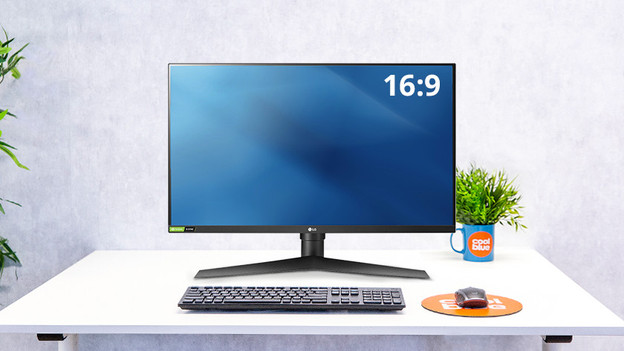
16:9: the European standard
A monitor with a 16:9 aspect ratio is the standard for monitors. This ratio is the most commonly available version. A 16:9 monitor is suitable for any situation you can think of, whether it's working at the office, image editing, or gaming. These screens fit on nearly every desk, even if you live in a small student room. The ratio 16:9 is available in screen sizes up to about 27 inches.
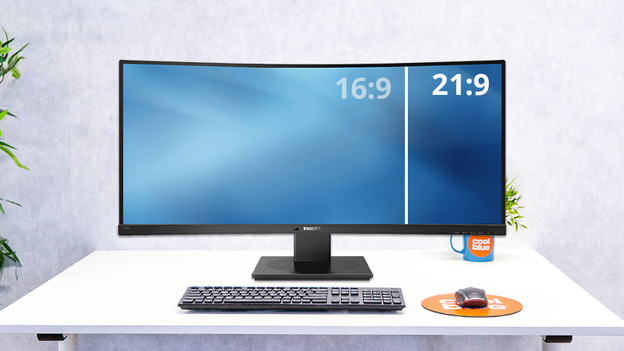
21:9: extra screen space
If you need more screen space, choose a 21:9 monitor. This aspect ratio is also known as 'ultrawide'. Ultrawide screens offer 33% more screen space, so you can easily multitask. For example, you can open a spreadsheet and Word document side by side to keep an overview while analyzing data. In addition, you watch movies without black borders and game in ultrawide mode. These monitors do require a large desk due to their large size.
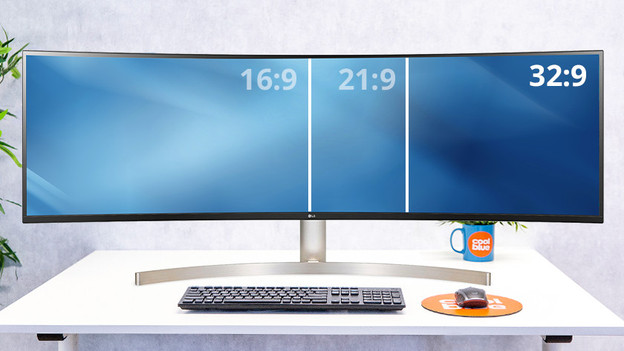
32:9: the same as 2 standard screens side by side
For the ultimate experience, you choose a 32:9 monitor. These 'super ultrawide' monitor are just as wide as two 16:9 monitors side by side. The difference is that you don't see any bezels in the middle. You can open up to 4 or 5 windows side by side to work even more efficiently. Keep in mind that these monitors require quite a large desk. These huge monitors take up a lot of space and are usually fairly heavy.