Written by Bob
Edited on
1 May 2025
·
11:27
What's Apple Intelligence on an iPhone and what can you use it for?
Apple Intelligence is Apple's own version of AI, or artificial intelligence. It's a collection of useful tools that allow you to improve texts and easily edit photos. Apple Intelligence is only available on the newer iPhone models, such as the iPhone 16 series and the iPhone 15 Pro and Pro max. We'll explain how AI on your iPhone works and what you can use it for.

Which iPhone models have Apple Intelligence?
You can only use Apple Intelligence with newer iPhone models. Currently, this includes the following models:
- Apple iPhone 16, 16 Plus, 16 Pro, 16 Pro Max, and 16e
- Apple iPhone 15 Pro and 15 Pro Max
Older iPhone models don't get AI functions, also not in the future.
How do you use Apple Intelligence?
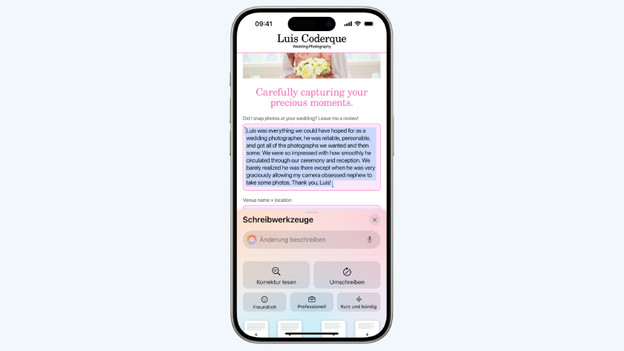
All functions will automatically appear on your iPhone if you've installed the latest iOS version. Most AI functions are integrated in the menus where you use them. You see the Clean Up photo editing function when you view a photo, for example. The Writing Tools menu appears automatically when you select a text. You do have to open some functions separately. Press the camera button for a long time to open visual intelligence, for example.

Visual intelligence
With visual intelligence, you can easily look up information about the things you're seeing. Take a photo with your camera and ask Apple Intelligence for information. Do you see someone on TV with a fun shirt or nice shoes? You can find out where to buy it via visual intelligence. If you see a beautiful building on vacation, you can read more information about that building via visual intelligence. A menu in a different language is also no problem, because you can easily translate a photo of that menu.

Photo editing and creating emojis
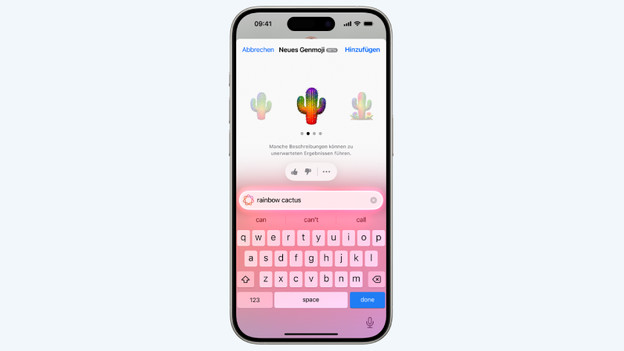
With the Clean Up function, you can remove distracting elements from your photos. Did you think you had the perfect vacation photo, but you spot a tourist in the background later? You can remove that person at a press of the Clean Up button. With Genmoji, you can create your own unique emojis. Want an emoji of a cat with a party hat carrying a cake? Type it out and Genmoji will create that emoji within a couple of seconds.
Writing Tools
You can write better texts with Writing Tools. When you write an email or send a message, you can easily adjust the text. You can make a message to your boss more businesslike or professional, for example. You can also have AI shorten a long email, without losing any information. These functions are even more useful on a MacBook, especially if you use your MacBook for work or school.

Other functions
Apple Intelligence has many more useful functions and will continue to add new ones. Apple Intelligence can summarize notifications and emails for you and you can answer an email with a single tap via Smart Reply. You can also search through your photos more easily. Ask to see all photos of your dog at the beach to see an overview of all those photos in the Photos app. You no longer have to scroll through all your photos.
Article by Bob
Apple iPhone Expert.