Want to connect 2 monitors to your laptop? Choose a docking station that can expand your laptop with 2 screens. This way, you can always work efficiently in multiple windows at the same time. In addition to monitors, you can also connect other peripherals. There are docking stations with extra USB ports, a connector for an internet cable or headphones or a memory card reader. With a docking station with Power Delivery, you also charge your laptop while working. This means you never have to worry about an empty battery. Keep the extra connectors in mind when choosing a dock, so you choose the best docking station for your laptop.


- You can connect an extra 4K monitor to your laptop for more screen space with this docking station.
- You can charge your laptop with this dock via the USB-C port.
- Connect accessories such as a mouse, keyboard, or hard drive to this docking station.
Retail price
€ 110,-€ 87,-
including VAT, free delivery
Delivered tomorrow


- You can connect 2 extra 4K monitors to your MacBook with this dock, so you can have more screen space.
- You can charge your MacBook with this dock via the USB-C port.
- Work with accessories like a keyboard and an ergonomic mouse that you can connect via the USB-A ports.
Retail price
€ 158,-€ 153,90
including VAT, free delivery
Delivered tomorrow
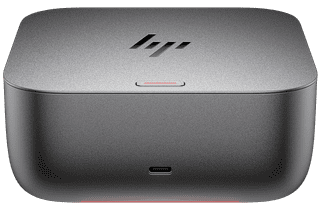

- With this dock, you can connect up to 4 extra 4K monitors to your laptop for more screen space.
- You can charge your laptop with this dock via the USB-C port.
- HP Sure Start protects your connected devices from hackers.
Retail price
€ 280,-€ 238,99
including VAT, free delivery
Delivered tomorrow

- With this dock, you can connect 2 extra 4K monitors to your laptop via DisplayPort HDMI.
- You can charge your laptop with this dock if your laptop supports Power Delivery.
- Work with accessories like a keyboard and an ergonomic mouse that you can connect via the USB-A ports.
Retail price
€ 185,-€ 173,-
including VAT, free delivery
Delivered tomorrow
