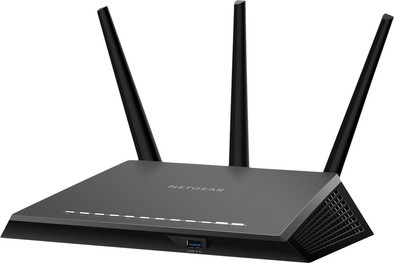
Netgear Nighthawk AC1900 R7000

Never available again
View alternatives in the sidebar
View alternatives in the sidebar
With Coolblue Extended Warranty, you are protected against costs due to quality defects of your router for the next 4 years. During the entire term, we will reimburse up to the original purchase price. You can easily add the Extended Warranty in your shopping cart.
€ 14,99
one-timeAdd your router to your shopping cart. In the next step, you can add the Extended Warranty. You can exchange or return your purchase for free within 30 days.
Product number | 401383 | |
|---|---|---|
Manufacturer code | R7000-100PES | |
Brand | Netgear | |
Warranty | 2 years | |
Processing of your defect | Carry-in warranty |
Type router | WiFi router | |
|---|---|---|
Number of stations | 1 | |
Can be expanded with extra stations |
Frequency bands | Simultaneous dual-band | |
|---|---|---|
WiFi speed | AC1900 | |
2.4GHz band speed | 600 Mbit/s | |
5GHz band speed | 1300 Mbit/s | |
Number of WiFi antennas | 3 | |
Jumbo frame support |
Ethernet speed | Gigabit Ethernet (1000Mbps) | |
|---|---|---|
Network connector | ||
Number of Ethernet ports | 4 | |
PoE support | ||
USB port | ||
Type of USB port | Standard USB-A | |
Number of USB ports | 2 |
Automatically switches to 3G/4G | ||
|---|---|---|
SIM card slot |
Quality of Service (QoS) | ||
|---|---|---|
MU-MIMMO | ||
Seamless roaming | ||
Beamforming | ||
Port forwarding | ||
LACP Link aggregation |
Parental controls | ||
|---|---|---|
WLAN security | WPA, WPA2 | |
Firewall | ||
Firewall type | NAT Firewall, SPI Firewall | |
Guest network | ||
VPN server | ||
VPN client | ||
VPN passthrough |
Mounting possible | ||
|---|---|---|
Width | 28,5 cm | |
Height | 5 cm | |
Depth | 18,45 cm | |
Weight | 750 g | |
Color | Black | |
Material | Plastic |
Battery level indicator |
|---|
anything for a smile
Ethernet speed | Gigabit Ethernet (1000Mbps) | |
|---|---|---|
Frequency bands | Simultaneous dual-band | |
WiFi speed | AC1900 | |
Number of Ethernet ports | 4 | |
Type router | WiFi router | |
Number of stations | 1 |
According to our router expert
With a speed of 1,300Mbps on the 5GHz frequency band, this router is faster than comparable routers.
Beamforming provides a better range and a more stable WiFi signal.
Protect your children from harmful websites with Parental Controls.
This router only supports WiFi 5, so your wireless internet is less stable than with WiFi 6 if you're online with many devices at the same time.
Depending on the size of your house, this router offers coverage on 1 or 2 floors. Choose multi-room WiFi for WiFi throughout your home.
The Netgear Nighthawk AC1900 R7000 is a wireless router for gamers and movie enthusiasts. This router supports Quality of Service, which allows you to prioritize the internet traffic that you consider important. This feature makes sure Netflix isn't buffering on your smartphone while your PC is downloading files. Connect an external hard drive or USB flash drive to the router to gain access to your personal files when you're not home.
5 stars
638
4 stars
437
3 stars
51
2 stars
9
1 star
6
Range
Installation ease
Speed
Design
Wireless Internet. A headache for the average household. The providers supply modem-and-router-in-one equipment, where the internet speed is halved if you stand 2 meters away from it. Changing the frequency and strategically placing the standard equipment was a nice first attempt, but unfortunately without success. A solution had to be found, preferably with limited resources. Attempt two was the purchase of a WiFi repeater. A budget solution. Again placed in a strategic place, again no success. That's when you think you're living in the 21st century, cars are going to drive themselves and people will soon be flying to mars. The internet is now part of the basic human needs. Because of the bad experiences with attempts 1 and 2, the new starting point was: no more hassle with bad reception. The Netgear nighthawk is the Batmobile of routers. The reception goes through several walls and floors. It is important to consider a few things: The biggest culprit in the interference of a WIFI signal is the signal from the neighbors. I live in a densely populated area with a lot of WIFI signals. The Nighthawk offers the option of using the 5GHz bandwidth as a solution. Second, other (kitchen) equipment interferes with the signal. Therefore, do not hide the router too much behind your other electronic equipment. Finally, the price made me doubt at first. But the peace of mind that comes after purchasing the Nighthawk is more than worth every euro.
Jan S.
17 February 2015
Automatically translated from Nederlands
After my Asus RT-AC66U went to heaven by lightning, a new router had to come. My requirements: good range to the back of the garden and to the top of the bedroom, it must be equipped with 802.11AC and of course the connection must be stable and fast.
The router has been in use for 3 weeks now.
Short version of the review: the router is very good and meets all my requirements!
Long version:
First impression Box contents:
The first thing I noticed when I opened the box was the size of the router. This one is pretty hefty. Not a big deal because it will hang in the meter cupboard anyway. Where my old router could be hung in a normal position, I have to tilt it a quarter turn, otherwise the router does not fit on the narrow wall in the meter cupboard for me. What also stood out when the plug went into the socket is the disco effect through all the lights. Fortunately, these are easy to disable after configuration.
Installation When the router was installed in the meter cupboard and all cables were connected, the installation could begin. This one was very simple. Simply connect via WiFi the data on the sticker on the router and go to routerlogin.net in the browser. I was online within 3 minutes. After that I had to do some further settings (such as changing the name and password of the WiFi network) The interface has a Basic and advanced tab and is well-arranged. Here you can set everything I want and it works fine for me. I am using the router as an access point. The router itself does not issue IP addresses, this is done by my ADSL modem/router. Configuration of this was easy. In addition to access point, the router can also be set up in bridge mode (or as a WiFi repeater).
Range I immediately went to the back of the garden with the laptop and the range is still very good here. With my old router, the range was only half the number of bars. Even with 5GHz (which is faster, but has less range) the range was still fine. My phone (Sony Xperia S) also indicated in the back of the garden that the range was "reasonable". By way of comparison: with the telephone I could not even reach here with my old router, which is also known as a very good router. Also with the IPad I had very bad reception in the bedroom with the old router and it was almost impossible to use the internet properly. With this Netgear, the range is very good in the bedroom.
Speed/Stability Because I often send large files up and down from my laptop to my NAS, the speed is important to me. Therefore, the router had to be 802.11AC capable. This was also my old router, but here I only got speeds of +/- 20 MB/sec. (160 mbps) With the Netgear Nighthawk I easily get 40-50MB/sec. (400 mbps) So the speed is significantly better than with my old AC router. These are of course speeds that are also affected by my NAS and are therefore not optimal. Incidentally, Windows states that it achieves a maximum speed of 702 mbps. All in all I am very satisfied with the speed. Also in terms of stability I have not encountered any problems in the past 3 weeks.
Other Then there are other functions that the router has:
Usually you have to download a file from the manufacturer's website, but with the Netgear, the router does this itself. Installation will then follow automatically.
Conclusion The router costs a bit more than its competitors' brothers, but in my opinion it is well worth the money. From my own experience I can make a comparison with the Asus RT-AC66U and this router is much better in terms of range and speed in the circumstances at my home.
Bram
1 July 2014
Automatically translated from Nederlands
What a fantastic device. Great speeds are achieved far away from the router. Do you have an above-average large house or office? Then this is highly recommended!
Jorrit
6 May 2014
Automatically translated from Nederlands

