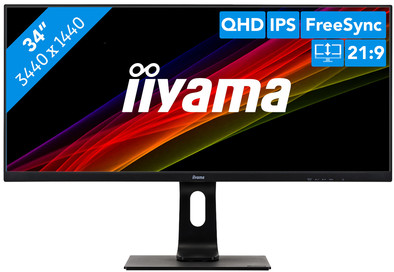
iiyama ProLite XUB3493WQSU-B1
Never available again
View alternatives in the sidebar
View alternatives in the sidebar
With Coolblue Extended Warranty, you are protected against costs due to quality defects of your monitor for the next 5 years. During the entire term, we will reimburse up to the original purchase price. You can easily add the Extended Warranty in your shopping cart.
€ 30,99
one-timeAdd your monitor to your shopping cart. In the next step, you can add the Extended Warranty. You can exchange or return your purchase for free within 30 days.
Product number | 840040 | |
|---|---|---|
Manufacturer code | XUB3493WQSU-B1 | |
Brand | Iiyama | |
Warranty | 3 years | |
Processing of your defect | On-site service |
Screen size | 34 inches | |
|---|---|---|
Recommended display resolution | 3440x1440 | |
Sharpness | Quad HD (1440p) | |
Aspect ratio | Ultrawide (21:9) | |
Refresh rate | 75 Hz | |
Response time | 4 ms | |
Panel type | IPS panel | |
Brightness | 400 cd/m2 | |
Local dimming | ||
HDR support | ||
Contrast ratio | 1000 | |
Touchscreen | ||
Type of HDR | HDR10 | |
Screen reflection | Anti-glare | |
Blue light filter | ||
Flicker-free technology | ||
Color space | sRGB | |
sRGB color coverage percentage | 100 % | |
Color depth | 17 million colors (8-bit) | |
Adaptive Sync | ||
Type of adaptive sync | FreeSync | |
Resolution width | 3440 pixels | |
Resolution height | 1440 pixels | |
Anti-reflection type | Anti glare | |
Horizontal viewing angle | 178 ° |
Height | 41,5 cm | |
|---|---|---|
Width | 81,7 cm | |
Depth | 23 cm | |
Weight | 9,5 kg | |
Color | Black | |
Including stand | ||
Material | Plastic | |
Cable management | ||
Appearance | Neutral | |
Curved |
Number of HDMI connectors | 2 | |
|---|---|---|
Number of Female HDMI type A 2.0a port | 2 | |
Number of headphone jacks | 1 | |
Type of headphone connection | 3.5mm (TRRS) | |
Number of Female Standard DisplayPort 1.2 ports | 1 | |
Number of female standard USB-A ports | 2 | |
Female standard USB-A port version | 3.0 | |
Number of female 3.5mm TS Audio Jack ports | 1 | |
Number of female 3.5mm TRRS Audio Jack ports | 1 | |
Type of USB port | Standard USB-A | |
Number of USB ports | 2 | |
Suitable for daisy chaining |
Included by default | DisplayPort cable, HDMI cable | |
|---|---|---|
Not included by default | USB-C cable |
Adjustable in height | ||
|---|---|---|
Tiltable | ||
Pivotable stand | ||
Pivot function | ||
VESA mount option | ||
VESA mount | 100x100mm |
Energy label | G | |
|---|---|---|
Energy consumption standby | 0,5 W | |
Energy consumption active | 44 W | |
Energy consumption per 1000h | 40 kWh | |
Annual energy consumption | 58,4 kWh | |
Annual energy costs | 23,36 euros |
Built-in speakers | ||
|---|---|---|
Sound system | Stereo | |
Webcam | ||
Split screen | ||
Kensington lock | ||
Best tested |
Recommended for use | Internet, email, and text processing, Office work, Watching movies in Full HD |
|---|
anything for a smile
Sharpness | Quad HD (1440p) | |
|---|---|---|
Curved | ||
Aspect ratio | Ultrawide (21:9) | |
Refresh rate | 75 Hz | |
Response time | 4 ms | |
Panel type | IPS panel | |
Color depth | 17 million colors (8-bit) | |
Built-in speakers |
According to our monitor expert
This monitor can be adjusted in multiple ways for a comfortable posture.
The IPS panel shows true-to-life colors from any angle.
This screen's flicker-free technology reduces the strain on your eyes.
With a 75Hz refresh rate and 4ms response time, this monitor isn't suitable for gaming.
The iiyama ProLite XUB3493WQSU-B1 is a 34-inch monitor used for multitasking, watching movies, or playing games. This wide monitor lets you easily open multiple programs side by side to work more efficiently. You can watch movies in widescreen settings, thanks to the Ultra Wide QHD resolution. The IPS panel displays lifelike colors and wide viewing angles, and with a response time of 4 milliseconds, your movies and series won't have any lag. Thanks to the screen's flicker-free technology and blue light filter, your eyes won't feel as strained.
Installation ease
Image quality
Price-quality ratio
Design
Then went to a store to look (recommended) and compared the 3 common monitor types (VA/TN/IPS). In the end, TN fell for me because of the viewing angles and I'm not a heavy gamer. I was looking for nice colors for video/photo editing (amateur). Decided to go for VA or IPS and did a comparison on Tweakers.
I also looked at the different sizes, but everything under a 32 "was for me to give up on what I already had in terms of size. So quickly decided to go for a 32” inch.
After this, resolution differences were also viewed in the store. And in my opinion at a 32 you really need 3440 x 1440 resolution to have a decent image. Lower resolution was a real disappointment for me and in terms of price not much cheaper. Higher resolution, regardless of whether this is necessary, is also not very affordable.
Ultimately chosen by the brand, price and specifications for this one. I found this difficult because I could only find 1 review and only on Coolblue. The price here is also the same as with competitors, but then choose the familiar. One of the points for me was that there was also sound in the monitor.
I have been using the monitor for 4 days now and am pleasantly surprised. I like the colors, very nice design, very handy leg that can be moved in all directions. Connection options (2x HDMI, 1x Dp, USB hub and jack) are more than sufficient for me and are in a convenient position for me. Against all expectations, the sound from the internal speakers is actually relatively excellent. The sound sounds reasonably full and is of sufficient quality for what I use it for.
I am very happy with the monitor, it does not interfere with the rest of the interior. Furthermore, it meets all my requirements with regard to movies, gaming, browsing and multitasking. For the price (despite still quite a reasonable expense) I got the idea good quality.
Keep in mind that at this resolution you need a reasonable PC and graphics card to make this run smoothly.
Tibor
30 October 2019
Automatically translated from Nederlands
Bought in the CoolBlue store in Wilrijk and immediately installed at home and connected to my MacBook Pro (°2017) via a USB-C to HDMI cable that I already had. However, the image quality at the time was not what I expected: not the full screen resolution and consequently an overstretched screen with murky print.
Then tried with the supplied HDMI cable and another "dongle" on my MacBook Pro and that gave a better resolution, but not yet the full potential of this screen.
After some research on the net decided to order a DisplayPort to USB-C cable (via Cool Blue) and this turned out to be the "holy grail": The full screen potential was used and then it was just fun! A screen to say the least with razor-sharp quality.
Andy van Geffen
28 January 2020
Automatically translated from Nederlands
The screen is difficult to set up, the standard settings are not so good in terms of color and sharpness. After a lot of setup and searching, it is now to my liking. You have to do the buttons by feel, these are on the back and first set the closing time of the OSD differently! Closes by default after 5 seconds. The bleeding from the corners of the screen can be called disturbing, especially in a dark room. This is noticeable when you turn on a film full screen, good lighting in the room where you sit makes it a little less disturbing. I don't notice it during the day. The connections on the back are very difficult to reach. You don't always want to move a large screen first to connect a cable. The desk and therefore the screen are against a wall with me... now you will not often change the connections, but if you want to use the USB connection, you will probably want to change it! You just can't get it done without good visibility and access to the rear. An extra USB hub then... The screen is also neatly finished and looks sleek and solid. I enjoy the lovely large work surface without the disadvantage of the frame in the middle, I always worked with 2 monitors. Anyway, a nice screen for the price and despite the negatives and my initial doubts whether it can stay, it can ;-)
John
5 April 2020
Automatically translated from Nederlands