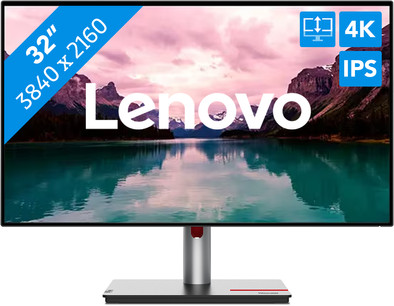
Lenovo ThinkVision P32p-30
Never available again
View alternatives in the sidebar
View alternatives in the sidebar
With Coolblue Extended Warranty, you are protected against costs due to quality defects of your monitor for the next 5 years. During the entire term, we will reimburse up to the original purchase price. You can easily add the Extended Warranty in your shopping cart.

€ 49,99
one-timeAdd your monitor to your shopping cart. In the next step, you can add the Extended Warranty. You can exchange or return your purchase for free within 30 days.
Product number | 955447 | |
|---|---|---|
Manufacturer code | 63D1RAT1EU | |
Brand | Lenovo | |
Warranty | 3 years | |
Processing of your defect | Via Coolblue |
Screen size | 32 inches | |
|---|---|---|
Recommended display resolution | 3840x2160 | |
Sharpness | 4K (UHD) | |
Aspect ratio | Standard (16:9) | |
Refresh rate | 60 Hz | |
Response time | 4 ms | |
Panel type | IPS panel | |
Brightness | 350 cd/m2 | |
Local dimming | ||
Touchscreen | ||
Blue light filter | ||
Flicker-free technology | ||
Color space | Adobe RGB, DCI-P3 | |
Adobe RGB color coverage percentage | 100 % | |
Color depth | 1 billion colors (10-bit) | |
Adaptive Sync | ||
Resolution width | 3840 pixels | |
Resolution height | 2160 pixels | |
Horizontal viewing angle | 178 ° |
Height | 59,95 cm | |
|---|---|---|
Width | 71,42 cm | |
Depth | 23,46 cm | |
Weight | 7,2 kg | |
Color | Black | |
Including stand | ||
Material | Plastic | |
Appearance | Business, Neutral | |
Curved |
Number of HDMI connectors | 1 | |
|---|---|---|
Number of Female HDMI type A 2.1 ports | 1 | |
Version female micro usb-B (3.0 form) port | 3.2 | |
Number of female micro usb-B (3.0 form) ports | 1 | |
Number of Female Standard DisplayPort 1.4 ports | 1 | |
Number of female standard USB-B (3.0 form) ports | 4 | |
Number of Female RJ-45 ports | 1 | |
Type of USB port | Micro USB-B (3.0 form), Standard USB-B (3.0 form), USB-C | |
Number of USB ports | 5 | |
Suitable for daisy chaining | ||
USB-C dock | ||
Maximum USB-C dock power | 100 W |
Included by default | USB cable | |
|---|---|---|
Not included by default | HDMI cable, USB-C cable |
Adjustable in height | ||
|---|---|---|
Tiltable | ||
Pivotable stand | ||
Pivot function | ||
VESA mount option | ||
VESA mount | 100x100mm |
Energy label | F | |
|---|---|---|
Energy consumption standby | 29,5 W | |
Energy consumption active | 193,7 W | |
Energy consumption per 1000h | 32 kWh | |
Annual energy consumption | 46,72 kWh | |
Annual energy costs | 18,69 euros |
Built-in speakers | ||
|---|---|---|
Webcam | ||
Kensington lock |
Recommended for use | Internet, email, and text processing, Office work, Watching movies in Full HD |
|---|
anything for a smile
Our digital expert will help you, but it can sometimes make mistakes, like humans do.
According to our monitor expert
You can enjoy a sharp image and many details thanks to 4K resolution.
The screen displays 98% of the DCI-P3 spectrum, which ensures lifelike and realistic colors.
The screen is tiltable, adjustable in height, and you can swivel it to create a comfortable working posture.
Due to the low refresh rate and high response time, this monitor isn't suitable for gaming.
Edit photos and videos or do your daily work with the Lenovo ThinkVision P32p-30 32-inch 4K monitor. Thanks to the 32-inch screen, you can open multiple screens next to each other. This way, you can use multiple editing programs at once. You can see every detail sharply thanks to the 4K resolution. This monitor also has an IPS panel, so you can experience realistic colors form every viewing angle. Thanks to the 98% coverage of the DCI-P3 color space, you can choose from a wide color palette. Thanks to the high brightness of 350 nits, you can see the screen well in well-lit rooms. The ThinkVision P32p-30 also has local dimming. This way, only the necessary parts of the screen light up. You can also tilt, turn, or adjust the monitor in height for an ergonomic sitting posture. You can turn the screen 90 degrees with the pivot function, which is useful during programming or editing texts. Do you keep working into the late hours? The blue light filter ensures that you won't get strained or irritated eyes.
With the Lenovo ThinkVision T24-40 monitor, I work comfortably on my daily tasks at the office or at home. Thanks to the many connections, I can connect various peripherals to the monitor. The screen has a high refresh rate. This allows me to scroll smoothly through long PDFs or read a lot of code at a glance. Due to the low brightness, I see the screen less clearly when sunlight shines on it, but thanks to the IPS panel, the colors remain sharp from every angle.
Many connections Thanks to the monitor's various connections, I can connect multiple devices to the screen, such as a business laptop or an extra monitor. This allows me to work on multiple programs side by side, which is useful for programming or performing data analysis. I connect the monitor to my computer using the USB B port, which allows me to use the USB ports on the screen. This way, I connect my keyboard and mouse directly to the screen. The ThinkVision T24-40 also features 3 USB A ports and a USB C connection with 15 watts of power. I use the USB C port to connect a USB C stick or charge my mobile phone. Additionally, the monitor features a dynamic refresh rate. This allows me to switch between low and high refresh rates. I choose a refresh rate of 120 hertz when reading long PDFs or code. This is also nice when watching movies, as fast-moving images do not stutter due to the high refresh rate. The monitor has no built-in speakers, but I can easily connect my headphones via the USB-C port.
Ergonomically adjustable Thanks to its 24-inch size, the ThinkVision T24-40 fits on any desk. I can easily assemble the monitor without tools. I can also rotate, tilt, and adjust the height of the monitor for a comfortable sitting position. This reduces neck and back strain when I work long days. I can also rotate the monitor to a vertical position thanks to the pivot function. The screen has low brightness, but thanks to the IPS panel, I enjoy bright colors from every viewing angle. This is useful when I work in the office and show my screen to a colleague sitting next to me. I can install the monitor quickly because it has few loose parts. Additionally, I do not need a screwdriver. I click the screen onto the monitor arm without any difficulty. All necessary cables are included, so I get to work with the monitor right away.
Job. Monitor specialist.
24 August 2026
Automatically translated from Nederlands
I had been looking for a monitor for both Mac and Windows for quite some time. And then with 1 specific requirement: my Thunderbolt audio interface had to work on it too. That turned out to be quite a search, until I came across the Lenovo. On paper, it appeared to meet all my requirements:
Now I have a screen that connects to my MBP with 1 cable, supplies it with power, and gives the Mac access to all peripherals. Ideal! No external docking station required. The same applies to a business Surface laptop with USB-C.
From an aesthetic point of view, the Lenovo is subtle thanks to the thin edges. Cables can also be neatly kept out of sight via the foot. Despite the 32 inches, this screen does not feel ridiculously large. I mainly use it with Logic Pro X and some business applications. So I do not have high graphical requirements. But the screen gives me a nice and clear image. And I am very happy with the matte finish. This provides significantly less reflection compared to my previous screen.
The price may be a bit on the high side if you are looking at a 32 inch screen with such functions. It must be said that it is mainly the Thunderbolt options that drive up the price.
Pieter
6 December 2024
Automatically translated from Nederlands
Tiltability, height adjustability and rotation are fantastic. Connection points at the back are difficult to reach, we would recommend placing them on both sides or plugging them in horizontally at the back
Lucienne
3 October 2023
Automatically translated from Nederlands