Never available again
View alternatives in the sidebar
View alternatives in the sidebar
With Coolblue Extended Warranty, you are protected against costs due to quality defects of your monitor for the next 5 years. During the entire term, we will reimburse up to the original purchase price. You can easily add the Extended Warranty in your shopping cart.
€ 13,99
one-timeAdd your monitor to your shopping cart. In the next step, you can add the Extended Warranty. You can exchange or return your purchase for free within 30 days.
Product number | 970333 | |
|---|---|---|
Manufacturer code | 27G4HRE | |
Brand | AOC | |
Warranty | 3 years | |
Processing of your defect | Via Coolblue |
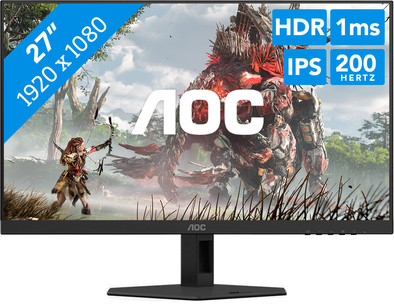
Screen size | 27 inches | |
|---|---|---|
Recommended display resolution | 1920x1080 | |
Sharpness | Full HD (1080p) | |
Aspect ratio | Standard (16:9) | |
Refresh rate | 200 Hz | |
Response time | 1 ms | |
Panel type | IPS panel | |
Brightness | 300 cd/m2 | |
Local dimming | ||
HDR support | ||
Contrast ratio | 1000 | |
Touchscreen | ||
Type of HDR | HDR10 | |
Screen reflection | Anti-glare | |
Blue light filter | ||
Flicker-free technology | ||
Color space | Adobe RGB, DCI-P3, sRGB | |
Adobe RGB color coverage percentage | 90,5 % | |
sRGB color coverage percentage | 115,4 % | |
Color depth | Less than 17 million colors (less than 8-bit) | |
Adaptive Sync | ||
Type of adaptive sync | G-Sync Compatible | |
Resolution width | 1920 pixels | |
Resolution height | 1080 pixels | |
Anti-reflection type | Anti glare | |
Horizontal viewing angle | 178 ° |
Height | 36,6 cm | |
|---|---|---|
Width | 61,4 cm | |
Depth | 5,4 cm | |
Weight | 4,14 kg | |
Color | Black | |
Including stand | ||
Material | Metal, Plastic | |
Cable management | ||
Appearance | Gaming | |
Curved |
Number of HDMI connectors | 2 | |
|---|---|---|
Number of Female HDMI type A 2.0 ports | 2 | |
Number of headphone jacks | 1 | |
Type of headphone connection | 3.5mm (TRS) | |
Number of Female Standard DisplayPort 1.4 ports | 1 | |
Number of female 3.5mm TRS Audio Jack ports | 1 | |
Number of Female RJ-45 ports | 0 | |
Suitable for daisy chaining |
Included by default | DisplayPort cable, HDMI cable | |
|---|---|---|
Not included by default | USB-C cable |
Adjustable in height | ||
|---|---|---|
Tiltable | ||
Pivotable stand | ||
Pivot function | ||
VESA mount option | ||
VESA mount | 100x100mm |
Energy label | E | |
|---|---|---|
Energy consumption standby | 0,3 W | |
Energy consumption active | 23 W | |
Energy consumption per 1000h | 21 kWh | |
Annual energy consumption | 30,66 kWh | |
Annual energy costs | 12,26 euros |
Built-in speakers | ||
|---|---|---|
Sound system | Stereo | |
Webcam | ||
Split screen | ||
Kensington lock |
Recommended for use | Gaming, Internet, email, and text processing, Watching movies in Full HD |
|---|
anything for a smile
Our digital expert will help you, but it can sometimes make mistakes, like humans do.
According to our monitor expert
Smooth visuals: you can watch fast action without stuttering thanks to the 200-hertz refresh rate.
View from every angle: you can see clear images from every viewing angle thanks to the IPS panel.
Better overview: you can see more of the playing field thanks to the 27-inch screen.
Less sharp image: you’ll see less detail in your game because of the Full HD resolution.
DisplayPort required: you can only get 200Hz with a DisplayPort cable, not with an HDMI cable.
Installation ease
Image quality
Price-quality ratio
Design
You can't get a better screen for this price
Gerald
19 August 2025
Automatically translated from Nederlands
Nice large screen, super sharp image quality
Jochem
9 July 2026
Automatically translated from Nederlands
This monitor really surprised me and feels great when I set it up. I expected it to be recognized immediately, and it was. It's easy to adjust the height, and in my case, it was eventually installed on a monitor arm. I've been using this monitor with my Mac for a while now, and overall, I'm quite happy with it. The monitor should be able to handle 160Hz at 4K, but on my Mac, it's stuck at 144Hz. I think that's due to macOS. If you switch to Full HD, you should get 320Hz, but my Mac only manages 240Hz. I personally prefer 4K, so I prefer that setting. And let's be honest: if you're coming from 60Hz, 144Hz is already a significant improvement.
The monitor has thin bezels and looks sleek on my desk. The screen is easily height-adjustable, and connecting it is simple, as you only need one power cable without an extra adapter block. The monitor doesn't have built-in speakers, which is a shame. My previous monitor did have that, and I used it often. Now I have to use external speakers. Luckily, it does have a 3.5mm jack.
What's less convenient is the USB hub. You have to use two cables: one for power (USB-A to USB-A, which you don't see often anymore) and one for data (USB-B, also a bit outdated). The speed is fine for small files or things like a security key, but transferring large files is a bit slow. USB-C would actually have been a much better choice here. A clever feature: you can neatly tuck USB dongles behind the monitor, but it can sometimes take a bit of fiddling around finding the right one.
In short: this is a very good monitor for the price, especially if you use a Mac. The picture is great, it works smoothly, and it looks great on your desk.
Jan-Ward
25 July 2025
Automatically translated from Nederlands