Written by Charlotte
Edited on
13 October 2025
·
14:37
How do you descale your Melitta Barista T Smart?
On this page, you'll read how to easily and quickly descale your Melitta coffee machine. If you use a water filter, you'll have to descale your coffee machine less often. Descale your machine once every 3 months. That way, you can avoid limescale.
Get started with descaling
Descale your Melitta coffee machine with these useful video instructions. We'll go through these 4 steps:
- Step 1. Prepare descaling
- Step 2. Start descaling
- Step 3. Rinse the machine
- Step 4. Place the water filter
You need:
- Melitta Bio descaler
- Container of at least 700ml
How often should you descale?
We recommend you to descale your Melitta coffee machine every 3 months. You can use the Melitta Bio descaler for this. This descaler allows you to descale your coffee machine in an environmentally-friendly way. The descaler contains citric acid, which makes it biodegradable. By descaling your coffee machine, you can prevent limescale build-up in the pipes. In addition, you extend the lifespan of your machine and ensure the best coffee taste.

€ 21,99
No longer available

Step 1: prepare the descaling
- Press and hold 'Menu/OK' for 2 seconds to get to the menu.
- Use the arrows to navigate to 'Maintenance'. Press 'Menu/OK' to confirm.
- Use the arrows to navigate to 'Descaling'. Press 'Menu/OK' to confirm.
- Press 'Menu/OK' again.
- Remove the drip tray from the coffee machine. Empty the drip tray and coffee grounds container and put both of them back into the machine.
- Take the water tank out of the machine.
- Use the included coffee spoon to take the water filter out of the water tank.
- Empty the water tank.
- Press 'Menu/OK'.

Step 2: descale the machine
- Grab the Melitta descaler.
- Use the coffee spoon and pour 3 spoons of descaler in the water tank.
- Add water to the descaler up to the 0.5L mark.
- Place the water tank back into the machine.
- Put a container of at least 700ml under the coffee outlet.
- Press 'Menu/OK' to confirm.
- Take the tube out of the milk reservoir and connect it to the drip tray.
- Press 'Menu/OK' to confirm.
- The descaling program will start. This takes about 20 minutes.

Step 3: rinse the machine
- After 20 minutes, the program will be pause.
- Pull the tube from the coffee machine. Press 'Menu/OK' to confirm.
- Remove the container and drip tray and empty them in the sink.
- Put the container and drip tray back.
- Press 'Menu/OK' to confirm.
- Put both ends of the tube back into the machine. Press 'Menu/OK'.
- Take the water tank out of the machine. Rinse it thoroughly and fill it with water to the 'Max' mark.
- Put the water tank back into the machine.
- The machine will start to rinse right away, this takes about 5 minutes.
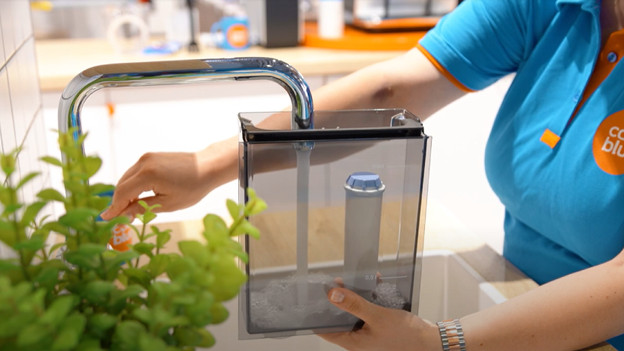
Step 4: place the water filter
- The program will pause. Take the tube out of the machine and press 'Menu/OK'.
- Remove the container and drip tray and empty both in the sink.
- Put only the drip tray back.
- Take the water tank out of the machine.
- Click the water filter onto the included coffee spoon and secure it into the water tank.
- Fill the water tank with water up to the 'Max' mark.
- Press 'Menu/OK'.
- Put the water tank back. Press 'Menu/OK' to confirm.
- You've now descaled your Melitta Barista T Smart successfully.