
Written by Megan
Edited on
26 May 2023
·
15:02
How do you solve charging problems with your tablet?
It can be very annoying if your Android tablet won't charge or charges slowly. The problem could be a dirty charging port, or maybe it's the charger you're using. Sometimes, restarting your tablet solves the problem. In this article, we'll give you 4 tips so you can charge your tablet without any problems again.

Solve charging problems
Charging problems are sometimes caused by dirt in the charging port or by a broken charger. The tips in this article should solve the most common problems.
- Clean thecharging port.
- Check the charger.
- Use a fast charger.
- Reboot your tablet.
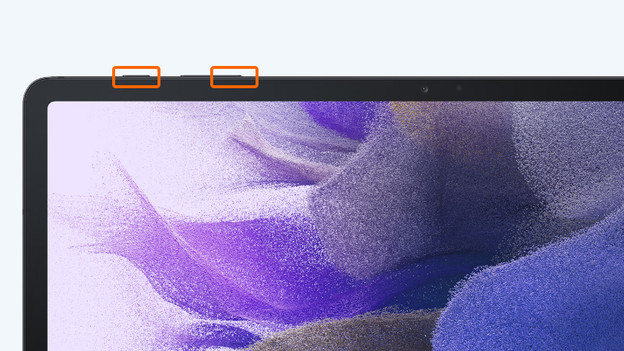
Tip 1: restart the tablet
A software issue could also cause charging problems. Perform a soft reset to solve this, which is the same as rebooting your tablet.
- Press and hold the volume button and on/off button.
- Wait for the tablet to switch off.
- The tablet will now reboot.

Tip 2: check the charger
A broken charger or charging cable could cause charging problems with your tablet.
- Check whether the charging cable is connected to the charger and your tablet properly.
- Use a different cable and different charger to find out if 1 of the parts is broken.
- Check is the charging cable is broken.
- Is your cable or charger broken? Purchase a new one.

Tip 3: use a fast charger
Some tablets support fast charging. If your tablet charges slowly, you're probably not using a fast charger. Carefully check which type of fast charging your tablet supports. In the article below, we explain how to choose the best fast charger.
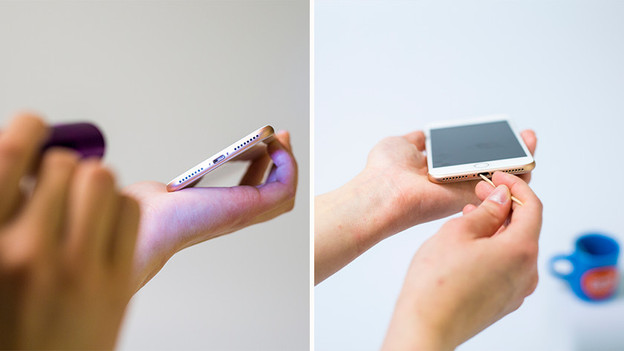
Tip 4: clean the charging port
If there's dirt in the charging port, your charging cable can't connect to the tablet properly. Carefully clean the charging port so you don't damage it.
- Remove the dirt from the charging port with a thin object, such as a toothpick.
- Blow the dust out of the charging port, preferably with compressed air.
- Connect the charger to your tablet and try to charge it again

